Excel AI vs Copilot: A 7-Point Guide to Choosing the Best Tool

When you're looking at Excel AI vs Copilot, the choice really comes down to one thing: do you need an assistant to help you with steps, or an expert to run the entire project for you? Think of it this way: Copilot is your helpful copilot in the cockpit, while a specialized AI agent like ElyxAI is the autopilot that flies the plane. Which one you pick depends entirely on whether you want guidance or you just want the job done.
1. Your 2-Minute Decision Guide: ElyxAI Vs Microsoft Copilot
Trying to figure out which AI to use in Excel can feel like a chore, but it really boils down to a simple question: do you want a partner or a problem-solver? Microsoft Copilot is a fantastic partner. It sits right there in Excel, ready to suggest a formula, explain a tricky function, or help you brainstorm ideas for a chart. It’s perfect for users who know what they want to do but need a hand with the individual steps.
Spending too much time on Excel?
Elyx AI generates your formulas and automates your tasks in seconds.
Sign up →For example, if you want to find the average of a column of sales figures (let's say from B2 to B100), you could ask Copilot for the formula. It would provide you with: =AVERAGE(B2:B100).
=AVERAGE: This is the Excel function that calculates the average (the arithmetic mean) of numbers.(B2:B100): This is the range of cells you want to average. Copilot helps you identify the correct function and syntax, but you still need to implement it and decide on the next step.
On the other hand, a dedicated AI agent like ElyxAI is built for autonomy. You give it a high-level goal, like "Clean this messy sales data, build a pivot table by region, and then create a bar chart showing our quarterly revenue." From there, the agent just gets it done. It handles every single step on its own, from start to finish. Seeing how different AI tools stack up in direct comparisons, like this one on Cursor Vs Windsurf Vs Copilot, can also clarify which approach is right for your needs.
This difference between step-by-step help and full automation is the heart of the Excel AI vs Copilot debate. To make your choice even easier, let's break down where each tool truly shines. For a deeper dive, you can also explore our guide on which AI can do Excel and handle genuinely complex work.
2. A Quick 4-Point Comparison: ElyxAI Vs Microsoft Copilot
To help you see the difference in a single glance, here’s a quick table outlining where ElyxAI and Microsoft Copilot stand on 4 key criteria.
| Criterion | ElyxAI (Specialized AI Agent) | Microsoft Copilot (AI Assistant) |
|---|---|---|
| Primary Function | Executes complete, multi-step workflows from a single prompt. | Assists with single-step tasks and provides suggestions. |
| Best For | Automating entire reports, data cleaning, and complex analysis. | Generating formulas, explaining functions, and brainstorming ideas. |
| User Interaction | Give a high-level goal and let the agent work autonomously. | Guide the assistant through each step of a process. |
| Typical Use Case | "Analyze this data and build a full sales performance dashboard." | "Suggest a formula to calculate the average of this column." |
Ultimately, ElyxAI is for when you want to delegate a whole project, while Copilot is for when you want a little help along the way.
3. The 2 Core Philosophies Guiding AI in Excel
When you look at Excel AI vs Copilot, it’s not just about comparing feature lists. These tools are built on two completely different ideas about how AI should help you get work done. One acts like an assistant, the other like an agent.
Getting this difference is the key to picking the right tool for your needs. An AI assistant is a partner you guide step-by-step, while an AI agent is more of an autonomous worker you delegate tasks to.
4. The AI Assistant: Your Step-by-Step Partner
Microsoft Copilot is the perfect example of an AI Assistant. Think of it as having a spreadsheet expert sitting over your shoulder, ready to jump in when you ask. It’s fantastic at handling specific, one-off tasks you tell it to do.
For instance, you might ask Copilot things like:
- "What's a formula to find the average sales in column G?"
- "Explain what a VLOOKUP does in simple terms."
- "Give me some ideas for a chart to visualize this data."
Copilot will give you a great answer—a formula, an explanation, or a few suggestions. For instance, if you're trying to pull a product's price from a table, it would explain and provide the VLOOKUP formula: =VLOOKUP(A2, E:F, 2, FALSE).
=VLOOKUP(...): The function that looks for a value in the first column of a table and returns a value in the same row from a column you specify.A2: The value you're looking for (e.g., a product ID).E:F: The table where you're searching (e.g., product IDs in column E, prices in column F).2: The column number in the table from which to retrieve the value (in this case, the second column, F).FALSE: Specifies an exact match is required.
But here's the key: you are still the one driving. It’s up to you to take that formula, apply it, check the results, and then figure out what comes next. It’s a collaborative back-and-forth, but you manage the entire workflow. This approach is perfect for people who want to learn, need a quick fix for a specific problem, or just prefer to keep tight control over every step.
The real value of an AI assistant is its ability to answer your questions and handle small, directed tasks. It cuts down on the time you'd spend on Google, but you're still the one connecting all the dots.
5. The AI Agent: Your Autonomous Problem-Solver
Now, let's switch gears and look at a specialized tool like ElyxAI, which acts as an AI Agent. This approach is all about autonomy. Instead of giving it a series of small commands, you tell it your end goal, and it figures out how to get there on its own.
Imagine giving an AI agent a single, high-level prompt: "Take this raw sales data, remove all duplicate entries, create a summary pivot table by product category, and generate a bar chart showing the total revenue for each."
An AI agent gets it. It will run through all of those steps—data cleaning, analysis, and visualization—in one go, without you needing to intervene. It can string together multiple actions because it understands the overall objective, not just the immediate command. This ability to reason through a complex project is what truly separates an agent from an assistant. If you want to dive deeper into this concept, you can learn more about what defines Excel AI as a true autonomous tool.
This philosophy is built for one thing: pure efficiency. It’s for the professional who knows exactly what they want the final report to look like but would rather not spend their time on the manual, repetitive steps to build it. The agent is less of a partner and more of a skilled virtual analyst you can hand entire projects off to.
6. A 5-Point Breakdown: How They Actually Handle Your Work
To really get a feel for the differences between an Excel AI and Microsoft Copilot, we have to go beyond the spec sheets. It all comes down to how they execute tasks. The best way to see this is by looking at five common jobs that Excel pros do every single day.
What you'll notice is a fundamental difference in philosophy. An AI assistant like Copilot acts as your helper, guiding you through individual steps. An AI agent, like ElyxAI, is designed to take your high-level goal and handle the entire workflow on its own.
6.1. Task 1: Automated Data Cleaning
Let's start with data cleaning. It’s the essential, yet often grueling, first step for any real analysis. This is where you immediately see the contrast between an assistant and an agent.
With Copilot, you’re in the driver's seat for every small task. You might ask, "How do I remove duplicate rows?" and it will give you the steps or a formula. Then you have to ask it how to trim extra spaces, then how to fix date formats, then how to fill in blank cells. It’s a one-by-one process.
An AI agent like ElyxAI is built to handle it all at once. You can give it a single, broad instruction: "Clean this dataset by removing duplicates, standardizing the date column to MM/DD/YYYY, and filling any blank sales figures with 0." The agent understands the whole request and runs all those steps for you, turning a messy spreadsheet into a clean, analysis-ready table in one go.
6.2. Task 2: Data Analysis and Summarization
Once the data is clean, you need to find the story within it. Again, the approaches diverge: Copilot assists you, while an agent does the work for you.
Copilot is a solid partner for this. You can highlight your data and ask, "Create a pivot table that shows sales by region." It will build it, but then it's back to you. You have to figure out the next steps, like adding calculated fields or applying filters yourself.
An agent, on the other hand, can take a more complex command and run with it. A prompt like, "Analyze this data and create a pivot table showing total revenue and average deal size for each salesperson, sorted by highest revenue," is all it needs. The agent doesn't just build the table; it adds the calculated field (average deal size) and applies the sort order, delivering the finished summary without you needing to intervene.
This image really clarifies the philosophical difference between an AI Agent and an AI Assistant.
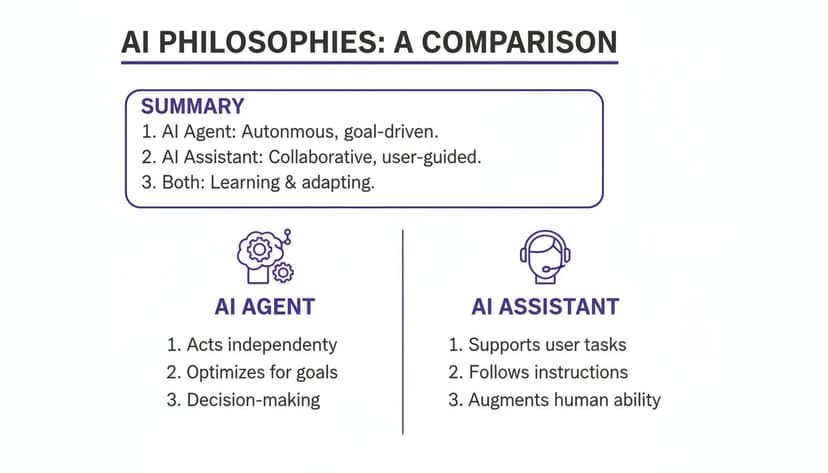
As you can see, one is built for executing entire workflows, while the other is designed for step-by-step guidance.
6.3. Task 3: Advanced Chart and Visualization Generation
Good visuals make data understandable, but building them can be fiddly. Both tools can create charts, but their methods and the final results are worlds apart.
Copilot handles basic requests well. Ask it to "create a bar chart of sales by month," and you'll get a standard bar chart. But if you want to customize it—change the colors, add data labels, or tweak the axes—you have to issue more specific, follow-up commands.
An AI agent’s real strength is its ability to understand intent. It knows that "create a professional sales dashboard" is more than a single chart—it’s a request for a set of related, well-formatted visuals that tell a complete story.
An AI agent can digest much more nuanced instructions from the start. For example: "Generate a line chart showing sales trends over the last year with a trendline, and add a pie chart breaking down revenue by product category." The agent creates both charts, applies the requested trendline, and often arranges them logically on the sheet for you.
6.4. Task 4: Professional Document Formatting
A report isn't finished until it looks professional. This means consistent fonts, clear headings, and branded colors, which can take a surprising amount of time to apply manually.
Copilot is great for targeted formatting changes. You can tell it to "make the headers in this table bold" or "apply currency formatting to column F." It’s effective for these small, specific tweaks, but you’re still directing every single change.
An AI agent thinks bigger. A single command like, "Format this entire report using our company colors (blue and gray), set the font to Arial, bold all headers, and make the main table easy to read" is enough. The agent applies all of these formatting rules across the entire workbook at once, giving you a polished, consistent document in seconds.
6.5. Task 5: Complex Multi-Step Operations
This is where the agent model really shines. Most meaningful work in Excel isn't a single action but a sequence of steps where each one depends on the last.
Consider a typical request: "Take the raw sales data from the 'Data' tab, clean it up, create a pivot table summary on a new sheet showing Q2 revenue by region, generate a bar chart from that pivot table, and then format the whole thing to be presentation-ready."
For Copilot, this is a multi-stage project. You’d have to feed it at least four or five separate prompts, acting as the project manager connecting the output of one step to the input of the next.
For an AI agent like ElyxAI, that entire sequence is just one task. It understands the dependencies and just does it, from start to finish. For analysts and finance pros who feel buried in repetitive Excel workflows, this opens the door to privacy-first tools that can save hours every week without enterprise-level costs. If you want to dig deeper into Microsoft's broader strategy, you can find more insights on their AI numbers at perspectives.plus.
This ability to autonomously handle a full, multi-step process is the single most important distinction when comparing Excel AI vs Copilot.
7. How 3 Real-World Use Cases Reveal the Better Tool
Comparing features on a spec sheet is one thing. But the real measure of a tool is how it performs when you’re actually trying to get work done. To see how these two Excel AI tools stack up, let's walk through three common scenarios you’ve likely faced yourself.
You'll quickly see the difference between an AI agent like ElyxAI, which can take a project from start to finish on its own, and an AI assistant like Copilot, which needs you to guide it through each step. This isn't just about saving a few clicks; it's a fundamental shift from being a guide to being a delegator.
7.1. Use Case 1: The Financial Analyst's Monthly Report
Picture a financial analyst staring at a raw data export for the month. It’s a mess—full of duplicates, weird date formats, and extra columns that just get in the way. The goal is to turn this chaos into a clean, professional monthly performance report.
With Microsoft Copilot, the analyst starts a conversation, breaking the task down:
- First, they ask Copilot how to find and remove duplicate rows.
- Next, they ask for a way to get all the dates into a standard
MM/DD/YYYYformat. - Then, they request a pivot table to summarize sales by product category.
- Finally, they ask Copilot to create a bar chart from that new pivot table.
Each step needs a new prompt and the analyst’s input to move forward. Copilot is a capable helper, but the analyst is still the project manager, steering the process from one small task to the next.
Now, let's see how an AI agent handles this. The analyst gives ElyxAI a single, clear instruction:
"From the raw sales data, remove duplicates, standardize dates, create a pivot table summarizing sales by product, and generate a bar chart showing the results."
That's it. The agent gets to work, processing the entire request without any further input. It cleans the data, builds the table, and designs the chart in one go. The analyst gets a finished report, not just a series of completed steps.
7.2. Use Case 2: The Marketing Manager's Campaign ROI
A marketing manager has just pulled data from several ad platforms to analyze campaign ROI. The data is inconsistent—campaign names like "FallSale23" and "fall_sale_2023" need to be grouped, and some entries are missing the "cost" metric, making ROI impossible to calculate.
Using Copilot, the manager would have to solve these problems one by one. They might ask, "Can you suggest a formula to standardize these campaign names?" and follow up with, "How do I calculate ROI if some cost cells are blank?" Copilot offers solutions, but the manager has to apply them, fix any errors, and then piece together the final analysis.
This is where an AI agent's ability to reason really shines. The marketing manager can give ElyxAI a much more complex prompt:
"Analyze this campaign data. Group similar campaign names, calculate the ROI for each, and create a dashboard visualizing the performance of each campaign group."
The agent doesn't just follow steps; it interprets intent. It intelligently figures out which campaign names belong together, calculates the ROI for the data that's complete, and builds a visual dashboard—all from that one command. It can handle the "fuzzy" logic required to group similar text, a task that often trips up simpler assistants. If you want to dive deeper into this kind of smart workflow, you can learn more about AI Excel automation and what it looks like in practice.
7.3. Use Case 3: The Operations Coordinator's Project Dashboard
An operations coordinator needs to build a dynamic dashboard to track key project KPIs—things like budget vs. actual spend, timeline progress, and resource allocation. Critically, the dashboard needs to update automatically when new data is added.
With Copilot, the coordinator would assemble this dashboard manually. They’d ask it to create a chart for each KPI, format the tables, and maybe suggest formulas to track variances. It’s a constructive process, but it’s still a process of building something from scratch.
An AI agent, on the other hand, can build the entire thing at once. The coordinator simply describes the final product they want:
"Build a project tracking dashboard from this data. Create dynamic charts for budget vs. actual, project timeline progress, and resource workload. Format the entire dashboard for a weekly executive review."
The agent understands what "dynamic" and "dashboard" mean in an Excel context. It creates properly structured tables that expand automatically, links the charts to those tables, and applies a clean, professional format suitable for an executive summary. The result is a fully functional, ready-to-use tool, not just a collection of parts. This gets to the heart of the difference: one helps you build, while the other delivers the finished product.
8. 3 Critical Factors to Consider: Privacy, Security, and Integration

When you're comparing Excel AI vs. Copilot, it’s easy to get lost in feature lists. But for most of us, especially those working in finance, HR, or consulting, the real deciding factors are much more fundamental. We need to talk about privacy, security, and how the tool actually fits into your daily workflow.
These aren't just checkbox items for the IT department. They're about trust, compliance, and whether your team will even use the tool. After all, a powerful AI is useless if it compromises your data or just gets in the way.
8.1. Factor 1: How Your Data Is Handled
The single biggest difference between these tools comes down to where your data gets processed. This is a make-or-break detail you absolutely need to understand.
Microsoft Copilot is built directly into the Microsoft 365 ecosystem. That means your information is handled according to Microsoft's extensive data policies, processed within their cloud environment. While the security is strong, your data does leave your machine.
A privacy-focused AI agent like ElyxAI works on a completely different principle. Your Excel file never leaves your computer. The add-in analyzes your request locally, sends anonymized instructions to the AI model, and then applies the solution right back in your spreadsheet. For anyone handling sensitive client lists, financial projections, or employee information, this local-first approach is a game-changer.
A privacy-first approach means that your raw data remains on your local machine, completely isolated from the AI model. This architecture is designed to give you the full power of AI without the data exposure risk.
8.2. Factor 2: Meeting Security Standards
Data security is simply non-negotiable. Both Microsoft and high-quality third-party add-ins take this incredibly seriously, but their approaches are built on different foundations.
Copilot inherits its security from the massive infrastructure of the entire Microsoft 365 platform. You get the benefit of Microsoft's full suite of enterprise-grade security protocols and compliance certifications.
Specialized AI agents like ElyxAI, which are vetted and sold on the official Microsoft AppSource, have to pass their own strict security reviews. These tools typically rely on enterprise-grade AES-256 encryption for any data sent from the add-in, all protected by modern TLS 1.3 protocols. This keeps the anonymized instructions sent to the AI completely secure. If you want to go a step further, you can learn how to encrypt your Excel files for an extra layer of protection.
8.3. Factor 3: Fitting Into Your Daily Workflow
Finally, how does the tool actually feel to use day-to-day? A clunky user experience (UX) can kill productivity faster than anything else.
Copilot's integration is intentionally broad—it’s designed to be a general assistant across Word, Teams, and Excel. The experience is consistent everywhere, but it isn't hyper-focused on solving deep, complex Excel problems.
This is where a dedicated AI agent like ElyxAI really shines. It lives in its own task pane right inside Excel, so it’s always there when you need it but never in your way. You can run complex, multi-step tasks without ever leaving your spreadsheet. Recent analysis suggests that these specialized agents are gaining serious traction because they offer a level of autonomy and workflow focus that busy professionals need, often at a more accessible price point. You can read more on this trend and find statistics on how these specialized agents are impacting the market over at AIBusinessWeekly.net.
9. The Business Case in 3 Factors: Cost, Adoption, and ROI
When you're deciding between AI tools for Excel, it's easy to get lost in feature lists. But the real decision comes down to the business fundamentals: what does it cost, what do you get back, and will your team actually use it? Let's break down how ElyxAI and Copilot stack up on these three critical points.
The most immediate difference is the price. Microsoft Copilot comes in at a fixed $30 per user per month, but it's usually bundled with enterprise-level Microsoft 365 plans. This works well for large companies that are already deep in the Microsoft ecosystem.
ElyxAI, on the other hand, is built for more flexibility. With plans starting at just €19 per month, it’s a much more accessible starting point for individual professionals, consultants, or smaller teams who need serious AI power without the enterprise price tag.
9.1. Factor 1: Calculating the Return on Investment
A tool's sticker price is one thing; its return on investment (ROI) is what truly matters. The easiest way to measure this is in time saved.
Think about it this way: if a tool saves you just one hour a week, that’s four hours back in your pocket every month. For a professional whose time is valued at $50/hour, that’s a $200 monthly return. Suddenly, a small subscription fee looks like a fantastic deal.
This is where the difference between an AI assistant and an AI agent really hits home. An assistant that helps you write a formula might save a few minutes. But an autonomous agent that handles an entire one-hour reporting workflow on its own delivers a much, much bigger return.
The core of the ROI calculation is simple: If the cost of the AI subscription is less than the value of the time it saves you, it’s a net positive. For many professionals, saving just a few hours a month makes the investment a clear win.
9.2. Factor 2: Market Adoption and Active Usage
Finally, don't just look at who has the tool—look at who uses it. A massive initial rollout doesn't mean much if people aren't logging in. Before going all-in on an enterprise-wide tool, it's worth the time for assessing your Microsoft 365 environment's readiness for Copilot.
While Copilot has the advantage of Microsoft's enormous reach, recent data shows that access doesn't always translate to active use. According to Recon Analytics, Copilot's paid market share among U.S. users actually fell from 18.8% to 11.5% in six months, as more focused, specialized tools started to gain traction. You can dig into the numbers in this analysis of Microsoft's AI market share.
This trend suggests that even when Copilot is available, many professionals are actively choosing specialized agents that solve their specific, high-value problems more effectively. If you want to see how easy it is to get started with a specialized tool, check out our guide on how to install an Excel AI add-in. At the end of the day, the best tool is the one that gets used, and people use what gives them the best results.
10. Your 4 Most Asked Questions Answered
When you're trying to decide between a tool like ElyxAI and Microsoft's own Copilot, you're bound to have some practical questions. Let's get right to them and clear things up.
10.1. Question 1: Can I Use Both ElyxAI and Copilot at the Same Time?
You absolutely can, and many people do. Think of them as serving two totally different needs. They don't overlap as much as you'd think.
You might find yourself using Microsoft Copilot for quick, general office tasks—maybe summarizing an email chain or asking it to explain a formula you've forgotten. But when you have a serious, multi-step project in Excel, you’ll want a specialist. That’s where an AI agent like ElyxAI comes in, handling a big task like cleaning a messy dataset, building a full report, and creating charts from a single request.
10.2. Question 2: Is My Data Safe with a Third-Party AI Add-in?
This is a huge deal, and rightly so. The short answer is yes, as long as you're using a trusted tool from the official Microsoft AppSource. Add-ins like ElyxAI have to pass strict security and privacy checks to even be listed there.
They are designed with a privacy-first architecture. This is just a technical way of saying your actual Excel file and all its data never leave your machine. Only anonymized instructions are sent to the AI, and the results are applied right back on your local file. Everything is also protected in transit with enterprise-grade AES-256 encryption.
10.3. Question 3: How Steep Is the Learning Curve for an AI Agent?
The learning curve for an autonomous AI agent like ElyxAI is actually much gentler than for a typical AI assistant. The reason is simple: you don't have to learn a bunch of specific commands or walk the tool through each step of a process.
You just describe the final outcome you want in plain English.
With an AI agent, you're not issuing commands; you're delegating work just like you would to a human analyst. The entire focus shifts from how to do something to just describing what you want the final result to be. This makes it incredibly intuitive from day one.
10.4. Question 4: What AI Models Power ElyxAI Compared to Copilot?
Microsoft Copilot is built on OpenAI's powerful GPT models, which makes sense since they are tightly woven into the Microsoft 365 ecosystem. This gives it broad intelligence across all the Office apps.
Specialized tools often take a different route. ElyxAI, for instance, uses a fine-tuned version of advanced models from providers like Anthropic, which has been specifically trained for complex data analysis inside Excel. This specialization is what allows it to handle complicated, multi-step workflows with a high degree of accuracy and independence, all without leaving your spreadsheet.
Ready to stop managing Excel tasks and start delegating them? Elyx AI acts as your autonomous data analyst, turning complex instructions into finished reports in minutes. Experience the power of a true AI agent with a free trial today.
Reading Excel tutorials to save time?
What if an AI did the work for you?
Describe what you need, Elyx executes it in Excel.
Sign up