Procurement Automation: Your 6-Step Excel Guide for 2026

Monday starts with a familiar procurement ritual. One spreadsheet tracks open requisitions, another tracks supplier quotes, a third tries to reconcile invoices against purchase orders, and your inbox is doing the rest of the work. Someone changed a supplier name manually, a cost center is missing, and an urgent approval is sitting in the wrong email thread.
That's the point where many organizations say they need procurement automation, then assume they need a major platform project to get it.
They usually don't. A lot of procurement automation starts much closer to home, inside Excel, with cleaner data structures, rule-based formulas, and AI that can execute repetitive spreadsheet work instead of just suggesting what to do.
Spending too much time on Excel?
Elyx AI generates your formulas and automates your tasks in seconds.
Sign up →What Is Procurement Automation and Why It Matters Now
Procurement automation is the use of technology to handle repetitive, rule-based procurement work. That includes routing requisitions, checking approvals, generating POs, matching invoices, standardizing supplier records, and flagging exceptions before they become payment problems.
In practice, it matters because procurement teams rarely fail on strategy first. They fail on handoffs. A request arrives in email instead of the intake file. A supplier is entered three different ways. An invoice reaches finance before anyone confirms receipt. Excel becomes the control tower, but nobody trusts the data.
The problem usually starts in the spreadsheet
Most procurement teams already have some digitization. They have shared workbooks, ERP exports, and approval trackers. What they often don't have is a workflow that behaves consistently from request to payment.
That's where procurement automation changes the job. IBM notes that early procurement automation mainly replaced manual spreadsheet entry, while newer systems use AI and machine learning to centralize workflows, improve visibility into spending and vendor dynamics, and reduce order-cycle bottlenecks. IBM also reports that its procurement teams onboarded suppliers 10 times faster and completed pricing analysis in 10 minutes instead of over two days with key automations, as described in IBM's overview of procurement automation.
Those numbers matter because they show what good automation does. It doesn't just remove keystrokes. It compresses business time.
Why this matters now
Procurement has become more cross-functional. Finance wants cleaner coding. Operations wants speed. Legal wants control. AP wants fewer exceptions. Suppliers want faster answers. If your process still depends on manual Excel edits plus inbox follow-up, every one of those groups feels the delay.
Practical rule: If a buyer has to copy the same information between sheets more than once, that process is a candidate for automation.
A useful way to think about it is this. Workflow automation moves work along a defined path. Procurement automation adds procurement-specific logic to that path, including approvals, supplier checks, PO controls, and matching rules. If you want a broader primer on that distinction, this explanation of workflow automation fundamentals is a good starting point.
Excel is still a valid starting point
You don't need to begin with a full suite rollout. If your team lives in Excel already, the fastest wins usually come from:
- Standardizing input tables so supplier, PO, and invoice data follow the same structure
- Automating lookups and exception flags instead of checking rows manually
- Creating approval logic columns so routing becomes visible and auditable
- Using AI for cleanup and report generation when the workbook is too messy for manual maintenance
That's still procurement automation. It's just practical procurement automation.
5 Key Benefits of Procurement Automation You Can Measure
The strongest business case for procurement automation isn't that it feels modern. It's that teams can track the impact in cycle time, cost control, compliance, visibility, and capacity.
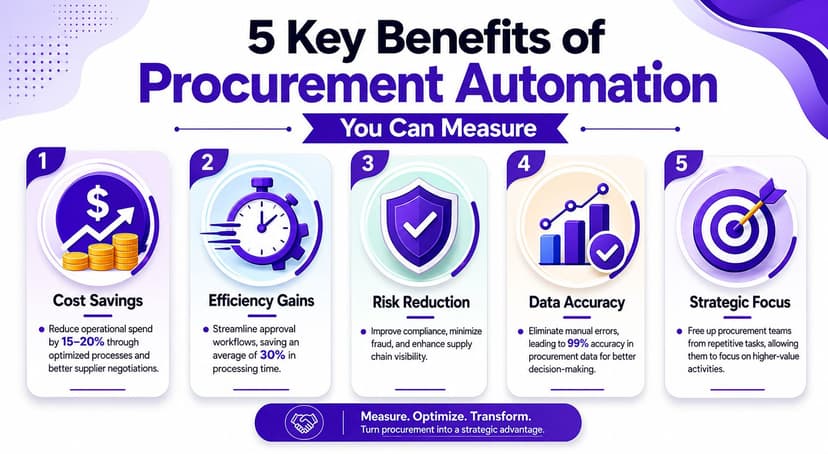
1. Faster processing
Procurement has a lot of waiting built into it. Requests wait for coding. POs wait for approval. Invoices wait for matching. When those steps are rule-based, automation removes avoidable pauses.
Sirion reports that automation can reduce procurement processing time by 25–45%, save procurement teams 15–20% of their time, and deliver a typical ROI in 12–18 months, according to Sirion's review of procurement automation benefits.
For an Excel-heavy team, that usually means fewer manual checks and fewer status-chasing emails.
2. Better cost control
Savings don't only come from negotiating lower prices. They also come from enforcing contract terms, catching duplicate work, and spotting spend drift before month-end.
If your spreadsheet can identify off-contract suppliers, mismatched unit prices, or invoices without valid PO references, procurement starts controlling spend instead of documenting it after the fact.
3. Lower compliance risk
Manual procurement relies on memory. Someone remembers the approval threshold. Someone notices that a vendor isn't approved. Someone spots that the invoice total doesn't align with the PO. That's fragile.
Automation embeds the checks into the process itself. The workbook can force a budget code, compare invoice amounts to PO values, and flag missing receipts before payment review starts.
Good procurement automation doesn't eliminate exceptions. It makes exceptions visible early enough to handle them calmly.
4. Clearer spend visibility
A lot of reporting problems aren't reporting problems. They're data structure problems.
If one workbook says "IBM Ltd", another says "IBM Limited", and a third says "International Business Machines", your category summary is already broken. Centralized, standardized data is what makes spend analysis useful.
If you build procurement dashboards in Excel, these KPI reporting best practices help when you move from raw transactions to decision-ready views.
5. More strategic time for the team
This benefit is less glamorous, but in real teams it matters most. Every hour spent fixing vendor names, checking duplicate invoices, or stitching together reports is an hour not spent on supplier performance, sourcing strategy, or negotiation prep.
Here's the practical difference:
| Task | Manual Process (The Old Way) | Automated Process (The New Way) |
|---|---|---|
| Requisition review | Buyer reads emails and checks policy manually | Rules assign approval path based on fields in the sheet |
| PO validation | Staff compare rows across exports by eye | Lookup formulas and exception flags identify mismatches |
| Invoice matching | AP checks PO, receipt, and invoice separately | Structured sheet highlights 3-way match issues automatically |
| Spend reporting | Analyst rebuilds pivot tables each month | Standardized tables refresh the report with minimal rework |
| Supplier tracking | Notes live across inboxes and tabs | One tracker shows status, owner, and next action |
What to measure first
Don't launch with twenty KPIs. Start with five operational signals:
- Cycle time: How long requests take from submission to PO
- Touchpoints: How many manual edits each transaction needs
- Exception count: How many invoices or POs require rework
- Data quality issues: Missing fields, duplicate suppliers, invalid codes
- Reporting effort: How much manual prep is needed before leadership review
Those are measurable even in Excel. Furthermore, they reveal whether procurement automation is improving the work.
4 Technologies Powering Today's Procurement Automation
Many envision "automation" as one giant system doing everything. In reality, modern procurement automation is a stack. Each layer solves a different problem.
Workflow automation
This is the base layer. Workflow automation routes work from one step to the next according to rules.
In procurement, that usually means a requisition moves to the right approver, a completed approval triggers PO creation, and an exception gets sent for review instead of disappearing in someone's inbox. In Excel terms, workflow often starts with status columns, owner columns, due dates, and validation checks that make the path visible.
RPA for repetitive execution
Robotic Process Automation, or RPA, acts like digital hands. It handles deterministic tasks that follow the same logic every time.
Precoro notes that the most mature procurement automation strategies add AI and RPA on top of core workflows. In that model, RPA handles deterministic work like data entry and PO submission, while AI improves decision quality by analyzing spend patterns and forecasting supplier risk, as outlined in Precoro's explanation of procurement automation.
This distinction matters. If the task is "copy values from system A to system B when fields match," RPA is often enough. If the task is "identify unusual supplier behavior from mixed spend data," you need something more analytical.
AI for judgment support
AI is the layer that helps procurement teams interpret, classify, summarize, and prioritize.
That doesn't mean it should approve every supplier or negotiate every contract. It means it can help with work like:
- Spend classification when descriptions are inconsistent
- Supplier comparison when responses arrive in different formats
- Risk scanning across large data sets
- Narrative summaries for monthly procurement reports
AI agents inside Excel
This is the layer many practitioners miss. You no longer need to leave the spreadsheet to automate useful work.
Inside Excel, AI tools can help rewrite formulas, clean transaction tables, standardize text fields, generate pivots, or prepare a supplier comparison without building every step manually yourself. If you're evaluating options in that category, this guide to Excel automation tools is a practical reference.
The best automation tool is not the most advanced one. It's the one your team will actually use on a Tuesday afternoon with a messy workbook and no time.
What works and what doesn't
A simple rule helps here.
Use workflow automation when the path is known.
Use RPA when the task is repetitive and exact.
Use AI when the data is messy, the inputs vary, or the output needs interpretation.
What doesn't work is expecting AI to fix broken process design. If approvers aren't defined, supplier records aren't standardized, and finance codes are inconsistent, adding more technology just accelerates confusion.
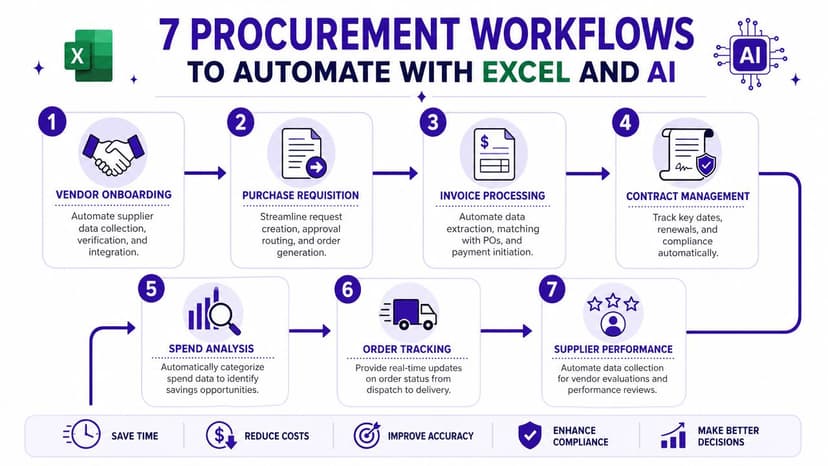
7 Procurement Workflows to Automate with Excel and AI
Procurement automation becomes practical. You don't need to start with a full source-to-pay redesign. Start with the workflows that already consume time in your workbook every week.
1. Spend data cleansing
Raw exports are rarely analysis-ready. Supplier names vary, categories are inconsistent, and descriptions are too messy for reliable reporting.
In Excel, begin with a normalization table. Create one tab for approved supplier names and one for category mapping. Then use lookup formulas to replace inconsistent values with standard ones.
A practical pattern is:
- Create a master supplier table with "raw name" and "standard name"
- Use TRIM and CLEAN on imported text fields
- Apply XLOOKUP to map raw values to approved values
- Flag blanks and unmatched rows for review instead of silently accepting them
2. Purchase order matching
This is one of the best first automation projects because the logic is clear and the payoff is immediate.
If your invoice file contains a PO number and your PO register contains PO details, use XLOOKUP to pull expected values into the invoice sheet.
Example:
=XLOOKUP([@[PO Number]],PO_Register[PO Number],PO_Register[PO Amount],"Not Found")
How it works:
[@[PO Number]]is the PO number in the current invoice rowPO_Register[PO Number]is the column Excel searches inPO_Register[PO Amount]is the return column"Not Found"prevents an error value and gives you a clean exception label
Add a variance column next to it:
=[@[Invoice Amount]]-[@[Expected PO Amount]]
Then apply conditional formatting to highlight anything that isn't zero.
Watch for this: If your PO numbers are stored as text in one sheet and numbers in another, XLOOKUP will fail even when the values look identical. Standardize the field type first.
3. Vendor performance scorecards
Many supplier reviews stay subjective because the data is spread across tabs. Excel can do more than it is typically employed for.
Build a scorecard with fields such as on-time delivery status, invoice accuracy, issue count, and contract status. Use a simple weighted model if your team agrees on the criteria. Then summarize by supplier with a PivotTable.
If you're comparing suppliers for a renewal or sourcing decision, this supplier comparison Excel workflow is a useful example of how to structure the analysis.
4. Requisition routing
You can automate routing logic in Excel even without a full intake platform.
Create columns for category, request value, department, and supplier status. Then create a formula-driven routing output such as:
- Finance approval required
- Procurement review required
- Supplier onboarding required
- Auto-approved within threshold
This won't replace enterprise workflow software, but it does make approval logic explicit. That alone removes a lot of back-and-forth.
5. Invoice processing and 3-way checks
A mature procure-to-pay setup standardizes requisitions, approvals, PO generation, receiving, invoice matching, and payment reconciliation. Automating rule-based steps like PO generation, 3-way matching, and payment reconciliation reduces cycle times and data-entry errors while embedding compliance checks into the process, as explained in Ivalua's guide to procurement automation.
If your AP team is still handling too many exceptions manually, it's worth reviewing ways to streamline your AP process so invoice control doesn't break after procurement has done its part.
A simple Excel approach is to maintain three linked tables:
- PO table
- Goods receipt table
- Invoice table
Then use lookups and exception columns to answer three questions fast:
- Does the PO exist?
- Was receipt recorded?
- Does the invoice amount align with the approved value?
6. Contract renewal alerts
This workflow is low effort and consistently useful.
Add contract end date, notice period, owner, and renewal status to a contract register. Then calculate the alert date:
=[@[End Date]]-[@[Notice Period Days]]
Use another column to flag records where the alert date is approaching. Add conditional formatting or a filtered view for weekly review. This single step prevents a lot of reactive buying.
Here's a short video that shows how procurement workflows can be optimized further:
7. Automated reporting packs
Monthly procurement reporting often means rebuilding the same pivot tables, charts, and commentary from scratch.
Standardize your source table first. Then create:
- One pivot for spend by category
- One pivot for supplier concentration
- One pivot for exception counts
- One dashboard tab with charts and commentary placeholders
This is also where AI helps most inside Excel. Instead of manually cleaning labels, rebuilding visuals, and drafting narrative notes, you can use AI to complete the workflow and then review the output.
What works well is starting with one painful workbook. Clean it. Standardize it. Add flags. Build one reliable dashboard. Then replicate that pattern.
A 5-Phase Roadmap to Successful Procurement Automation
Most procurement automation projects don't fail because the idea is wrong. They fail because the team automates too much, too early, on top of weak data.
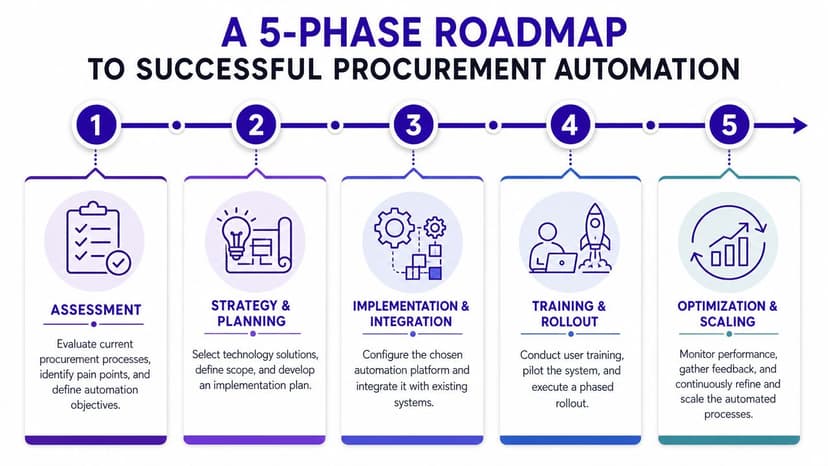
Phase 1. Assess the friction
Start with the work that creates the most repeatable pain. Not the most strategic process. The most frustrating one.
Look for tasks with these traits:
- High volume: They happen daily or weekly
- Rule-based logic: A clear if/then pattern exists
- Multiple manual touchpoints: People re-enter or re-check the same data
- Visible downstream impact: Errors create AP issues, reporting delays, or supplier confusion
Map the current process in one sheet. Keep it simple. Step, owner, input, output, common error.
Phase 2. Standardize the data
This is the phase teams skip, then regret.
A NetSuite-cited survey found that "limited data and insights" is the number one internal procurement challenge for 54% of professionals, which is why automation often fails without data standardization and a single source of truth, as discussed in NetSuite's overview of procurement challenges.
In spreadsheet terms, this means:
- One naming convention for suppliers
- One category taxonomy for spend
- One field format for PO numbers, dates, and cost centers
- One owner for master data updates
Clean data beats clever automation. If your source tables aren't stable, every dashboard and every AI output will drift.
If you want to automate repetitive cleanup steps once your structure is defined, an Excel AI macro generator can help turn recurring workbook actions into repeatable routines.
Phase 3. Pilot one workflow
Pick a workflow that is narrow enough to finish and painful enough to matter.
Good pilot examples include PO matching, supplier master cleanup, or contract renewal alerts. Avoid launching with a giant transformation plan. Excel is ideal here because you can test the logic quickly with real data and visible outputs.
A good pilot should produce three things:
- A cleaner process
- A measurable before-and-after comparison
- A template the team can reuse
Phase 4. Scale across connected workflows
Once one process works, don't jump straight to ten. Expand to adjacent workflows that benefit from the same data foundation.
For example:
| Starting workflow | Good next step |
|---|---|
| Supplier cleanup | Spend analysis by supplier |
| PO matching | Invoice exception review |
| Contract alerts | Supplier renewal planning |
| Requisition routing | Approval workload tracking |
The key is to scale through connection, not ambition. If your PO register is finally clean, use it to support invoice checks. If your supplier list is standardized, use it in performance scorecards.
Phase 5. Measure and optimize
After rollout, teams often stop at "it works." That's too early to stop.
Review the process monthly and ask:
- Where do exceptions still happen most often
- Which fields are still entered inconsistently
- Which report still needs manual fixing
- Which approval step causes delay
- Which task should be moved from formula logic to AI assistance
This is also where a practitioner mindset matters. Automation isn't a one-time installation. It's maintenance, refinement, and simplification.
What works:
- Starting with one controlled file
- Naming clear data owners
- Building visible exception logic
- Testing with real transactions
What doesn't:
- Automating broken inputs
- Mixing multiple naming standards
- Letting every team keep its own version of the truth
- Trying to replace judgment with automation everywhere
Start Your Procurement Automation Journey in Excel Today
Procurement automation doesn't have to begin with a major software budget or a long transformation program. For many teams, it starts with one spreadsheet that finally stops fighting back.
If you work in procurement today, you probably already know where the waste is. It's in the duplicate supplier names, the invoice checks done line by line, the approval tracker that lives half in Excel and half in email, and the monthly report that has to be rebuilt because the source data isn't clean enough to trust.
That's why Excel is still such a practical starting point. It lets you expose the process, clean the data, test the logic, and prove value quickly. Once those basics work, AI becomes much more useful because it can accelerate a process that already makes sense.
You don't need to automate everything this month. Pick one workflow that repeats every week and drains time without adding much judgment. PO matching is a good candidate. Supplier normalization is another. Contract renewal alerts are an easy win. Build the structure, add the formulas, create the exception view, and make the process visible.
Start where errors repeat, not where the presentation deck looks impressive.
That approach does two things. It saves time immediately, and it builds trust. Once your team sees one workbook become faster, cleaner, and easier to manage, the next automation step becomes much easier to justify.
The best first move is simple. Choose one recurring procurement task this week and redesign it inside Excel so the sheet does more of the checking for you. If AI can take over the cleanup, formatting, or reporting work on top of that, even better.
If you want to automate real Excel work instead of just getting formula suggestions, Elyx AI is worth trying. It works as an Excel add-in and can execute multi-step spreadsheet workflows from a plain-language prompt, including data cleaning, report building, chart creation, formatting, and analysis. For procurement teams, that means you can start with the files you already use and remove hours of repetitive spreadsheet work without rebuilding your whole process first.
Reading Excel tutorials to save time?
What if an AI did the work for you?
Describe what you need, Elyx executes it in Excel.
Sign up