Can AI Excel Humans? 5 Superhuman Ways AI Enhances Your Analysis

The big question on everyone's mind is whether AI can actually do a better job in Excel than a seasoned professional. The short answer? Yes, absolutely—but not by making human analysts obsolete. Instead, AI is becoming the ultimate partner, giving us superpowers in speed, scale, and accuracy when we're buried in complex spreadsheets.
1. The Billion-Dollar Question: Can AI Really Outperform Humans in Excel?

It’s easy to get caught up in the "humans vs. machines" narrative. But when it comes to spreadsheet work, that's the wrong way to look at it. The reality is far more interesting and, frankly, more productive. To get a real sense of this, it helps to understand What Is Artificial Intelligence in Business beyond the hype.
Spending too much time on Excel?
Elyx AI generates your formulas and automates your tasks in seconds.
Sign up →Instead of a competitor, think of AI as the world’s most efficient assistant. It’s built to take on the mind-numbing, repetitive tasks that eat up hours of our day, freeing us up to do the work that actually requires a human brain: critical thinking and strategic decision-making.
The Power of Partnership: 2 Strengths of Humans and AI
The real magic happens when you pair human insight with AI’s raw processing power. It’s a classic case of the whole being greater than the sum of its parts.
Each brings something unique to the table:
- AI's Strengths: It has unmatched speed for crunching huge datasets, flawless accuracy when running formulas, and it never gets tired of formatting reports perfectly.
- Human's Strengths: We provide the critical thinking to ask the right questions, the business context to understand what the numbers mean, and the strategic foresight to make smart decisions with that information.
This combination isn’t about one replacing the other; it’s about creating a powerful team.
The new wave of AI acts like a "wizard." You make a complex request, and it delivers a sophisticated output. This shifts the human role from executing tasks to verifying and interpreting the final product.
For example, you could spend an hour wrestling with formulas to build a multi-tab financial model. Or, you could simply ask an AI agent to build it for you in a few minutes. Let's say you have a list of sales data in columns A (Date), B (Product), and C (Sales Amount) and you want to summarize total sales by product.
Instead of manually building a PivotTable, you could use a formula like SUMIF.
=SUMIF(B:B, "Product A", C:C)
Formula Explanation:
B:Bis the range where the criteria will be checked (the Product column)."Product A"is the specific criterion you're looking for.C:Cis the range to sum if the criterion is met (the Sales Amount column).
While effective, this requires you to write a separate formula for each product. An AI assistant handles this complexity automatically. If you want to see how this works in practice, you can learn more from our complete guide on what Excel AI is and how you can use it.
That hour you just saved can be spent analyzing the model’s strategic business implications—a job that requires human experience and intuition.
Ultimately, the goal isn't for AI to "beat" us at Excel. It's to build a human-AI team that delivers faster, smarter insights than any one person could ever manage on their own. The AI handles the mechanics, so you can focus on the big picture.
2. 3 Ways AI Makes You Superhuman in Excel

The question isn't really if AI can outperform humans in Excel anymore. We've moved past that. Now, the real conversation is about how much more we can get done when we work with AI. This isn't just about a small speed bump; it's a massive leap in what one person can accomplish in a single workday.
And there’s solid proof to back this up. Recent studies have shown that using generative AI tools can boost productivity by an average of 66% on complex business tasks. That’s not a typo. This shows AI is especially good at the heavy-lifting, brain-draining work, turning hours of manual effort into minutes of review. You can read the full breakdown of these significant AI productivity gains on nngroup.com.
Let's look at three real-world ways AI gives you this incredible boost.
1. Work at an Impossible Speed and Scale
The most obvious advantage AI has is pure, raw speed. It can chew through tasks in minutes that would take even a seasoned analyst hours, if not days.
Imagine you're handed a dataset with 50,000 rows that needs cleaning. It's a mess of duplicates, typos, and inconsistent formatting. For a human, that's a long, frustrating marathon of filtering, sorting, and formula-writing, where every minute increases the chance of a mistake.
For an AI, it’s a quick sprint.
- A human has to hunt and peck, writing
VLOOKUPs and cautiously using "Find and Replace," all while fighting off eye strain and fatigue. - An AI scans the entire file at once, running thousands of checks and corrections per second without ever getting tired or losing its place.
This completely changes the game. What used to be a project in itself—cleaning a huge dataset—now becomes a quick first step before you get to the actual analysis.
2. Get Expert-Level Skills, Instantly
AI is the ultimate skill-booster, closing the gap between a complete beginner and a spreadsheet wizard. A junior analyst might not have a clue how to build a complex pivot table with multiple layers or write a monster IF statement with seven different outcomes.
But with an AI assistant, they don't have to.
They can just type what they want in plain English, like: "Create a pivot table that shows our sales broken down by region and product category. Then, make the top 10% of performers stand out." The AI understands this and does the heavy lifting, instantly giving that junior employee the power of a senior data pro.
This makes data analysis accessible to everyone. Instead of funneling all requests through a few overwhelmed Excel experts, your entire team can start finding answers in their own data. That makes the whole organization faster and smarter.
3. Free Up Your Brain for What Matters
Every minute you spend on repetitive, mind-numbing work is a minute you're not spending on strategy. AI is brilliant at taking over the tasks that drain your mental battery—the endless cell formatting, the manual data entry, the frustrating formula debugging.
By handing off this grunt work, AI clears your plate and frees up your mind. You can finally stop worrying about the "how" (the boring, mechanical steps) and focus entirely on the "why" (what the data is actually telling you).
This is where the real value is created—spotting a new trend in the market, finding a hidden inefficiency in your operations, or building a powerful story with your numbers. You can learn more about how this works by checking out our guide to integrating AI into Excel on getelyxai.com.
3. 4 Real-World Examples of AI Turning Messy Data into Insights
Theory is one thing, but seeing is believing. The debate over whether AI can outperform humans in Excel is best settled with some real-world proof. So, let’s move past the abstract and look at four common business tasks where an AI agent like ElyxAI can take a simple instruction and deliver a finished product on its own.
Each example walks you through the whole process: the messy "before," the simple English prompt you give the AI, and the analysis-ready "after."
1. Cleaning and Standardizing Data Automatically
We’ve all been there. You get a raw data export, and it's a complete nightmare. You're looking at duplicate entries from a system bug, blank cells where people forgot to enter data, and a "Country" column with a mix of "USA," "U.S.," and "United States." Fixing a few thousand rows like this by hand is easily a full day's work.
With an AI agent, you can get it done in seconds.
The Prompt: "Remove all duplicate rows based on the 'Order ID' column. Fill any blank cells in the 'Sales Amount' column with the average sales value. Finally, standardize all entries in the 'Country' column to the official two-letter country code format."
The AI gets right to work. It scans the sheet, finds the duplicates, calculates the average to fill in the missing sales figures, and converts every country variation into its proper ISO code. What you get back is a perfectly clean dataset, ready for analysis in minutes, not hours. If you're constantly dealing with messy files, exploring AI-powered data cleaning in Excel can genuinely change your workflow.
2. Generating a Full Report in One Go
Alright, now that our data is clean, let's make it useful. Your manager wants a sales report summarizing performance by region and product category. Oh, and they need a chart to go with it for the weekly meeting. This usually means creating a pivot table, then building a chart from it, and finally spending time formatting everything so it looks good.
An AI agent can handle that entire sequence with a single command.
The Prompt: "Using the cleaned data, create a pivot table that shows total sales by 'Region' and 'Product Category'. Then, generate a bar chart from this pivot table to compare regional performance and place it next to the table."
In a flash, the AI builds the whole thing. It creates the pivot table with the right rows, columns, and values. Then, it generates a perfectly labeled bar chart sourced directly from that pivot data. You get a complete report snapshot without having to click a single button in the PivotTable or Chart menus.
3. Running an Advanced Financial Forecast
Building a proper forecast is more than just dragging a trendline across a chart. A financial analyst often needs to project future revenue based on past growth while factoring in things like seasonality. This usually involves wrestling with complex formulas like FORECAST.ETS and meticulously setting up your data.
For example, to forecast a value for a specific future date (e.g., in cell A49) based on historical values (C2:C48) and dates (A2:A48), the formula would be:
=FORECAST.ETS(A49, C2:C48, A2:A48, 12, 1)
Formula Explanation:
A49is the target date you want to forecast.C2:C48are your historical sales values.A2:A48are your historical dates.12tells Excel the data has a 12-month seasonal cycle.1lets Excel automatically detect and complete missing data points.
AI makes this kind of high-level analysis much more approachable.
The Prompt: "Analyze the monthly sales data from the last 36 months. Create a new table that projects sales for the next 12 months, accounting for seasonal trends. Add a column showing the forecasted growth percentage month-over-month."
The AI agent recognizes the time-series data, picks the right forecasting model, and builds a new table with the projections. It even adds the month-over-month growth calculation you asked for, turning a complicated analytical job into a simple request.
4. Creating a Professional-Looking Dashboard
A great dashboard isn’t just about the data—it's about presentation. A polished report needs consistent branding, readable column widths, and smart use of color to highlight what's important. Getting all that formatting right by hand is tedious work.
Think of an AI agent as your personal design assistant.
The Prompt: "Format this entire dashboard. Apply a blue and gray color theme, make all column headers bold, and auto-fit the columns. In the 'Profit Margin' column, color all values below 10% red and all values above 25% green."
Instantly, the dashboard is completely made over. The AI applies the color scheme, adjusts the layout for a clean look, and adds the conditional formatting rules. The result is a presentation-ready report that looks like it was carefully put together by a design pro.
4. Calculating the ROI of AI in Excel: 2 Simple Ways to Measure Value
Watching an AI agent chew through an Excel task in seconds is one thing, but the real question is what that speed means for your bottom line. Figuring out the return on investment (ROI) for an AI tool doesn't need to be some complex accounting exercise. It really just comes down to seeing how those productivity boosts translate into real dollars and cents.
This isn't just a hypothetical idea, either. The data backs it up. A recent study found that employees using generative AI get 33% more productive for every hour they use it. On average, that's 2.2 hours saved each week. For the heavy users? They're getting back over 4 hours of their week. You can check out the full details in the Federal Reserve Bank's research on AI productivity gains on hrdive.com.
Every single one of those hours saved is a direct return, giving your team back its most precious resource: time.
1. Measure Direct Time and Cost Savings
The most straightforward way to see the ROI is to simply count the hours your team gets back from ditching tedious Excel work. Think about all the time spent on cleaning up messy data, formatting reports, or hunting down a broken formula.
You can map this out with a pretty simple calculation:
(Hours Saved Per Employee Per Week) x (Number of Employees) x (Average Hourly Cost) = Weekly Cost Savings
Let’s put some real numbers to that. Say you have a team of 10 analysts, and their average loaded cost to the business is $50/hour. If an AI tool helps each of them save just 3 hours a week, you're looking at $1,500 in direct savings. Every single week.
Over a year, that adds up to a staggering $78,000 in recovered productivity.
This table helps put that value into perspective for teams of different sizes.
Projected Annual Productivity Value from an AI Excel Agent
| Team Size | Weekly Hours Reclaimed | Annual Hours Reclaimed | Estimated Annual Value (at $50/hr) |
|---|---|---|---|
| 5 | 15 | 780 | $39,000 |
| 10 | 30 | 1,560 | $78,000 |
| 25 | 75 | 3,900 | $195,000 |
| 50 | 150 | 7,800 | $390,000 |
As you can see, the value scales quickly, turning what seems like small daily time savings into a significant financial return for the business.
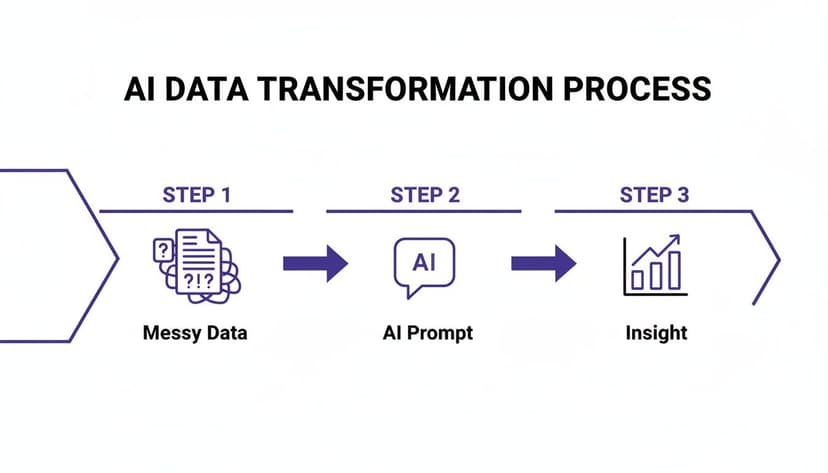
This process is exactly what the image above shows—an AI agent taking messy, raw data and turning it into clear insights with just a simple instruction. It completely skips the hours of manual work in the middle.
2. Factor in Indirect Value and Opportunity Cost
But the story doesn't end with just time savings. Some of the most significant benefits of AI are a little harder to put a number on, but they often deliver the most long-term value.
Think about the knock-on effects:
- Faster Decision-Making: What happens when your team can pull a report in minutes instead of days? You can react to market shifts almost instantly. That kind of agility is what lets you jump on an opportunity while your competitors are still running the numbers.
- Reduced Error Costs: We've all been there. A tiny mistake in a formula or a copy-paste error can lead to a bad decision that costs the company real money. AI’s precision drastically cuts down on these human errors, meaning you can actually trust the data in front of you.
- Increased Employee Satisfaction: Let’s be honest, nobody loves spending their day doing mind-numbing, repetitive tasks. Handing that grunt work over to an AI agent frees up your team to work on more interesting, strategic projects. That's a huge boost for morale and helps you keep your best people.
When you start looking at these gains, you get a much fuller picture of AI's total impact. We explore this further in our guide on proven strategies for business cost reduction. Ultimately, the ROI of AI isn't just about cutting costs—it's about re-investing your team's talent where it truly counts.
5. How a Privacy-First AI Keeps Your Company Data Safe

As soon as we talk about whether AI can excel humans in their work, the conversation always pivots to one critical question: Is my data safe? It's a dealbreaker. Handing over sensitive information like financial reports or client lists to any third-party tool feels like a huge leap of faith.
The problem is that many cloud-based AI tools require you to upload your entire spreadsheet to their servers just to get an answer. That means your confidential data is no longer under your control. It’s sitting on someone else’s server, creating a major security blind spot. This is exactly where a "privacy-first" approach changes the game.
A Smarter, More Secure Architecture
A privacy-first AI, like ElyxAI, is built completely differently from the ground up. The core design ensures that your sensitive spreadsheet data never leaves your computer.
So how does it work? Instead of uploading your file, the tool only sends your instructions—the text-based prompt you type—to the AI model. The file itself stays put.
Think of it like hiring a consultant. You can describe a business problem to them over the phone without ever having to let them inside your office to see your private files. The AI gets the instructions it needs, and your data’s confidentiality is never compromised.
The concept is simple but powerful: Your Excel file stays local. Only the instruction gets processed remotely, giving you complete data privacy and control.
Backed by 3 Layers of Enterprise-Grade Security
Of course, a promise of privacy needs to be backed by serious security measures. To keep company data truly safe, a tool needs to meet the highest standards, like the strict SOC 2 encryption requirements. ElyxAI, for instance, uses a multi-layered security strategy you can count on.
Here’s what that looks like in practice:
- Official Microsoft Verification: As an add-in on the official Microsoft AppSource, the tool has already passed a tough security and compliance audit by Microsoft itself.
- End-to-End Encryption: Every bit of communication between your computer and the AI model is locked down with AES-256 and TLS 1.3 encryption. This is the same bulletproof standard used by major banks.
- Zero Data Retention: We have a strict policy: no user data is ever stored on our servers or used for training AI models. This completely removes the risk of data leaks or misuse down the line.
These protocols are designed to give businesses the confidence to use powerful AI tools without risking their most valuable asset. If you want to add another layer of protection, check out our guide on how to encrypt an Excel file.
4 Key Questions on AI in Excel Answered
It's completely normal to have questions when you're thinking about bringing AI into your Excel workflow. The whole idea can bring up some big concerns about what these tools can actually do, what skills you'll need, and how they stack up against what you’re already using. Let's walk through some of the most common questions we hear.
1. Is an AI Agent Like ElyxAI Better Than Microsoft Copilot for Excel?
This is a really common point of confusion, but they’re built for different jobs. Think of Microsoft Copilot as an assistant sitting next to you, helping you out. It's great for things like, "What's the formula for a VLOOKUP again?" or suggesting a chart type. It helps you do the work.
An autonomous agent like ElyxAI, on the other hand, is more like a trusted team member you delegate a whole project to. You give it an objective in plain English, such as, “Take this messy sales data, clean it up, build a pivot table showing sales by region, and then format it into a final report.” ElyxAI handles that entire sequence of tasks on its own. The goal isn't to assist you—it's to do the work for you.
2. Do I Need Advanced Excel Skills to Use an AI Assistant?
Absolutely not. In fact, these AI tools are a huge advantage for people who don't live and breathe Excel formulas. Instead of trying to remember the exact steps to create a complex chart or write a nested formula, you just describe the outcome you want. The AI handles all the technical stuff behind the scenes.
We're seeing this level the playing field. These tools make it possible for team members with less technical Excel experience to produce the same high-quality analysis as a seasoned expert. It’s a powerful way to spread data skills across your entire team.
Your expertise shifts from knowing how to do something in Excel to knowing what to ask for. The AI handles the mechanics, so you can focus on the strategic goal.
3. Will AI Make My Current Excel Skills Obsolete?
Quite the opposite—it makes your experience more valuable than ever. Your understanding of the business, the context behind the data, and what questions are worth asking is something AI simply can't replicate. The AI is fantastic at the "how," but it needs your human expertise to provide the "what" and the "why."
Your most important skills—asking smart questions, interpreting the results to find a business opportunity, and spotting when something looks off—are uniquely human. AI automates the tedious parts of the job, which frees you up to operate at a higher, more strategic level. You get to focus on insights, not keystrokes.
4. Is My Data Secure When Using an AI Add-in for Excel?
This is a critical question, and the answer comes down to how the tool is built. With a privacy-focused AI agent like ElyxAI, your data is completely secure. We specifically designed it so your spreadsheet information never leaves your local machine.
Only your plain-text instructions are sent to the AI model to figure out what you need. A truly secure tool will never upload your spreadsheet, store your data, or use it to train its models. You should always check the privacy and security policies of any AI tool before connecting it to sensitive company files.
Ready to stop wrestling with tedious Excel tasks and start focusing on strategy? Elyx AI acts as your autonomous data analyst, executing entire workflows from a single instruction. Transform how you work with data by starting a free trial and get hours back in your week.
Reading Excel tutorials to save time?
What if an AI did the work for you?
Describe what you need, Elyx executes it in Excel.
Sign up