What is data driven decision making: Excel Explained

A lot of Excel decisions start the same way. Someone asks why sales dipped, which region should get budget next month, or whether a process is worth fixing. The workbook opens, filters get applied, a few tabs are checked, and then somebody says, “I think the issue is probably X.”
Sometimes that guess is right. Often it is not.
What is data driven decision making? It is the practice of using actual data to choose a direction, instead of relying mainly on habit, memory, or seniority. In plain terms, you define the question, collect the relevant facts, analyze them, and act on evidence.
Spending too much time on Excel?
Elyx AI generates your formulas and automates your tasks in seconds.
Sign up →That sounds obvious. In daily work, it is messy. Files are incomplete. Column names change. Dates import as text. Half the team wants speed, the other half wants certainty. That gap between theory and reality is exactly why many teams talk about being data-driven without consistently working that way.
The reason this matters is simple. In 2024, a S&P Global Market Intelligence Study revealed that 96% of businesses worldwide consider data-driven decision-making essential to their operations (IBM). The expectation is no longer optional. The challenge is execution.
For readers who want a broader process view, Querio has a useful piece on mastering the data driven decision making process. If your first bottleneck is understanding how to inspect a dataset before making any decision at all, this guide on exploratory analysis is also useful: https://getelyxai.com/en/blog/what-is-exploratory-data-analysis
Introduction What is Data-Driven Decision Making?

A practical definition is better than a polished one. Data-driven decision making means you use measurable evidence to answer a business question, then translate that answer into an action.
If you work in Excel, that usually means pulling data from exports, cleaning the mess, building a few checks, summarizing the patterns, and turning those patterns into a call. Which customers are slowing down. Which product line deserves inventory. Which campaign should lose budget. Which team needs support.
What this looks like in real work
A manager using intuition might say, “The North region feels weak.” A data-driven approach checks the numbers by month, product, rep, and customer type before changing anything.
That distinction matters because instincts tend to overweight recent events and loud opinions. Data does not remove judgment, but it gives judgment something solid to work with.
Why Excel users feel the pain first
Excel is where many business decisions get made. Not in a perfect warehouse. Not in a polished dashboard. In a workbook with ten tabs, two rushed VLOOKUP replacements, and one summary chart built five minutes before a meeting.
Practical rule: If the decision matters, write the question in one sentence before touching the data. Most wasted Excel analysis starts with a fuzzy question.
Good data-driven work in Excel is not about making spreadsheets look advanced. It is about making decisions repeatable, explainable, and less fragile.
The 3 Core Reasons Why Data-Driven Decisions Matter
Gut decisions usually fail for predictable reasons. People remember the last complaint, not the full pattern. They push the option they already preferred. They react to one bad week as if it were a trend.
Data helps because it forces the conversation away from opinion and toward evidence.
1. It reduces bias and lowers avoidable risk
When teams use data well, they stop arguing from anecdotes. They can test whether a belief is true before acting on it.
A finance team, for example, may think late payments are caused by one client segment. After reviewing aging data, invoice timing, and payment terms, they may find the core issue is internal billing delay. That changes the fix completely.
This is one reason data-driven work is stronger than “I’ve seen this before.” Experience matters, but experience without validation can become expensive.
2. It improves operational efficiency
Excel users know the biggest drag is not usually analysis. It is the work before analysis.
Duplicate rows. Broken date formats. Blank categories. Reports rebuilt from scratch because nobody trusts last month’s version. A solid data-driven process exposes those inefficiencies and makes them easier to remove.
A business intelligence report should do more than display numbers. It should help a team act faster and with less confusion. This practical breakdown of reporting structure is worth reading: https://getelyxai.com/en/blog/business-intelligence-report
Here is where the benefit becomes concrete:
- Less rework: Teams stop rebuilding logic every cycle.
- Cleaner handoffs: Finance, sales, and operations can work from the same definitions.
- Faster review: Leaders spend less time debating spreadsheet mechanics and more time discussing actions.
3. It creates a competitive advantage
Some companies use data to support decisions after the fact. Better companies use it earlier, while choices are still open.
Netflix is a clear example. Its shift from DVD rentals to streaming was a data-driven move that helped push the company to massive scale. Starbucks is another. It uses demographic data, traffic patterns, and local business information to guide store location decisions, supporting a substantial global footprint. Those examples are summarized in IBM’s overview of data-driven decision-making, cited earlier.
What works and what does not
| Approach | What usually happens |
|---|---|
| Decision first, data later | Teams search for numbers that justify a choice already made |
| Question first, data second | Teams test assumptions and usually find a cleaner path |
| One dashboard for everything | Nobody knows which metric drives action |
| Focused reporting tied to one decision | Analysis becomes faster and easier to defend |
Key takeaway: Data matters most before commitment. Once a team has emotionally chosen a path, even good analysis gets filtered through bias.
The 5 Essential Components of a DDDM Framework
A strong framework is less glamorous than a dashboard. It is also more important. Most failed data-driven efforts do not fail in the chart. They fail earlier, when the data is incomplete, inconsistent, or disconnected from the decision.
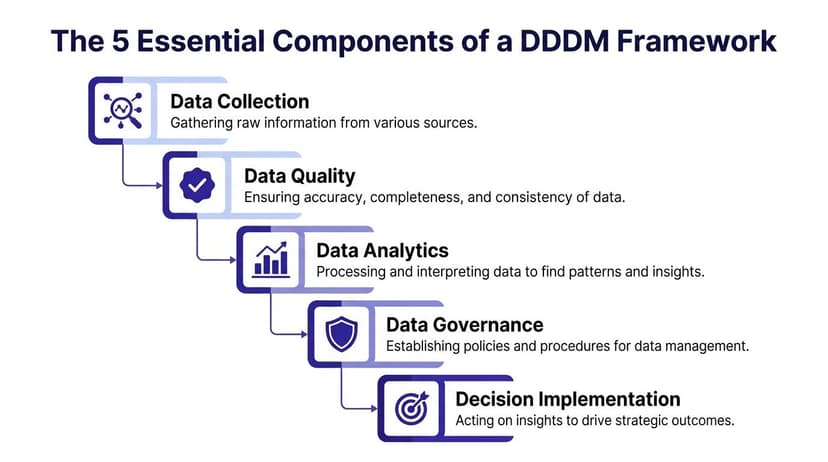
Think of the framework like building a house. Collection is the material delivery. Quality is checking whether the materials are usable. Analytics is the actual construction work. Governance is the building code. KPIs are how you decide whether the house serves its purpose.
The five components in plain English
Some teams overcomplicate this. The working version is simpler.
| Component | Role in the Process | Example in Excel |
|---|---|---|
| Data Collection | Brings information into one place | Importing CRM exports, sales files, or survey results into separate tabs |
| Data Quality | Makes the dataset reliable enough to use | Removing duplicates, fixing dates, standardizing region names |
| Data Analytics | Finds patterns that answer the question | Pivot tables, filters, formulas, trend comparisons |
| Data Governance | Defines rules for consistency and trust | Agreeing on approved metric definitions and source tabs |
| KPIs | Keeps the analysis tied to the decision | Tracking revenue, margin, churn, fulfillment delays, or conversion |
Why Excel users struggle most with the first two
Collection and quality sound basic. They are usually the hardest part.
Data arrives from different systems in different shapes. Sales exports may use customer IDs. Marketing files may use account names. Finance may classify the same item under a different label. If you do not resolve those mismatches, analysis becomes decoration.
If you need a quick refresher on what belongs in the cleanup stage, this article on preprocessing is useful: https://getelyxai.com/en/blog/what-is-data-preprocessing
Structured data is easier, but not enough
Many Excel workflows rely on tidy tables with rows and columns. That is structured data. But real decisions often require notes, comments, survey text, or customer feedback as well. If you want a simple explanation of the difference, Mintline has a helpful guide on structured and unstructured data.
A framework only works if people use it
This is the part many articles skip. A framework is not just technical. People have to trust it.
That means:
- Clear ownership: Someone is responsible for the dataset.
- Stable definitions: “Revenue” should not mean one thing in sales and another in finance.
- Decision fit: The KPI must match the question. Tracking opens will not answer a margin problem.
- Review discipline: Someone checks strange outputs before leaders act on them.
Tip: If a workbook needs a spoken explanation every month, the framework is still weak. Strong decision systems survive handoff.
Your 6-Step Plan to Make Data-Driven Decisions in Excel
The fastest way to understand data-driven decision making is to use it on a real problem. Take a common question: Which region should receive next month’s marketing focus based on recent sales performance?
That is specific enough to analyze and useful enough to matter.

1. Define the question tightly
Bad Excel analysis starts with broad prompts like “analyze sales.” Good analysis starts with one decision.
Try this instead: Which region showed the strongest recent sales performance, and should receive more campaign budget next month?
That wording matters. It tells you what data to collect and what output you need.
2. Gather the minimum useful data
Pull only what supports the decision. For this example, that could include:
- Sales transactions: Date, region, product, revenue
- Customer data: Segment or account type
- Marketing context: Campaign source if available
- Targets or benchmarks: So “good” has meaning
Do not start by exporting everything. Most Excel files become unmanageable because people collect first and think later.
3. Clean and prepare the data
Clean and prepare the data. This step often consumes the most time. Data analysts dedicate 80% of their time to cleaning and organizing data, leaving only 20% for actual analysis (Northeastern University).
In Excel, this usually means:
- Fixing dates: Convert text dates into actual Excel dates
- Standardizing labels: “North”, “NORTH”, and “north region” should become one value
- Removing duplicates: Especially after merged exports
- Checking blanks: Empty region or revenue cells can distort summaries
A reliable report starts here. If this step is weak, everything after it becomes suspect.
4. Analyze the data
Now build the first answer. A pivot table works well for a regional summary. If you want a formula-driven method, SUMIFS is one of the most useful functions in Excel.
Example:
=SUMIFS(B:B, C:C, "North")
Detailed explanation:
B:Bis the sum range. Excel adds the values in column B.C:Cis the criteria range. Excel checks this column for your condition."North"is the criteria. Only rows where column C equals North are included.
If column B contains revenue and column C contains region, this formula returns total revenue for the North region.
You can make it more flexible by referencing a cell instead of typing the region directly:
=SUMIFS(B:B, C:C, F2)
Now Excel sums revenue for whatever region name appears in F2.
5. Visualize what the numbers say
A table proves the point. A chart makes it visible.
Use a bar chart when comparing regions. Use a line chart when looking at trend over time. Keep it simple. If the visual needs narration to be understood, it is too busy.
If you regularly need to turn raw analysis into something shareable, this walkthrough on building a report in Excel is useful: https://getelyxai.com/en/blog/how-to-create-a-report-in-excel
A short visual guide can also help if you want to see this workflow in action:
6. Make the decision and monitor it
Suppose your analysis shows that one region has stronger sales momentum and better average order patterns. The decision is not “the chart looks good.” The decision is the action tied to it.
For example:
- Shift more campaign focus to that region next month.
- Keep a control view on the others.
- Review the outcome after the next reporting cycle.
That last part matters. Data-driven work is not one report. It is a loop. You make the call, monitor the outcome, and refine the next call.
What usually goes wrong in this process
- Step 1 fails: The question is too vague.
- Step 3 fails: Dirty data creates false confidence.
- Step 4 fails: Teams summarize everything instead of the few variables tied to the decision.
- Step 6 fails: Nobody checks whether the decision worked.
Practical rule: If you cannot state the final action in one sentence, you are still analyzing, not deciding.
3 Industry Examples of DDDM Driving Real Results
The value of data-driven work becomes obvious when you map it to an actual decision. A clean way to do that is problem, data, decision, result.
Retail and store expansion
Starbucks does not choose locations by intuition alone. It uses demographic data, traffic patterns, and local business information to decide where a store is more likely to succeed. That approach supported expansion to a significant number of global stores, as noted in IBM’s data-driven decision-making overview cited earlier.
The useful lesson for Excel users is not the scale. It is the logic. Location decisions improve when teams combine demand signals instead of relying on one person’s view of a neighborhood.
Media and product strategy
Netflix is one of the clearest examples of strategic data use. Its move from mail-based DVD rentals to internet streaming was a data-driven shift, and by 2024 the company had grown to a massive subscriber base, according to the same IBM overview cited earlier.
Data-driven decision making is important because it is not only about optimizing a report. It can shape a business model. The numbers are useful only if leadership is willing to act on them.
Internal finance and operations work
Many less visible examples happen inside companies every week. A finance team may review invoice timing, overdue balances, and customer categories to decide where collections effort should go first. An operations team may analyze fulfillment delays by product line to decide which workflow needs fixing.
These examples rarely become public case studies, but they are where Excel carries the primary load.
What these examples have in common
| Part | Common pattern |
|---|---|
| Problem | A decision had to be made under uncertainty |
| Data | Multiple inputs were combined, not just one metric |
| Decision | Leaders changed allocation, strategy, or process |
| Result | The organization acted with more confidence and less guesswork |
The point is not that every team needs a streaming-scale strategy shift. The point is that the same discipline works at every level. A workbook that helps allocate budget better is using the same decision logic, just on a smaller stage.
4 Common DDDM Pitfalls and 1 AI Solution to Avoid Them
Many teams do not fail because they reject data. They fail because the daily mechanics get in the way. The workbook is too messy, the deadline is too close, or the analysis feels harder than it should.

Pitfall 1. Poor data quality
Bad labels, missing rows, duplicate records, and inconsistent formats produce bad decisions with a professional-looking finish.
This is why skepticism matters. If an output looks strange, inspect the inputs before presenting the conclusion.
Pitfall 2. Lack of time
Most analysts are not short on questions. They are short on hours.
When cleanup consumes the week, decision quality drops because teams rush the parts that require judgment. That is why automation matters most in prep-heavy Excel workflows.
Pitfall 3. Skill gaps in analysis
Some users know the business but not the formulas. Others know Excel well but struggle to frame the business question correctly.
That mismatch creates dependency. One person becomes the spreadsheet bottleneck, and every other team waits.
Pitfall 4. Fear of complexity
A lot of people avoid data-driven work because they think it requires code, advanced statistics, or a complete BI stack.
Usually it does not. Many solid decisions can be made with clean tables, a pivot, a few formulas, and disciplined review. If you are curious about where AI fits into that workflow inside spreadsheets, this overview is a good starting point: https://getelyxai.com/en/blog/what-is-excel-ai
One practical AI option inside Excel
Some tools only explain formulas. Some generate text. A more useful category is the tool that performs the spreadsheet work.
AI and machine learning tools like ElyxAI automate complex Excel tasks, with over 700 professionals reporting savings of 3+ hours per week, allowing them to shift focus from manual data mechanics to strategic interpretation and decision-making (TechnologyAdvice).
Used well, that kind of tool addresses the main bottlenecks directly:
- For data quality: It can help clean duplicates and standardize structure.
- For time pressure: It reduces manual multi-step work.
- For skill gaps: Users can describe the task in plain language.
- For complexity: It keeps the workflow inside Excel instead of forcing a tool switch.
The trade-off is important. Automation should not replace judgment. A person still needs to define the question, review the output, and decide what action is sensible. The strongest setup is not human versus machine. It is human review supported by faster execution.
Best practice: Use automation for mechanics. Keep humans responsible for assumptions, exceptions, and final decisions.
That balance is what makes data-driven decision making useful instead of brittle.
If your team already works in Excel and keeps losing time to cleanup, formatting, pivot tables, and repetitive report building, Elyx AI is worth evaluating. It works as an AI-powered Excel add-in that executes multi-step spreadsheet workflows from plain-language instructions, so you can spend more time interpreting the numbers and less time wrestling with the file.
Reading Excel tutorials to save time?
What if an AI did the work for you?
Describe what you need, Elyx executes it in Excel.
Sign up