What Is Workflow Automation: Master AI & Efficiency with These 4 Steps

Let’s be honest, we all have parts of our job that feel like a complete waste of time. So, what is workflow automation, really? Think of it as putting your most repetitive business tasks on autopilot. It’s the digital assistant that handles the manual chores—like copying data between apps, sending routine status emails, or updating your weekly Excel reports—so you don’t have to.
This is especially true in Excel, where repetitive tasks can consume hours. For instance, cleaning messy data before analysis is a common time-sink. Using an AI tool, you can simply ask it to "Remove duplicates from this sheet and format the 'Date' column to DD/MM/YYYY." This one command automates a multi-step process.
What Is Workflow Automation and Why Does It Matter for Excel Users?

Spending too much time on Excel?
Elyx AI generates your formulas and automates your tasks in seconds.
Sign up →Workflow automation isn't about replacing you or your strategic thinking. Far from it. It's about getting rid of the mind-numbing work that stands in the way of that thinking. When you automate the boring stuff, you free up your mind to focus on what actually matters: analyzing information, solving tough problems, and making smart decisions.
This move from manual to automated isn't just a nice-to-have; it's a game-changer for getting more done with greater accuracy, especially in tools we use every day like Excel. For a solid overview of the fundamentals, check out this great guide on what is workflow automation.
A Look at the Growing Demand for Automation
The shift toward automation isn't just a passing trend; it's a major movement in the business world. The numbers back this up, with the global workflow automation market projected to hit an incredible $42.3 billion by 2026. This boom is fueled by a simple, powerful need: to get more done without burning out.
Cloud-based tools are at the forefront, grabbing a 66.2% market share in 2026 as more companies look to automate processes that deal with structured data. This trend is especially important for anyone who feels like they live in spreadsheets all day.
The core idea behind workflow automation is beautifully simple: do more with less effort. It's about taking back the hours you lose to repetitive tasks and putting that energy into high-impact work that actually moves the needle.
3 Reasons to Move Beyond Manual Excel Tasks
Think about the daily grind in Excel. Copying and pasting data from one sheet to another. Manually cleaning up messy exports. Building the same exact report, week in and week out. These tasks are practically begging to be automated. The whole point is to turn these frustrating, multi-step chores into a smooth, one-click (or even no-click) process.
Imagine a world where, instead of spending an hour formatting a sales report, the system just does it for you the second new data comes in. That's the real, practical power of workflow automation.
- Eliminate Tedious Work: Stop wasting your day on mind-numbing data entry and report formatting.
- Increase Accuracy: Drastically cut down on the human errors that sneak in with manual data handling.
- Focus on Insights: Spend your time analyzing the data and finding hidden gems, not just preparing it.
By bringing automation into your routine, you can make Excel work for you, turning it from a static calculator into a dynamic, intelligent partner. To see how, check out our guide on automating Excel to save time and discover a whole new level of productivity.
The 3 Core Components of Every Automated Workflow

So, how does this automation magic actually happen? If you peek behind the curtain, you’ll find it’s simpler than it seems. Every automated process, from sending a quick notification to generating a complex report, is built on three core components.
Think about ordering a pizza online. The moment you click “Place Order,” you set off a chain of events that ends with a pizza at your door. That simple click is the key, and it’s a perfect way to understand how automation works.
The 3 Building Blocks of Automation
At its heart, every automated workflow follows a simple, logical sequence. Without these three elements working together, none of the hands-free magic would be possible.
-
Triggers: This is the starting gun. A trigger is the specific event that officially kicks off the entire workflow. It’s the "if this happens…" part of the equation.
-
Actions: These are the individual jobs the system performs once the trigger fires. Actions are the "then do that" steps, carried out one after another in a specific order.
-
Orchestration: This is the conductor of the whole operation. Orchestration is the intelligence that makes sure all the actions happen in the right sequence, at the right time, and that information passes between them correctly.
Workflow automation is essentially a digital domino effect. A trigger knocks over the first domino, which sets off a chain reaction of actions, all perfectly orchestrated to achieve a final result without you lifting a finger.
A Practical 3-Step Example in Excel
Let's see how this plays out in a common spreadsheet task. Imagine you need to calculate the average sales price for a list of products but first need to standardize the currency.
-
Trigger: You type a command into an AI tool like, "Convert all prices in column C from USD to EUR using a rate of 0.92, and then calculate the average price in cell D1."
-
Actions: The AI performs a series of steps:
- It identifies column C as the target.
- For each cell, it multiplies the USD value by 0.92.
- It then places the
=AVERAGE(C:C)formula (adjusted for the new EUR values) into cell D1.
-
Orchestration: The automation tool ensures the currency conversion happens first across the entire column before the
AVERAGEfunction is executed, guaranteeing an accurate final calculation. Properly preparing your data is a huge part of this, and you can learn more by reading our guide on what data preprocessing is.
Once you get the hang of triggers, actions, and orchestration, you can start to see how even your most complex, multi-step processes can be broken down into automatable chunks.
The Real-World Payoff: 7 Tangible Benefits of Workflow Automation
It's one thing to understand the theory behind workflow automation, but what does it actually do for your business? The real magic happens when you see the tangible returns. It’s not just about "saving time"—it's about fundamentally changing how work gets done for the better.
Here are seven concrete benefits you can expect when you start automating.
1. You Get More Done (Without Working More Hours)
Productivity isn't about grinding away for longer; it's about getting more meaningful work accomplished. Automation takes the repetitive, manual tasks off your team's plate.
Think about it: instead of spending an hour cleaning up a messy Excel file, you could spend that hour analyzing what the data actually means for your business. That’s a huge shift in value.
2. It Directly Lowers Operational Costs
Every manual task has a hidden cost attached to it—your team’s time. When you automate those processes, you’re directly cutting down on the hours spent on administrative grunt work.
This is a core part of any smart approach to strategies for business cost reduction, freeing up budget that can be put toward growth, innovation, or other critical projects.
3. Mistakes and Errors Vanish
Let's be honest, we've all made a typo in a spreadsheet. Manual data entry is prone to human error, no matter how careful we are.
Automation is the perfect fix. It performs tasks with 100% consistency, eliminating the typos, misplaced numbers, and copy-paste errors that can corrupt your data and lead to bad decisions.
4. Your Data Becomes Far More Reliable
Good automation doesn't just move data around; it improves it. You can build data cleaning and validation right into your workflows.
For example, an AI can automatically apply the =PROPER() formula to a column of names to standardize capitalization.=PROPER(A2)
=PROPER(): This Excel function converts the first letter of each word in a text string to uppercase and all other letters to lowercase.A2: The cell containing the text you want to format (e.g., "john smith"). The result would be "John Smith."
This means your data is consistently standardized and ready for analysis from the get-go.
The proof is in the numbers. The workflow automation market is projected to rocket from USD 26.01 billion in 2026 to USD 40.77 billion by 2031, largely because 80% of organizations are increasing their investment in it. Businesses are clearly seeing the ROI. You can dig deeper into these workflow automation market trends to see why.
5. You Can Finish Projects in Record Time
What once took your team days can now be done in minutes.
Imagine building a complex financial report in Excel. Manually, that's hours of gathering data, formatting cells, and building charts. With an automated workflow, the entire process can be triggered and completed almost instantly. Project timelines shrink dramatically.
6. Team Morale Gets a Serious Boost
The greatest benefit is freeing your team from tedious, low-value work. When employees can swap soul-crushing tasks for meaningful projects, their job satisfaction and engagement soar. This directly combats burnout and fosters a more innovative company culture.
This might be the most underrated benefit of all. When you take away the boring work nobody wants to do, you allow your talented people to focus on the strategic, creative problems they were hired to solve.
7. You Can Make Smarter, Faster Decisions
Finally, with automated reporting and data processing, you're no longer working with stale information. You get access to accurate, up-to-the-minute data whenever you need it.
This empowers everyone, from the front lines to the executive suite, to make confident decisions based on what’s happening right now—not on a report that was outdated the moment it was finished.
How AI Is Revolutionizing Excel Automation in 3 Key Ways
If you've spent any time working in Excel, you've probably heard of—or wrestled with—automation. For a long time, this meant one thing: macros. Using VBA, we could build powerful, rule-based systems to handle repetitive tasks. But let's be honest, it was often a rigid and unforgiving process.
You had to meticulously map out every single step in a strict "if-this-then-that" sequence. One small change in your data's layout could break the entire script. It worked, but it wasn't exactly user-friendly, especially if you weren't a programmer.
This is where AI enters the picture, and it’s completely rewriting the rules. We’re moving beyond clunky code and into a new era where automation feels less like programming and more like a conversation.
1. From Rigid Code to Simple Conversation
The most profound change is how we tell the tool what to do. Old-school automation made you speak its language—a rigid syntax of functions and commands. Today’s AI-powered agents, like ElyxAI, understand plain English.
Instead of spending hours writing a complex script, you can now just describe your goal. This simple shift opens up powerful automation to everyone, not just the tech-savvy specialists.
Think of it this way: you have an expert Excel analyst sitting right next to you. You wouldn't hand them a list of cell coordinates and function names. You’d just ask, "Could you clean up this data, build a quick sales report, and turn it into a chart?" That's precisely the kind of partnership AI now offers.
This accessibility is why the workflow management market is seeing such explosive interest. Projections show the market growing from USD 22.84 billion in 2025 to an incredible USD 371.92 billion by 2035. That massive growth is being driven by AI's ability to interpret complex requests from a single prompt, saving Excel users countless hours of manual work. You can dig into the numbers yourself in this workflow management system market report.
2. From Single Functions to Multi-Step Workflows
Modern AI does more than just fetch answers or suggest a formula. It can operate as an autonomous agent inside your spreadsheet, interpreting the bigger picture and carrying out complex, multi-part jobs all on its own.
Here’s a peek under the hood at how it works:
- It Understands Context: The AI doesn't just see a wall of cells. It analyzes your sheet's structure, identifies headers, recognizes table formats, and understands data types. This gives it the context it needs to get the job done right without you spelling everything out.
- It Executes Complex Plans: You can give it a high-level goal like, "Create a regional sales dashboard." The AI then independently breaks that down into a logical sequence of actions—cleaning the data, creating a pivot table, and then generating the right charts to visualize it.
3. From Cloud-Only Processing to Secure, Local Execution
A major concern with cloud AI has always been data privacy. Top-tier tools are built with this as a core principle. An AI agent might use the cloud to process your instructions, but it keeps your actual spreadsheet data securely on your local machine. Your sensitive information never has to leave your computer. This hybrid model offers the best of both worlds: powerful AI intelligence and ironclad data security.
The ability to manage an entire workflow from one or two sentences is a monumental shift. For anyone who works with data, understanding what Excel AI is and how it works is quickly moving from a nice-to-have advantage to an essential skill for staying productive.
Automating a 5-Step Excel Report From Start to Finish
Enough with the theory—let's see what this looks like in the real world. We're going to walk through a task that has probably stolen hours of your life: creating a monthly sales report from a raw, messy data export.
It’s the kind of multi-step grind that feels perfectly designed for manual drudgery. But with a modern AI agent like ElyxAI, you can knock out the entire job with a single, simple instruction.
The whole idea is to shift from doing all the tedious steps yourself to just telling the AI what you want at the end. You state the goal, the AI handles the process, and you get the finished report.
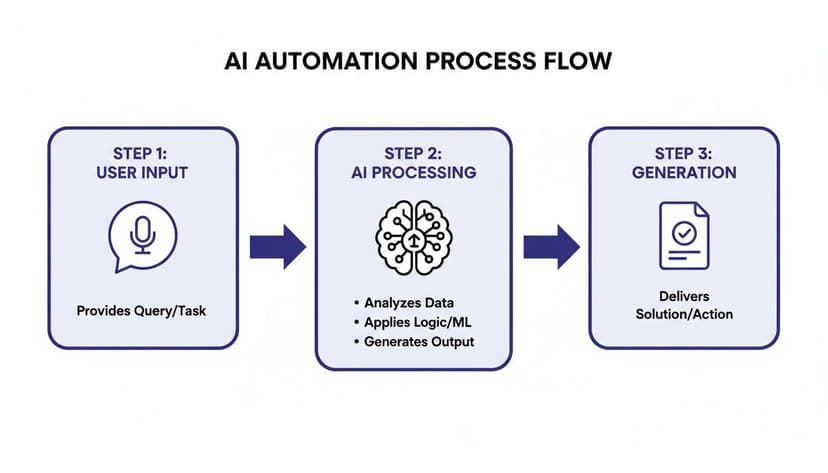
It’s about describing the destination, not mapping out every single turn.
From Hours of Clicks to a Single Prompt
Picture this: you have a spreadsheet filled with raw sales data. The old way involves a painful checklist of clicks, formulas, and formatting tweaks. Now, imagine just telling your AI assistant what you need.
You could give an AI agent a prompt like this:
"Take the raw sales data on this sheet and clean it up by removing all duplicates and blank rows. Then, create a pivot table summarizing total sales by region. After that, make a bar chart to show the regional sales, format the report to look professional, and write a quick summary of the main sales trends."
Without AI, that’s easily an hour of work, and that’s if you don’t hit any snags. With an AI agent, the entire 5-step workflow is done for you in minutes. Let's look at how it actually tackles each part of your request.
The 5-Step Automated Workflow in Action
- Data Cleaning: First, the AI zips through your data, instantly finding and deleting any duplicate entries and empty rows. This is a boring but crucial first step that ensures your analysis starts with clean, reliable information.
- Pivot Table Creation: Without you needing to drag and drop a single field, the agent reads the column headers, understands what "Sales" and "Region" are, and builds the perfect pivot table to summarize the numbers.
- Chart Generation: Using the new pivot table, the agent immediately generates a bar chart. It automatically picks the right data and chart type to clearly show the regional sales breakdown you asked for.
- Professional Formatting: Next comes the polish. The AI tidies everything up—adjusting column widths, bolding headers, and maybe even applying brand colors—to make the report look clean and ready to share.
- Insight Summary: Finally, the AI does something truly remarkable: it analyzes the report it just created. It looks at the numbers and trends, identifies the top-performing regions, and writes a short, easy-to-understand summary to give the data context.
This whole sequence is a perfect example of AI-driven workflow automation at its best, right inside Excel. You go from being the one doing all the clicking to the one directing the strategy.
It turns a task that used to take hours of frustrating work into something simple and efficient. If you want to explore the manual steps that AI can replace, our guide on how to create a report in Excel is a great place to start.
Your 4-Step Plan to Start Automating Workflows Today
Ready to stop wasting your day on mind-numbing, repetitive tasks? The good news is that getting started with workflow automation isn't some massive, complicated project. You can start small and make a real difference today.
This simple 4-step plan is all about building momentum. Let's walk through it.
1. Identify Your Time Sinks
First things first: you can't fix what you can't see. Before you automate a single thing, you have to figure out where your time is actually going.
For the next day or two, just be mindful as you work in Excel. What are the tasks that make you sigh? Is it the daily ritual of cleaning up messy data downloads? Or maybe it's building the same weekly pivot tables and reports from scratch. Jot down a quick list of these repetitive, boring jobs. These are your best starting points for automation.
2. Start Small and Win Big
I've seen so many people try to automate their entire job in one go. That's a recipe for failure. The real secret is to score a quick, meaningful win.
Look at the list you just made and pick one task. Just one. Make sure it's something highly repetitive but also fairly straightforward. If you can automate a process that saves you just 15 minutes every day, you've just given yourself back over an hour every single week. That first victory is what gives you the confidence and momentum to keep going.
A small win creates immediate value and demonstrates the power of automation firsthand. It’s better to perfectly automate one simple task than to get bogged down trying to solve everything at once.
3. Choose the Right Tool
Okay, you've got your target task. Now you need the right tool for the job. If you live in Excel, the best choice is a tool that works right alongside you, inside the spreadsheet.
Here’s what to look for:
- Ease of Use: You shouldn't have to learn a programming language. Modern tools like ElyxAI let you use plain English. You just describe what you need done, and it does it.
- Security: This is non-negotiable. Your financial or business data is sensitive. A privacy-first tool should be able to follow your instructions without your spreadsheet data ever having to leave your computer.
4. Measure and Scale Up
Once your first automated task is running, don't just forget about it. Pay attention to the impact. Did that 20-minute daily cleanup job just become a 20-second click? That's a powerful metric.
Use that success—that real, tangible time you've saved—to justify doing more. With that first win in your pocket, go back to your list of time sinks and pick your next target. By starting small and growing from there, you’ll gradually build a system that works for you, one automated process at a time.
3 Frequently Asked Questions About Workflow Automation
If you’re just starting to think about automation, you probably have a few questions. That's completely normal. Let's tackle some of the most common ones we hear, especially from people who live and breathe Excel.
1. Isn't Workflow Automation Expensive and Complicated?
I get it—the word "automation" can sound intimidating and expensive. For a long time, it was something reserved for huge companies with massive IT budgets and specialized consultants.
But that's just not the reality in 2026. The game has totally changed. Modern AI tools are built for regular business professionals, not just giant corporations. Many offer free trials or affordable monthly plans that deliver a return on your investment almost immediately, without needing a complex setup.
2. Do I Need Coding Skills to Automate My Work?
Absolutely not. This is probably the biggest myth out there, and it stops so many people from even trying. You don't need to know Python, VBA, or any other code.
The latest generation of automation tools works with plain English. If you can write an email explaining what you need done in a spreadsheet, you have all the technical skill required. You just type your instructions, and the AI agent gets to work. It’s that simple.
3. Is My Data Safe With Cloud-Based AI Tools?
This is an excellent and incredibly important question. Any trustworthy tool puts data security at the very top of its priority list.
Here’s how the best ones handle it: A tool like ElyxAI is built with a privacy-first architecture. It processes your instructions (the "what to do") in the cloud, but your actual spreadsheet file never leaves your computer. Your sensitive information stays right where it belongs—with you. All communication is protected with enterprise-grade encryption, and your data is never, ever stored or used for training.
Ready to stop wasting hours on manual Excel tasks? ElyxAI can act as your personal AI assistant, running entire workflows from a single sentence. Get started with a free trial today and reclaim your time.
Reading Excel tutorials to save time?
What if an AI did the work for you?
Describe what you need, Elyx executes it in Excel.
Sign up