What Is Data Enrichment? A Practical Guide for Excel Users

So, what exactly is data enrichment? Think of it as taking the raw, basic information you already have in an Excel spreadsheet and layering on valuable details from other sources. It’s the process of turning a simple dataset into a much richer, more complete, and genuinely useful resource for analysis and decision-making.
Imagine you have a basic customer list in an Excel sheet. It probably has names and email addresses. That’s a good start, but it’s a bit like a pencil sketch—you can see the outline, but you're missing the color and texture that bring the picture to life and make it useful.
Data enrichment is the process of adding that color. You take your existing data and merge it with information from external sources, adding layers of context that simply weren't there before. This isn't about piling on more data just for the sake of it. It's about strategically adding the right information to make your original Excel file smarter and far more powerful.
Spending too much time on Excel?
Elyx AI generates your formulas and automates your tasks in seconds.
Sign up →What's the Point of Data Enrichment in Excel?
At its core, the goal is to transform incomplete or bare-bones information into a comprehensive asset. For anyone working in Excel, this means turning a static spreadsheet into a dynamic tool that can actually drive smart decisions without hours of manual work.
Here's what that looks like in practice:
- Adding Critical Context: Instead of just a company name in a column, you can automatically add its industry, size, and location.
- Boosting Accuracy: It helps you verify and fix outdated information, like an old phone number or a previous address, ensuring your spreadsheet is reliable.
- Enabling Smarter Segmentation: You can build incredibly detailed customer profiles directly in Excel with AI, which allows for much more effective, targeted marketing and sales efforts.
- Powering Deeper Analytics: By layering demographic, firmographic, or geographic data over your existing records, you unlock insights you couldn't see before.
Let's look at a simple, practical example. Here’s how a standard customer list in Excel can be transformed through enrichment.
From Raw Data to Enriched Data
| Data Point | Before Enrichment (Raw Data) | After Enrichment (Enriched Data) |
|---|---|---|
| Contact Name | Jane Doe | Jane Doe |
| [email protected] | [email protected] | |
| Company Name | ABC Corp | ABC Corp |
| Job Title | null | VP of Marketing |
| Industry | null | SaaS (Software as a Service) |
| Company Size | null | 250-500 Employees |
| Location | null | San Francisco, CA |
| Annual Revenue | null | $50 Million |
See the difference? The "After" column gives you a complete picture, turning a simple contact in your spreadsheet into a qualified lead you can actually work with.
It's worth noting that data enrichment works best when you start with a solid foundation. Before you start adding new information, it's a good idea to understand the quality and structure of your current data through a process called data profiling. You can learn more about that in our guide on what is data profiling.
The demand for this kind of data enhancement is absolutely exploding. The global market for Data Enrichment solutions is growing fast as more businesses realize they need high-quality information to compete. The market was valued at around USD 1.5 billion in 2023 and is projected to skyrocket to USD 5.8 billion by 2032, which is a compound annual growth rate of 16.3%.
This isn't just a fleeting trend; it’s a clear signal that better data is becoming essential for modern business intelligence and analytics.
Why Data Enrichment Matters for Your Business
So, we've covered what data enrichment is. Now, let's get into the why. Why is this something your business absolutely needs to be doing, especially within a familiar tool like Excel?
The short answer is that enriched data helps you stop guessing and start making smart, strategic decisions. It’s the bridge between having a spreadsheet full of raw information and seeing real-world results. For anyone serious about wanting to master data-driven decision making, high-quality, enriched data is the foundation.

Driving Smarter Marketing Campaigns
For marketing teams, enrichment is a game-changer. It’s what powers truly personalized campaigns that actually connect with people.
Think about it. Imagine you have a customer list in Excel. With enrichment, that list goes from just names and emails to including valuable details like job titles, industries, and even personal interests.
This extra context lets you slice and dice your audience with surgical precision. You can craft a specific message for marketing managers in the tech world or create a special offer just for customers in a certain city. That kind of personal touch leads to way higher engagement and a much better return on every dollar you spend.
Key Takeaway: Enriched data helps you talk to your audience about what they actually care about. It turns generic blasts into meaningful conversations that build real loyalty and drive sales.
Empowering Sales and Lead Generation
Sales teams also see a huge lift from enriched data, especially when it comes to lead scoring. Instead of chasing down every single lead with the same energy, enrichment helps pinpoint the prospects who are genuinely a good fit and ready to buy.
For instance, you could take a B2B leads list in Excel and add firmographic data—things like company size, annual revenue, or the software they already use. Suddenly, your sales reps know exactly who to prioritize. They can focus their valuable time on leads that perfectly match your ideal customer profile, making their outreach far more effective.
The impact on the bottom line is very real. The global market for data enrichment solutions was valued at USD 2.37 billion in 2023 and is expected to hit USD 4.58 billion by 2030. In the B2B world, enriched lead data has been shown to boost conversion rates by an impressive 20-30%.
Of course, none of this works if the data you're adding is junk. The quality of the information you bring in is everything. To make sure your efforts pay off, it’s essential to have some ground rules. You can learn more by checking out our guide on data quality best practices.
At the end of the day, investing in data enrichment isn't just about collecting more information—it's about generating more revenue.
Common Data Enrichment Methods You Can Use
Alright, we've covered the "what" and "why" of data enrichment. Now for the fun part: the "how." There are a few different ways to beef up your data, from old-school manual techniques many of us know from Excel to slick, automated solutions. The best approach really just depends on the size of your project and what kind of information you're after.
Starting with the Basics in Excel
For many, the data enrichment journey starts right inside a spreadsheet. These hands-on methods are perfect for smaller datasets or one-off tasks where you already have the information you need, just split across different files.
- Manual Lookups: This is the most basic approach—literally just searching for information online and typing it into your spreadsheet. It works for a handful of records, but it’s painfully slow and a recipe for typos and other human errors.
- Using VLOOKUP or XLOOKUP: A classic for a reason. If you have two different spreadsheets—maybe one with customer names and another with their company info—you can use functions like
VLOOKUPto pull them together. It works by matching a common piece of data, like an email address, to merge the two lists. Simple, but effective for combining data you already possess.
The general workflow, from gathering your raw data to having a final, enriched dataset, follows a pretty clear path.
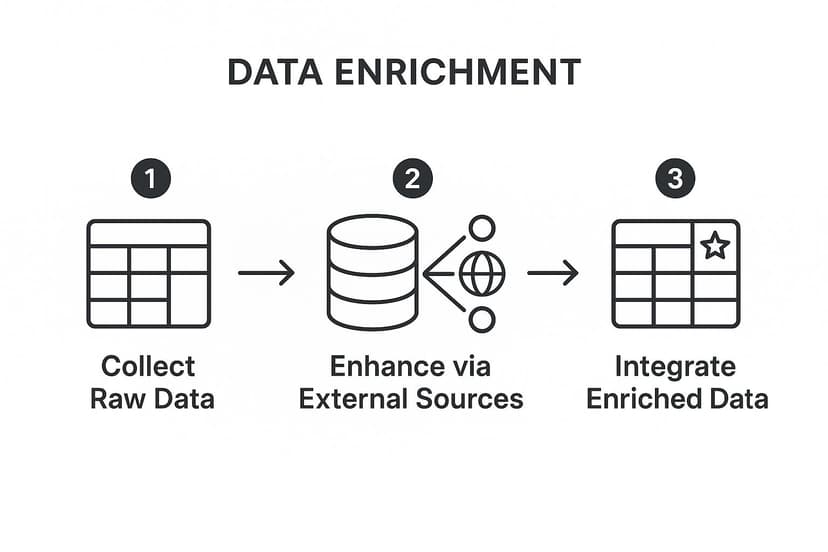
As you can see, the core idea is to take your starting data, enhance it with outside info, and then bring it all back together in a much more useful form.
Stepping Up to Automated Enrichment
Manual methods are great, but they hit a wall pretty fast. When you're dealing with larger datasets or need to enrich data regularly, automation is the only way to go. These techniques lean on external data sources and specialized tools to add new information systematically.
Automated enrichment comes in a few different flavors, each adding a unique type of value to your records.
The point of automation isn't just about speed. It’s about getting data that is consistent, accurate, and truly useful without chaining someone to a keyboard for hours on end.
Let’s break down the most common types:
- Geographic Enrichment: This is all about adding location data. You could start with a list of zip codes in an Excel column and automatically add the city, state, or country for each one. It's a must-have for planning regional marketing campaigns or sorting out logistics.
- Demographic Enrichment: This process adds personal details to a contact list, like age brackets, income levels, or family status. B2C businesses live by this stuff, using it to build out detailed customer profiles and sharpen their marketing messages.
- Firmographic Enrichment: Think of this as the B2B version of demographics. It adds company-specific information to your data. You can take a simple list of company names and flesh it out with their industry, employee count, or annual revenue. For sales teams, this is pure gold for qualifying leads.
Where Does All This Data Come From?
So, how do these tools magically find all this extra information? The secret lies with third-party data providers and their APIs (Application Programming Interfaces).
Imagine these providers as giant, specialized libraries. They spend their time collecting, cleaning, and organizing huge amounts of public and private data. An API, then, is like the librarian. It lets your software—whether it's a custom-built app or an AI tool inside Excel—request a specific piece of information and get a neat, structured answer back.
When you use an enrichment tool, it’s essentially sending your raw data (like a name or email) to an API, which then finds and returns all the extra details you asked for.
Automating Data Enrichment in Excel with AI
Let's be honest, manual methods and clunky formulas like VLOOKUP just don't cut it for enriching data from external sources. They have their place, but if you're serious about getting the most out of your data, the real game-changer is bringing AI right into Excel to automate the whole process. This is where you leave the tedious, mind-numbing work of manual lookups behind and step into a world of speed and accuracy.
Modern AI tools, like our own Elyx.AI, are designed to plug directly into your Excel ribbon. It essentially turns your familiar spreadsheet into a much smarter, more dynamic workspace. Forget wrestling with complex formulas or spending hours copying and pasting info from Google searches. Now, you can enrich your data in seconds with simple, plain-English commands.
This isn't just a niche trend; it's a massive shift. The market for AI-powered data enrichment was already valued at around $2.5 billion in 2020 and is expected to rocket to nearly $5 billion by 2025. That's not just growth; it's an explosion, showing just how much businesses are counting on AI to pull in external information and make their data better. You can see more on how businesses are unlocking their potential through data enrichment automation.
How AI Actually Works in Excel
Using an AI assistant inside Excel completely flattens the learning curve for data enrichment. You no longer need to be a formula guru or a data scientist to build a rich, complete dataset. The whole process becomes as easy as having a conversation.
Imagine you have a list of company names in Column A of your spreadsheet. The old way? Hours of soul-crushing work finding their industry, employee count, and website. With an AI tool, it’s a completely different story.
Here’s a practical, actionable example:
- Select Your Data: Just highlight the column with the company names you want to know more about.
- Give a Simple Command: Open the AI tool and type a straightforward request, like: "Find the industry, employee count, and website for these companies and put the results in the next three columns."
- Let the AI Do the Heavy Lifting: The tool immediately taps into vast online data sources to find exactly what you asked for, company by company.
- Watch the Magic Happen: In seconds, new columns appear in your spreadsheet, all neatly filled with clean, accurate data.
This screenshot shows you exactly what that looks like with Elyx.AI right inside an Excel sheet.

As you can see, a simple prompt is all it takes for the AI to populate the columns next to it with firmographic data. What was a basic list is now a detailed B2B lead sheet, ready for action.
The Real Payoff of AI-Powered Enrichment
The most obvious win here is the incredible amount of time you get back. A task that used to eat up an entire afternoon can now be finished before your coffee gets cold. This frees up your team to focus on what actually matters—digging into the data for insights and making smart decisions, not just collecting it.
By automating the repetitive, low-value work of data gathering, AI empowers you to operate at a higher level. It handles the "how" so you can focus on the "why" and "what's next."
And it’s not just for company info. You can use the exact same approach for all sorts of tasks, whether you're adding demographic details to a customer list or finding geographic coordinates for a list of addresses. The possibilities are huge. To see just how deep this goes, check out our guide on how AI is transforming Excel workflows. This move from manual grunt work to intelligent automation is, without a doubt, the future of working with data in Excel.
Best Practices for Successful Data Enrichment
Adding more data to your spreadsheets is one thing; adding the right data in the right way is what separates a messy file from a powerful business asset. To get real value from data enrichment, you need a smart approach. A few core practices can make all the difference, ensuring your efforts are effective, compliant, and built to last.
Think of it like building a house. You wouldn't just start throwing bricks and wood together. You need a blueprint first—a clear plan of what you're trying to achieve.
Define Your Goals Upfront
Before you pull in a single new piece of information, stop and ask a simple question: "What problem am I actually trying to solve?" The answer will tell you exactly what kind of data you need.
- For Sales: Is the goal to improve lead scoring? If so, you’ll want to hunt for firmographic data like company size, industry, and annual revenue.
- For Marketing: Trying to create more personal campaigns? Then you’ll focus on demographic details like age, location, or known interests.
Without a clear objective, you risk drowning in a sea of irrelevant information that just adds noise to your Excel sheets. A well-defined goal is your compass, guiding every step of the enrichment process.
Prioritize Data Quality and Source Vetting
The quality of your final dataset is only as good as the sources you pull from. Honestly, adding inaccurate or outdated information is worse than adding nothing at all—it just leads to bad analysis and even worse decisions.
That’s why it’s so important to vet your data providers carefully. Look for sources that are upfront about how they collect and verify their information. For example, if you're enriching B2B contacts, a provider that regularly verifies work emails and LinkedIn profiles is going to give you much more reliable results.
A good rule of thumb: treat all external data with a bit of healthy skepticism. Always test a small sample of your data first to see how accurate the provider is before you commit to a huge project.
This little bit of due diligence upfront can save you from polluting your clean data and prevent massive cleanup headaches down the road.
Maintain Governance and Compliance
Once your data is enriched, the job isn't done. You need a plan to manage it over the long haul. This is where data governance comes in—it’s simply the set of rules you create to keep your data consistent, secure, and accurate.
On top of that, you have to handle personal information responsibly. Regulations like GDPR (General Data Protection Regulation) have very strict rules about how you collect, store, and use customer data. Getting this wrong can lead to hefty fines and serious damage to your company's reputation. Always make sure your enrichment practices respect privacy and follow the law.
Finally, remember that data gets old. People change jobs, companies relocate, and information goes stale. Plan for regular updates to refresh your data and fight this natural decay. It’s the only way to keep your insights relevant and trustworthy.
Answering Your Top Data Enrichment Questions
As you start to wrap your head around data enrichment, a few practical questions always pop up. Getting clear on the answers will help you use these techniques with confidence and sidestep some common mistakes.
Let's dive into the questions we hear most often.
What Is the Difference Between Data Cleaning and Data Enrichment?
This is a great question, and the distinction is crucial. Think of data cleaning as tidying up the data you already have in your spreadsheet. You're fixing typos, removing duplicates, and standardizing formats. It’s all about creating consistency and accuracy within your existing dataset.
Data enrichment, on the other hand, is like adding new, valuable columns to that freshly cleaned spreadsheet. You’re bringing in brand-new information from outside sources to make your original data more valuable and insightful.
Key Takeaway: They're a team. You always want to clean your data first to build a solid foundation. Then, you enrich it to add new layers of value.
How Often Should I Enrich My Data?
The short answer is: it depends. The right frequency comes down to how quickly your data goes stale.
A few common scenarios might help you figure out your own rhythm:
- Fast-Moving Data: Think about B2B contact lists. People change jobs, get new phone numbers, and move to new companies all the time. This kind of data decays quickly, so you’ll want to enrich it often—maybe monthly or even quarterly.
- Slow-Moving Data: Things like geographic information (cities, zip codes) or historical company data don't change much. For this stuff, a one-time enrichment or a quick annual refresh is usually all you need.
Can Data Enrichment Be Done for Free?
Yes, you absolutely can enrich data for free, but it's a classic case of "you get what you pay for." You could manually search for information online or pull from public government databases to fill in the gaps in your spreadsheets.
The catch is that doing it manually takes an enormous amount of time and is filled with opportunities for human error. It just doesn't scale. Once you're dealing with more than a few dozen records, it becomes a nightmare.
This is why most businesses invest in paid tools or data providers. The time you save and the accuracy you gain from high-quality data almost always delivers a fantastic return on that investment.
Ready to stop wasting time on manual data tasks and start unlocking deeper insights? Elyx.AI integrates directly into your Excel workflow, allowing you to clean, enrich, and analyze your data with simple, conversational commands. Try it today and see how easy data enrichment can be.
Start your free trial of Elyx.AI now
Reading Excel tutorials to save time?
What if an AI did the work for you?
Describe what you need, Elyx executes it in Excel.
Sign up