A Practical Guide to Operational Cost Reduction with Excel and AI

When managers hear "cost reduction," they often think of drastic, painful cuts. But operational cost reduction isn't about slashing budgets in a panic. It's a strategic approach to lowering business expenses by making your processes more efficient, starting with the tools you already use, like Excel.
This guide isn't about short-sighted decisions that might hurt you later. Instead, it’s about providing actionable steps and real-world examples to make sustainable changes. The goal is for you to leave with practical skills to build a more profitable and resilient company by mastering your operational data in Excel.
What Operational Cost Reduction Really Means

Spending too much time on Excel?
Elyx AI generates your formulas and automates your tasks in seconds.
Sign up →Think of operational cost reduction not as a crash diet for your business, but as a strategic fitness plan. You're not starving the company of essential resources. You're building a leaner, stronger, and more agile organization by improving how work gets done. It's a continuous effort to get your company's engine running at peak performance.
The goal is to move beyond simple expense-slashing and create lasting value that supports growth. It’s about challenging old habits and discovering smarter, data-driven ways to operate.
Beyond Simple Budget Cuts
True operational cost reduction is methodical. It means digging into the "how" and "why" behind your spending using data, not just reacting to the final numbers on a report. The difference is in the approach:
- Reactive Cost Cutting: This is the knee-jerk reaction. Think freezing all travel or putting off equipment upgrades. It might provide a quick cash boost, but it often stifles long-term productivity and morale.
- Strategic Cost Reduction: This is a proactive, long-term game plan. It involves improving workflows with data analysis, adopting better technology, renegotiating supplier contracts, and eliminating waste at its source. The savings aren't a one-time fluke; they're a permanent improvement.
This strategic mindset is about re-engineering your processes to lock in efficiency. The idea is to lower your baseline operating costs for good, without ever compromising the quality of your products, services, or customer experience.
A Practical Example in Excel
Let's picture a small manufacturing business concerned about its soaring utility bills. The reactive move? Just turn down the heat. A strategic approach, on the other hand, starts with data in Excel.
The operations manager can create a simple Excel sheet to track hourly energy usage against production output. After just a few weeks of logging this data, they might use a simple formula or chart to find that a few key machines consume significant power even when idle between production runs.
Actionable Tip: To perform this analysis in Excel:
- Create columns for
Date,Time,Machine_ID,Energy_Usage (kWh), andProduction_Status(e.g., "Running," "Idle"). - After collecting data, use Excel's
SUMIFfunction to calculate the total energy consumed during "Idle" periods:=SUMIF(E2:E100, "Idle", D2:D100). - Visualize the data with a Bar Chart to compare energy usage across different machines and statuses, making the inefficiency impossible to ignore.
This straightforward analysis, done with a tool they already own, shines a light on a hidden inefficiency. The fix isn't temporary; it's a new standard procedure to power down specific equipment during scheduled breaks. This one small change, born from simple data analysis in Excel, creates immediate and ongoing savings.
If you're looking for a wider view on the topic, a guide to strategic reduction in costs offers a great primer on the core principles. As you get deeper, knowing how to measure your success is key; you can explore the most important operational efficiency metrics in our other article.
Pinpointing Where to Reduce Operational Costs

Before you can reduce operational costs, you have to know exactly where your money is going. The best place to start is with an operational audit, which is simply a methodical review of all your expenses. For this, your best friend is Excel. It’s perfect for organizing your spending data and making the numbers tell their story.
Creating Your Financial Snapshot in Excel
First, pull together all your expense data from the last six to twelve months from your accounting software, bank statements, and company credit cards. The goal is to get every single payment into one comprehensive Excel sheet.
With all your raw data in one place, the real work begins: categorization. This step is absolutely critical because it’s how you’ll spot patterns and outliers.
Set up your spreadsheet with these key columns:
- Date: When the money was spent.
- Vendor/Supplier: Who you paid.
- Description: A quick note on what it was for.
- Amount: The total cost.
- Category: A broad bucket for the expense (e.g., Software, Utilities, Marketing).
- Sub-Category: A more granular label (e.g., CRM Software, Electricity, Social Media Ads).
This simple structure turns a messy list of transactions into an organized database. The more detailed your categories, the more insights you'll uncover.
Uncovering Insights with Pivot Tables
Once your data is clean and categorized, it's time to use one of Excel’s most powerful features: Pivot Tables. A pivot table lets you slice, dice, and summarize huge amounts of data in seconds, without changing your original worksheet.
Actionable Tip: To create a Pivot Table in Excel:
- Select your entire data table (including headers).
- Go to the
Inserttab and clickPivotTable. - In the PivotTable Fields pane, drag
Categoryto theRowsbox andAmountto theValuesbox. - Instantly, you'll see your total spending summarized by category. You can then add
Sub-Categoryto drill down further or dragVendor/Supplierinto theFiltersbox to analyze spending with specific partners.
Considering that poor data quality costs organizations an average of $12.9 million a year, getting this clear financial picture is a must.
Using a pivot table is the difference between just collecting numbers and actually understanding them. It’s where you start to find the inefficiencies that hide in plain sight during the day-to-day grind.
A Retail Business Supply Chain Example
Let's imagine a mid-sized retail business trying to get a handle on its supply chain costs. The operations manager pulls a year's worth of logistics data into Excel—shipping invoices, warehouse fees, and last-mile delivery charges from several different carriers.
By creating a pivot table, they can filter spending by carrier, shipping route, and package weight. Almost immediately, a glaring inefficiency jumps out. While their main national carrier is cheapest for large, cross-country shipments, a smaller regional courier is much more affordable for local deliveries. The problem? Out of sheer habit, the company was using the expensive national carrier for 90% of all its shipments.
This simple analysis in Excel uncovered a massive opportunity. By shifting all local deliveries to the regional provider, the business could cut its annual shipping budget by 15%. This is a perfect example of how organizing data in a familiar tool can lead to real, actionable savings that were previously invisible.
Using AI in Excel to Improve Supply Chain Efficiency
The supply chain is one of the most complex parts of any business and a goldmine for operational cost reduction. For years, tapping into these savings required specialized software and data scientists. Not anymore. Today, modern AI tools built directly into Excel put powerful optimization capabilities into everyone's hands.
This means you can start untangling your logistics without ever leaving your spreadsheet. It demystifies artificial intelligence and turns it into a practical, everyday tool for solving real business challenges.
The impact is clear: companies that adopt AI in their supply chain management are seeing logistics costs drop by 15%, inventory levels fall by 35%, and service efficiency improve by 65%. These aren't just small tweaks; AI and automation are fundamentally changing how businesses manage operational costs.
Harnessing AI for Smarter Demand Forecasting
One of the biggest money pits in any supply chain is the mismatch between supply and demand. Overstocking ties up cash in products collecting dust, while understocking leads to lost sales and frustrated customers. AI in Excel helps you find the sweet spot with more accurate demand forecasting.
Instead of just looking at last year's numbers, AI algorithms can analyze years of sales data in seconds, spotting complex patterns, seasonal shifts, and emerging trends that are easy for a human to miss.
Actionable Tip:
- Prepare your data: Organize your historical sales data in an Excel table with columns for
DateandSales_Volume. - Use an AI feature: With an AI tool like Copilot in Microsoft 365 or an add-in like Elyx.AI, you can use a simple prompt like: "Forecast sales for the next 3 months based on this data, and identify any seasonal trends."
- Get your forecast: The AI instantly generates a forecast, often with charts and confidence intervals, showing what to expect.
This simple process helps you move from educated guesses to data-backed decisions, ensuring you order the right amount of stock at the right time.
From Reactive Repairs to Predictive Maintenance
Unexpected equipment breakdowns are another huge drain on resources, leading to expensive delays and emergency repair bills. AI helps you shift from a reactive "fix-it-when-it-breaks" model to a proactive one known as predictive maintenance.
You can feed equipment data—like run times, error logs, and sensor readings—into an AI model right inside Excel. The AI learns to spot the subtle warning signs that signal a machine is about to fail, giving you a heads-up to schedule maintenance during planned downtime, long before a costly failure occurs.
This animation shows just how intuitive this can be. A simple, plain-English prompt is all it takes for an AI assistant in Excel to analyze and visualize complex data on the fly.
It's a perfect example of how asking simple questions can unlock deep insights, turning rows of numbers into a clear plan for cutting costs.
Optimizing Logistics and Shipping Costs
Getting your products from point A to point B is a major expense. AI in Excel can help you find big savings here, too. By analyzing your shipping data, you can pinpoint the most cost-effective routes, carriers, and even packaging methods for different products and destinations.
AI doesn't just find the cheapest carrier. It weighs all the variables—delivery speed, reliability, fuel costs—to find the truly optimal choice. This holistic view ensures you aren't trading service quality for short-term savings.
A smart way to boost this internal analysis is by using external freight rate comparison tools, which help you find the most economical transport options on the market. Of course, you need to know what you're measuring; for a deeper dive, check out our guide on essential supply chain metrics. When you combine your own AI-driven analysis with the right external tools, you build a powerful, continuous system for keeping logistics costs low.
Implementing Shared Services to Streamline Workflows
Centralizing common business functions is a surprisingly powerful way to cut operational costs, especially for companies with multiple departments. This strategy is called the shared services model, and it's all about consolidating back-office tasks—like human resources, IT support, and accounting—into a single, super-efficient unit.
Think of it like this: imagine a large apartment building where every tenant has their own small, rarely-used washing machine. Now, picture a professional-grade shared laundry room available to everyone. The shared model eliminates duplicated effort, reduces waste, and lets everyone benefit from better equipment at a lower cost.
What Shared Services Look Like in Practice
The goal is simple: stop doing the same administrative work over and over in different parts of the business. Instead of each department managing its own hiring, payroll, and IT help desk, one specialized team handles it for everyone.
This approach doesn't just cut down on redundant staff. It also standardizes processes, which means fewer mistakes and more consistency across the company. Over time, this centralized unit becomes a true center of excellence, getting better and more efficient at what it does.
The shared services model turns necessary but non-core business functions from scattered cost centers into a streamlined, strategic asset. It standardizes quality, improves service delivery, and drives significant operational cost reduction.
The infographic below shows how AI can achieve similar savings in the supply chain by centralizing forecasting and maintenance. This mirrors the efficiency you gain from a shared services model.
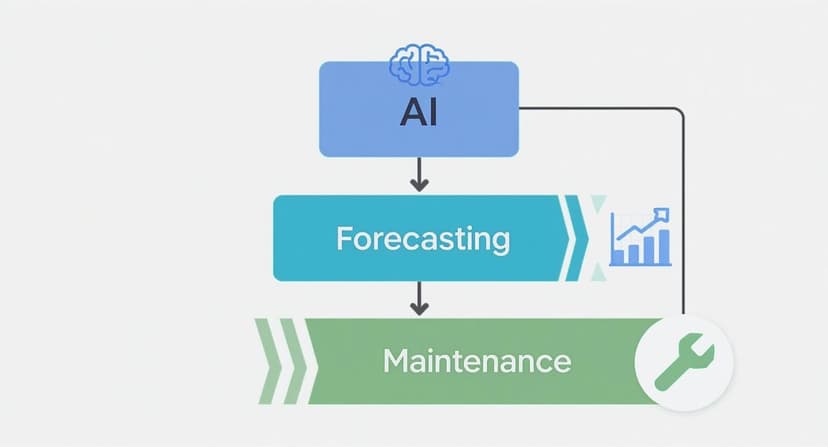
Whether it's an AI platform or a human team, centralizing intelligence and function is the key to a more efficient operation.
Adapting the Model for Any Business Size
You don't have to be a Fortune 500 company to make this work. Even small businesses can apply shared services principles to reduce operational costs. It could be as simple as having one person handle all purchasing to negotiate better deals with suppliers.
Another easy win is streamlining administrative tasks. Rather than letting every team member handle their own expense reports and invoices differently, you can create a single, standardized process. Technology is a huge help here. You can learn more in our guide on automated invoice processing to see how centralizing just this one task can save significant time and money.
When applied on a larger scale, the results can be impressive. General Electric famously cut its finance costs by over $500 million by consolidating its financial operations. Procter & Gamble saved a staggering $900 million in five years by moving its administrative functions into a Global Business Services unit. These huge wins show the massive potential of centralization, offering lessons that any business can scale down to fit its own needs.
Common Cost Reduction Mistakes to Avoid
When you set out to lower operational costs, you're walking a fine line. On one hand, you want a leaner, more profitable business. On the other, making aggressive or poorly planned cuts can cause significant damage. This isn't about short-term panic; it's about making smart, strategic moves.
The single biggest mistake is treating cost reduction like a one-time, slash-and-burn exercise. Real, lasting success comes from thoughtful changes that actually make the company stronger. Avoiding common pitfalls is just as crucial as spotting opportunities to save.
Mistake #1: Neglecting Your People
Too often, major changes are made behind closed doors. When employees are kept in the dark or see coworkers let go without explanation, fear and anxiety take over. That anxiety is a productivity killer and a surefire way to send your best people looking for other jobs.
A lack of transparency breeds mistrust. If your team doesn't understand why changes are happening, they’ll naturally assume the worst. This leads to disengagement and resistance, which undermines the very efficiency you were trying to create.
How to get it right:
- Be Open and Honest: Explain the business reasons behind the cost-saving efforts and what you're aiming to achieve.
- Involve Your Team: Your frontline employees know the daily processes better than anyone. Ask for their ideas on how to be more efficient.
- Celebrate Wins: When a team helps implement a successful change, acknowledge it. This keeps everyone motivated and feeling like part of the solution.
Mistake #2: Making Cuts in the Wrong Places
Not all expenses are created equal. It’s a classic mistake to apply the same percentage cut across every department without considering what each one contributes. Slashing the sales or customer support budget might look good for a quarter, but it can destroy customer loyalty and your revenue pipeline.
The same goes for skimping on quality control or product development. Those moves might save you a little now, but they lead to inferior products and a tarnished brand reputation. It’s a short-sighted trade-off, sacrificing long-term health for a quick financial fix.
The best cost reduction strategies are surgical, not blunt. They focus on trimming true waste from non-critical areas while protecting—or even boosting—investment in the things that drive growth and keep customers happy.
Actually putting these plans into action is tough. A recent survey showed that most companies only achieve 48% of their cost reduction goals, often because of implementation problems and internal pushback. For a deeper look into these challenges, you can explore the insights on navigating corporate restructuring at Ainvest.com.
Mistake #3: Forgetting to Reinvest the Savings
The final mistake is treating every dollar you save as pure profit to be tucked away. While improving the bottom line is great, failing to reinvest some of those savings back into the business is a massive missed opportunity. This is the step that turns cost reduction from a defensive play into a powerful engine for growth.
Strategic reinvestment is what helps your business not just survive, but thrive. It gives you the capital to fund the very initiatives that will keep you competitive for years to come.
Think about putting those saved funds toward:
- Better Technology: Invest in new software or equipment that makes your team even more efficient.
- Employee Training: Upskill your people so they can adapt to new, smarter ways of working.
- Innovation and R&D: Fuel the creation of the next great product or service that will drive your future revenue.
By sidestepping these common errors, you can ensure your cost-saving efforts build a stronger, more resilient company for the long haul.
Got Questions About Cutting Operational Costs?
When you start digging into an operational cost reduction strategy, a lot of questions pop up. It's totally normal. Getting the right answers is what turns a simple cost-cutting exercise into a real plan that strengthens your business for the long haul. Let's tackle some of the most common ones we hear.
Is This Just Another Term for Cost Cutting?
That's a great question, and the answer is no. They're fundamentally different.
Cost cutting is usually a quick reaction to a problem, like slapping a band-aid on a bigger issue. Think of a sudden hiring freeze or slashing the marketing budget overnight. It can stop the bleeding, but it often comes at a cost to morale, quality, or future growth.
Operational cost reduction, on the other hand, is a proactive and strategic game plan. It’s about making your entire operation more efficient from the ground up—rethinking workflows, using better technology, and eliminating waste. The goal is to lower your core operating expenses without hurting what you deliver to your customers.
How Can a Small Business Do This Without a Big Budget?
You don't need a massive budget to get started. In fact, some of the most effective changes cost little to nothing.
The best place to begin is with what you already have. Fire up a spreadsheet and do a deep dive into your expenses to see where every dollar is really going.
From there, look for the low-hanging fruit:
- Pick up the phone and try renegotiating contracts with your current suppliers. You’d be surprised what a simple conversation can achieve.
- Do a software audit. Are you paying for three tools that do the same thing? Cut the redundant ones.
- Start small with automation. You can use built-in Excel functions or affordable AI add-ins to handle simple, repetitive tasks that eat up your team's time.
The secret is to start small, measure the results, and then roll the savings into your next efficiency project. It creates a self-funding cycle of continuous improvement.
How Often Should We Be Looking at Our Costs?
Think of it less like a once-a-year spring cleaning and more like a regular health check-up.
While a major, in-depth review might happen once or twice a year, you should be keeping an eye on your key cost metrics every single month, or at least quarterly.
This constant monitoring keeps you nimble. You can spot small problems before they become big headaches and adjust your strategy as the market changes. It’s about making smart cost management a core part of how you do business, not just a project you dust off when times get tough.
Ready to turn your Excel data into real-world savings? Elyx.AI puts powerful AI right inside your spreadsheets. It helps you analyze expenses, forecast demand, and find those hidden inefficiencies, all with simple, natural language. Start making smarter, data-driven decisions today.
Reading Excel tutorials to save time?
What if an AI did the work for you?
Describe what you need, Elyx executes it in Excel.
Sign up