Mastering Decision Making Frameworks: A Practical Guide for Excel Users

Ever feel like you're staring at a tough choice, lost in a fog of spreadsheet data with no clear direction? That's where decision-making frameworks come in. They're like a toolkit for clearing your head, giving you a structured way to cut through the noise of too much information and unreliable gut feelings, especially when working in tools like Excel with AI.
Think of them less like rigid rules and more like flexible blueprints that organize your analysis in a spreadsheet and light up the best path forward.
Why Decision Making Frameworks Are Essential in Excel
In a world that moves at a breakneck pace, having a structured way to solve problems isn't just a nice-to-have; it's a critical skill for any professional using Excel. Trying to make a call without a clear process often ends in "analysis paralysis"—you get so bogged down by options and data that you just… freeze. This is exactly where a framework proves its worth. It breaks down overwhelming challenges into a series of manageable, logical steps that you can model and track in a spreadsheet.
Spending too much time on Excel?
Elyx AI generates your formulas and automates your tasks in seconds.
Sign up →When you evaluate a situation systematically, you sidestep the mental shortcuts, or cognitive biases, that can lead you astray. For instance, confirmation bias can trick you into only looking for information that backs up your gut feeling. A solid framework forces you to look at the other side of the coin, too. It’s no surprise that studies show bad decisions happen just about as often as good ones in many organizations, which really underscores the need for a more reliable, data-driven process.
Boosting Confidence and Improving Outcomes with Data
Using a decision-making framework does more than just improve the quality of your choices—it builds your confidence in them. When you know you've followed a logical and thorough process within a tool like Excel, you can stand behind your final call with conviction, even if the result isn't perfect. This kind of structured approach brings a clarity and defensibility that's crucial, whether you're in the boardroom or your living room.
Here’s a quick look at how frameworks lead to better results:
- They provide structure: A framework is your roadmap. It keeps you from getting lost in the weeds and helps you focus your energy on what actually matters.
- They reduce emotional influence: By leaning on objective criteria and data within a spreadsheet, frameworks help keep stress, anxiety, or gut-level excitement from clouding your judgment.
- They enhance team alignment: In a group, a shared framework gets everyone on the same page. You're all speaking the same language and pulling in the same direction, which ties directly into modern business intelligence best practices that champion clear, data-driven teamwork.
Ultimately, a decision-making framework is a tool for thinking. It doesn't make the decision for you, but it equips you to make the best possible choice with the information you have.
By making these powerful tools a part of your process, you can navigate uncertainty with more skill and start achieving more consistent, successful outcomes.
For as long as we can remember, big decisions were made based on gut feelings, past experiences, and who was in charge. It worked for a long time, but as the world got more interconnected and complicated, that approach started to show its cracks. We needed something more reliable.
This shift from pure instinct to structured analysis wasn't just a small change; it was a fundamental rethinking of how we solve problems. The goal was to move decision-making from an art form, subject to the whims of the moment, to something closer to a science.
The Rise of Rational Thinking
One of the first big steps forward was trying to apply the logic of mathematics to the unpredictability of human choice. A major moment came in 1944 when John von Neumann and Oskar Morgenstern laid out their expected utility theory. It was a formal, mathematical way to think about making decisions when you don't know the outcome, treating the person making the choice like a logical, risk-calculating computer. You can read more about the evolution of decision theory to see how these ideas developed.
What made this model so powerful was its ability to put a number on potential outcomes. This meant you could directly compare different choices. The theory worked on a simple assumption: a rational person will always pick the option that offers the highest "expected utility"—the biggest potential payoff.
Expected Utility Theory is like a classic balancing scale. On one side, you have the potential rewards of a choice. On the other, you have the odds of actually getting those rewards. The theory says we'll always go with the side that tilts the scale in our favor.
This infographic captures the journey from these purely rational models to ones that factor in the messiness of human psychology.
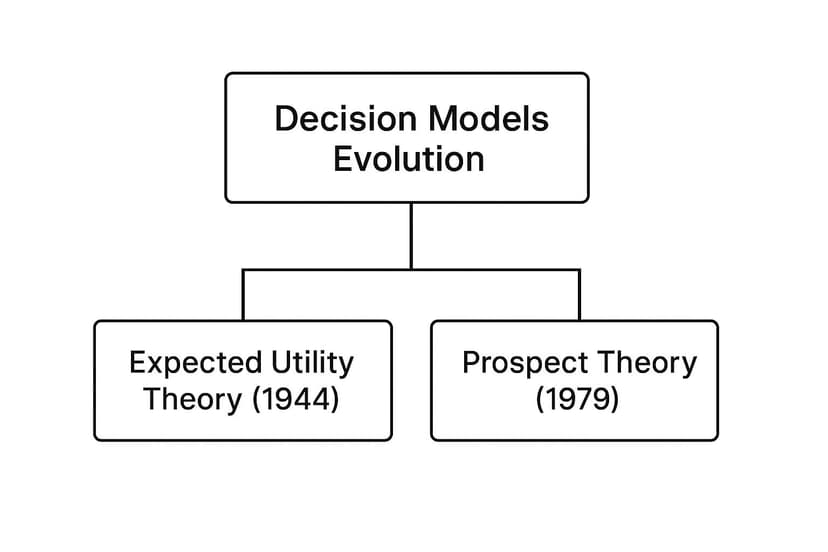
You can see a clear turning point in the diagram, where the strict mathematical logic of Expected Utility Theory gives way to the more realistic, psychology-based model of Prospect Theory.
Accepting Our Human Side
Expected utility theory was neat and tidy, but it ran into one major snag: people aren't always neat and tidy. Researchers started noticing that real-world choices were often shaped by emotions, biases, and mental shortcuts. This realization kicked off a new wave of thinking that mixed psychology with economics.
Daniel Kahneman and Amos Tversky were at the forefront of this movement. In 1979, they introduced prospect theory, and it completely changed the game by explaining why our choices often seem illogical.
They pointed out a few key human quirks:
- Loss Aversion: We feel the sting of a loss about twice as much as the joy of an equal gain. It’s why we’re often overly cautious, even when taking a risk might lead to a better outcome.
- Warped Probabilities: We're not great at judging odds off the cuff. We tend to get overly excited about small chances (like winning the lottery) and downplay high probabilities, which skews how we see risk.
- Reference Points: We don't make decisions in a vacuum. How we feel about an outcome depends entirely on our starting point, or "reference point." A $100 bonus feels very different if you were expecting $50 versus if you were expecting $200.
These weren't just interesting observations; they were revolutionary. They proved that a useful decision making framework couldn't be all about the numbers. It had to account for the predictable, often irrational, ways our minds work. This blend of structured logic and psychological insight is what makes today’s frameworks so effective. They give us a clear path to follow while making room for the human element that ultimately drives every choice we make.
Exploring Essential Decision Making Frameworks in Excel
Now that we have a sense of how decision models came to be, let's get our hands on the tools themselves. It's best to think of decision making frameworks not as rigid, one-size-fits-all formulas, but as a set of lenses. Each one is designed to bring a different kind of problem into sharp focus, and picking the right one is all about knowing what you need to see more clearly.
You wouldn't use a sledgehammer to hang a picture frame, right? In the same way, you shouldn't apply a heavy-duty strategic framework to a simple daily task. Let's walk through four of the most reliable frameworks—each easily implemented in Excel—to help you match the right tool to your next big decision.
The Eisenhower Matrix: Taming Your To-Do List in Excel
Feeling buried under a mountain of tasks? The Eisenhower Matrix is your go-to for cutting through the noise. Popularized by Dwight D. Eisenhower, this simple grid forces you to sort tasks by both their urgency and their importance. You can easily build this in Excel using four cells to represent the quadrants.
Think of it as a personal project manager for your brain. Instead of just reacting to whatever feels most urgent, it helps you step back and focus on what actually moves the needle on your long-term goals.
It’s all about dividing your to-do list into four quadrants:
- Urgent & Important (Do First): These are the fires you have to put out now. Think of a critical project deadline or a major client issue that just blew up.
- Important & Not Urgent (Schedule): This is where real growth happens. It’s for long-term planning, relationship building, and learning new skills—the stuff that's easy to push off but vital for future success.
- Urgent & Not Important (Delegate): These are the interruptions that masquerade as priorities. Answering certain emails, sitting in on meetings where you aren't a key player—if it doesn’t align with your goals, hand it off.
- Not Urgent & Not Important (Delete): This quadrant is for the time-wasters. Mindless scrolling, busywork—anything that offers zero real value needs to go.
The real magic happens when you start living in Quadrant 2 (Important & Not Urgent). By focusing here, you start solving problems before they become crises, which naturally shrinks Quadrant 1 over time.
This framework turns a chaotic list into a clear, actionable plan, making sure your best energy goes toward what truly matters.
SWOT Analysis: A Strategic Health Checkup in a Spreadsheet
When you need that 360-degree, "state of the union" view of a situation, the SWOT Analysis is your best friend. It’s perfect for big-picture strategic planning, and you can build a simple but effective template in Excel in minutes.
The best way to think about SWOT is as a thorough health checkup for your plan or business. It looks at what’s happening on the inside (your own capabilities) and what’s going on outside (the world around you) to give you the full story.
The framework breaks everything down into four key buckets:
- Strengths (Internal): What do you have going for you? This could be a killer team, a unique piece of tech, or a brand that people love.
- Weaknesses (Internal): Where are you falling short? Maybe it’s a tight budget, a gap in expertise, or clunky internal processes.
- Opportunities (External): What trends or changes can you jump on? This could be a new market opening up, a shift in technology, or a competitor dropping the ball.
- Threats (External): What’s lurking out there that could cause trouble? Think new regulations, an economic slump, or a new competitor shaking things up.
A great SWOT analysis doesn't just end with a list. The real insight comes from connecting the dots—using your strengths to seize opportunities or shoring up weaknesses to guard against threats. For a deeper dive into this kind of thinking, you might find valuable ideas in guides on building a winning product strategy framework.
To help you decide which framework fits your current needs, here’s a quick-reference table that breaks down their core purpose and ideal use cases.
Comparing Popular Decision Making Frameworks
| Framework | Best For | Complexity | Example Scenario |
|---|---|---|---|
| Eisenhower Matrix | Daily task prioritization and time management. | Low | Deciding what to work on today from a long to-do list, organized in an Excel sheet. |
| SWOT Analysis | Strategic planning and assessing competitive position. | Low to Medium | A business planning its annual strategy using a shared spreadsheet to gather input. |
| Cynefin Framework | Problem diagnosis and matching solutions to situations. | Medium | A leadership team trying to understand if a crisis requires a strict protocol or creative experimentation. |
| Pugh Matrix | Comparing multiple well-defined options objectively. | Medium | An engineering team using an Excel model to choose between three software vendors based on weighted criteria. |
This table can act as a starting point. As you get more familiar with each tool, you'll start to see exactly when to pull them out of your toolbox.
The Cynefin Framework: Matching Your Approach To The Problem
Here’s a hard truth: not all problems are the same. Some are straightforward, others are messy and unpredictable. The Cynefin Framework is a brilliant tool for figuring out what kind of problem you’re facing so you can respond in the right way.
Think of it as having a set of different lenses for viewing a situation. You wouldn't use binoculars to look at something under a microscope, and you shouldn’t use a simple checklist to solve a deeply complex issue.
Pronounced "kun-EV-in," this framework sorts problems into five domains:
- Clear (or Simple): Cause and effect are obvious to everyone. The answer is known. The right move is to Sense – Categorize – Respond by following the established best practice.
- Complicated: There's a clear relationship between cause and effect, but it requires an expert to see it. There are several right answers. Here, you Sense – Analyze – Respond, bringing in specialists to find the best path.
- Complex: You can only figure out cause and effect after the fact. The situation is emergent and unpredictable. The approach is to Probe – Sense – Respond—you run small experiments, see what happens, and adjust.
- Chaotic: Everything is in flux. There is no relationship between cause and effect. Your job is to Act – Sense – Respond. You have to act first to create stability, then figure out what to do next.
- Confusion/Disorder: This is the messy middle where you don't even know which domain you're in. The goal is to gather more information to move the problem into one of the other four domains.
Using Cynefin stops you from making classic mistakes, like overthinking a simple problem or, even worse, throwing a simple, ineffective solution at a truly complex one.
The Pugh Matrix: Choosing Between Good Options with Excel
Ever been stuck between several really good options, unable to make a rational, defensible choice? The Pugh Matrix (or decision matrix) is a perfect candidate for an Excel model. It gives you a structured way to compare multiple alternatives against criteria that actually matter.
It’s like being a judge in a competition. You can’t just go with your gut; you need a scorecard to rate each contestant on a consistent set of attributes. The Pugh Matrix is that scorecard for your decisions.
Here’s the process, which is easily built in a spreadsheet:
- Establish a Baseline: Pick one of your options to be the "control" or "baseline." It’s the standard that all other options will be measured against.
- Define Criteria: List your decision criteria in a column. This could be anything from cost and ease of use to customer impact and security. Assign a weight to each criterion to reflect its importance.
- Score the Options: Go through each criterion and compare every other option to your baseline. A simple scoring system works best: +1 (better than baseline), 0 (the same as baseline), or -1 (worse than baseline).
- Tally the Scores: Use a simple
=SUMPRODUCT()formula in Excel to multiply the scores by their weights and add them up for each option. The one with the highest weighted score is, logically, your strongest candidate.
This method is fantastic for group decisions because it strips away emotion and personal bias. It forces everyone to have a conversation about what's truly important and creates a clear, transparent record of why the final choice was made.
How to Choose the Right Framework for Your Situation
So, you have a whole toolbox of decision-making frameworks ready to go. But which one should you actually use? The goal isn't to find the single "best" framework—it's to pick the smartest one for the specific challenge you're facing right now.
Choosing the right tool can turn a tangled mess of a problem into something you can actually manage. It's all about making sure your effort is well-spent.
Think of it like a doctor with a patient. You wouldn't order a brain scan for a simple headache. In the same way, you don’t need to build a complex Pugh Matrix just to decide what to focus on this afternoon. The real skill is in quickly sizing up the situation and picking a framework that gives you just enough structure without bogging you down.
A few quick diagnostic questions can help you filter your options and land on the best approach for the decision at hand.
Key Questions to Guide Your Selection
Before you jump into any particular framework, just pause for a moment. Take stock of the decision itself. Answering these questions will point you toward the right tool and stop you from making a simple choice too complicated or, worse, not giving a critical decision the attention it deserves.
Here are four essential questions to ask yourself:
-
How much time do you have? If a decision is breathing down your neck, simple tools like a Pro-Con list or the Eisenhower Matrix can bring clarity fast. For long-term strategic plans where you have more breathing room, a deep-dive SWOT analysis makes more sense.
-
Is the decision reversible? Some decisions are one-way doors. Think major financial investments or hiring a key executive. These high-stakes, irreversible choices need a more robust, data-heavy framework like a weighted decision matrix built in Excel. If it's a low-stakes choice you can easily undo, a simpler tool will do just fine.
-
Are you deciding alone or with a team? Making decisions with a group is where collaborative frameworks really shine. Tools like a SWOT analysis or a Pugh Matrix, especially when built in a shared spreadsheet, are fantastic for structuring group conversations and getting everyone on the same page. It’s no surprise that nearly 75% of employers call collaboration "very important."
-
How complex is the problem? Can you clearly see the cause and effect, or are things a bit more unpredictable? The Cynefin framework was built for this exact question. It helps you figure out how complex your problem is so you can choose the right response, whether that’s following a checklist or running a few experiments to see what works.
By running through these questions, you create a simple decision tree in your mind. An urgent, solo, low-impact task points to one type of framework, while a long-term, collaborative, high-impact strategy points to another.
This quick diagnostic check ensures you don't just know what the decision-making frameworks are, but you understand when and why to use each one. It's the key to confidently picking the right tool for the job, every time.
For managers, knowing how to handle team input is a huge piece of this puzzle. You can learn more about that in our guide to data analysis for managers. Ultimately, this selection process is what bridges the gap between theory and making consistently better choices in the real world.
Common Decision Making Traps to Avoid
Knowing which decision-making framework to use is one thing. Actually applying it without falling into a mental trap is another game entirely.
Even the most logical, step-by-step process can get derailed by the hidden biases and mental shortcuts we all have. These things quietly sabotage our judgment, and they're sneakily common. They can lead even the most careful teams down the wrong path.
To really make a framework work for you, you have to do more than just follow the steps. You need a bit of self-awareness to spot these pitfalls before they mess up your analysis. Think of it this way: recognizing the traps is the first step to building a decision-making process that's actually objective and resilient.

Unmasking Common Cognitive Biases
Cognitive biases aren't a sign of weakness; they're just how our brains are wired to take shortcuts and process information quickly. The problem is, when you're facing a complex decision, these shortcuts can lead you right off a cliff.
Here are three of the most common offenders to watch out for:
- Confirmation Bias: This is our natural urge to find, believe, and focus on information that confirms what we already think. It’s like putting on blinders—you only see the evidence that supports your gut feeling and completely miss everything that challenges it.
- Analysis Paralysis: Ever get so stuck gathering data in your spreadsheet that you never actually make a call? That’s analysis paralysis. It’s driven by the fear of making the wrong choice, so you just keep digging for "one more piece of information" until the opportunity passes you by.
- Groupthink: This one is a team killer. It happens when the desire for everyone to get along becomes more important than making the right decision. People stop raising good points or alternative ideas just to avoid rocking the boat, leading to a weak consensus built on silence.
This is exactly why we use frameworks in the first place. A good framework forces you to look at a problem from multiple angles—not just the one that feels most comfortable.
The High Cost of Flawed Models
Falling into these traps can have serious consequences, especially when your decisions are based on bad data or overly simplistic Excel models.
Statistically, these kinds of errors are behind some catastrophic failures. When you look back at major policy blunders or financial meltdowns, you often find a trail leading back to a reliance on inaccurate data or faulty assumptions. The 2008 global financial crisis is a perfect, if painful, example. Banks were using risk models that completely underestimated the danger because their data came from a period of unusual market stability. They simply weren't prepared for the storm that was coming. You can read more about these kinds of data disasters and what we can learn from them.
Actionable Strategies to Stay on Track
Staying out of these mental traps takes real, deliberate effort. It’s all about building safeguards into your process to keep those biases in check.
Here are a few practical strategies you can start using right away:
- Build a Diverse Advisory Team: Don't just surround yourself with people who think like you. Intentionally bring in people with different backgrounds, areas of expertise, and points of view. That diversity creates a bit of healthy friction and challenges assumptions a uniform group would never even notice.
- Assign a "Devil's Advocate": Make it someone's official job to poke holes in the main argument. This gives people permission to challenge the consensus without feeling like they're being difficult, forcing the group to really defend its logic.
- Set Firm Deadlines: The best way to beat analysis paralysis is to give it a deadline. Set a clear date for when the decision must be made and a hard stop for gathering new information. A good decision made on time is almost always better than a "perfect" one made too late.
- Constantly Challenge Assumptions: Before you finalize a decision, stop and ask this simple question: "What would have to be true for this to be the right choice?" Then, go and test those assumptions. It's a powerful way to find the weak spots in your reasoning before it's too late.
How AI Is Shaping the Future of Decision Making in Excel
Think of artificial intelligence less as a replacement for human decision-makers and more as an indispensable co-pilot, especially within Excel. AI has a phenomenal ability to chew through massive datasets, spotting patterns and calculating probabilities that a human mind could never catch on its own. This partnership is pushing the boundaries of what's possible with decision making frameworks.
Imagine running a SWOT analysis in Excel and feeding it real-time market data, letting an AI instantly flag a new competitor or a sudden market shift. Or, you could have a machine learning model run through your Pugh Matrix, predicting the most probable outcome for each choice. This synergy turns static frameworks into living, breathing tools that adapt on the fly.
The Human-in-the-Loop Approach
Even with all this power, the best systems still keep a person at the helm. AI can serve up data-backed recommendations, but it doesn't have our uniquely human grasp of context, ethics, or long-term vision. This "human-in-the-loop" model really does give you the best of both worlds.
The goal is to combine machine precision with human wisdom. AI handles the heavy lifting of data analysis inside your spreadsheet, freeing up leaders to focus on what truly matters—making a final judgment call with emotional intelligence and a deep understanding of the bigger picture.
This blend of quantitative analysis and qualitative judgment is becoming standard practice. The most successful organizations use AI to inform, not dictate, decisions. By pairing AI's analytical muscle with human oversight, businesses can make sure cultural nuances are respected and subtle errors are caught. To see how this trend has developed, you can discover more insights about decision making on symbio6.nl.
Practical Applications in Excel and Beyond
This new wave of decision-making isn't just for data scientists; it's accessible right inside tools you already use, like Excel. With the right plugins, you can use AI for spreadsheets to crunch numbers and pull insights without ever writing a complex formula. It puts some seriously sophisticated analysis within reach for almost anyone.
At the same time, tools for gathering information are getting smarter. New technologies like AI surveys for smarter feedback are helping us collect better, more nuanced data to feed into these frameworks. When you combine powerful AI with sound human judgment, you get a future where our decisions are more robust, effective, and responsible than ever before.
Got Questions? We've Got Answers
Let's tackle some of the common questions that pop up when people start using decision-making frameworks. This should clear up a few things and give you the confidence to put these models to work.
What’s the Best Framework for Simple, Everyday Choices?
When you're just dealing with a straightforward, daily decision, you really can't beat a classic Pros and Cons List. It’s the quickest way to get your thoughts out of your head and onto paper (or a simple Excel sheet), letting you see the trade-offs at a glance without overcomplicating things.
If the choice has a few more moving parts—say, you're weighing two different job offers—try a Weighted Pros and Cons List. Just give each pro and con an importance score in an adjacent column, maybe from 1 to 5. This simple tweak ensures your final decision truly lines up with what matters most to you.
Can I Use These Frameworks with My Team in Excel?
Absolutely. In fact, that's where many of these frameworks really shine. They create a structured, shared process that can quiet the loudest voices and encourage everyone to contribute. Using a shared Excel or Google Sheet to build a SWOT Analysis or Decision Matrix is an excellent way to collaborate.
Models like the Pugh Matrix are fantastic for getting a team aligned. You can build one together in a spreadsheet, agree on the evaluation criteria, and score the options as a group. It shifts the conversation from subjective opinions to objective facts, making the final decision something everyone can stand behind.
How Do I Know If I'm Stuck in "Analysis Paralysis"?
Analysis paralysis is that frustrating feeling of being frozen by too much information. You're so busy gathering data and weighing options in endless spreadsheet tabs that you never actually make a decision.
You'll know you're there if you catch yourself constantly looking for "just one more piece of information," building monstrously complex spreadsheets, or feeling a wave of anxiety about not making the "perfect" choice.
The best way out? Give yourself a hard deadline. A good decision made today is almost always better than a perfect one made next month. Remember, these decision making frameworks are meant to be tools that help you move forward, not anchors that hold you back.
Ready to supercharge your decision analysis in Excel? With Elyx.AI, you can use simple text commands to analyze data, build complex formulas, and generate instant insights, turning your spreadsheet into a powerful decision-making co-pilot. Learn how Elyx.AI can help you make smarter, faster decisions today.
Reading Excel tutorials to save time?
What if an AI did the work for you?
Describe what you need, Elyx executes it in Excel.
Sign up