Data Entry Automation Software: An Excel User’s Guide

Imagine you have a stack of invoices, and your job is to manually type every line item into a Microsoft Excel spreadsheet. Now, picture a smart AI assistant that reads those invoices for you and puts all the information exactly where it needs to go. That’s data entry automation software in a nutshell. It’s the difference between handwriting a letter and sending an email—one is manual and slow, the other is fast, accurate, and can handle a massive workload without ever needing a coffee break.
For anyone who lives in Excel, this technology is a game-changer. It transforms the most tedious part of the job—getting data into the spreadsheet—into an automated, error-free process, freeing you up to do what you do best: analyze the data.
What Is Data Entry Automation?
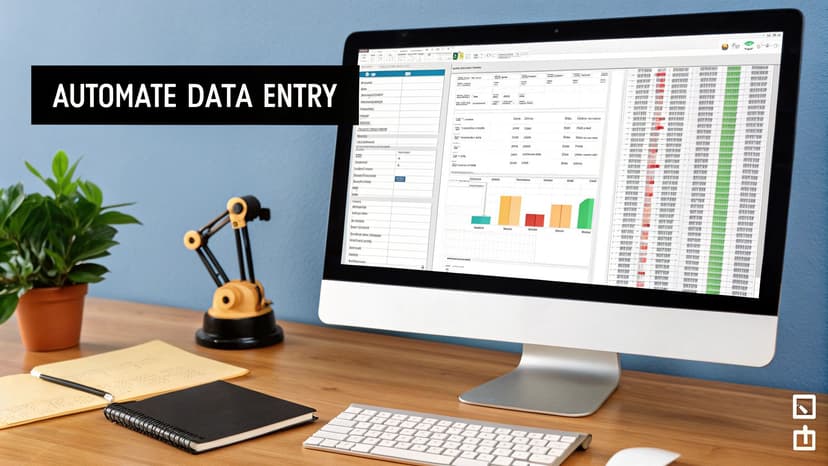
Spending too much time on Excel?
Elyx AI generates your formulas and automates your tasks in seconds.
Sign up →At its heart, this software is a digital bridge built specifically for data-heavy applications like Excel. It’s designed to automatically grab information from all kinds of sources—PDFs, emails, scanned paper forms, you name it—and then neatly populate your Excel workbooks with that data. It completely gets rid of the soul-crushing, error-prone task of copying and pasting, cell by tedious cell.
But let's be clear: this technology isn't about replacing people. It’s about freeing your team from the mundane stuff. When you take repetitive data entry off their plates, they can finally focus on what humans are great at: analyzing information, spotting trends, and making smart business decisions. The software handles the input, so your team can work with the data, not just for it.
The Shift from Manual to Automated Workflows
To really get what data entry automation does, it helps to zoom out and look at the bigger picture of workflow automation. Data entry is usually just one piece of a much larger business process. By automating that single step, you make the entire workflow smoother and more efficient. It’s a change more and more businesses are making once they see the real costs of manual errors and wasted time.
The numbers back this up. The global market for data entry software was worth around USD 4.5 billion in 2023 and is expected to more than double by 2033. Why the boom? Companies are desperate for better ways to handle huge amounts of data accurately while keeping costs down.
The real power of data entry automation is how it changes an employee's job. They go from being a data transcriber to a data analyst. The question shifts from, "How do we get this data in?" to "What is this data telling us?"
Ultimately, this software gives you a way to manage information that grows with your business. Whether you’re dealing with ten invoices a day or ten thousand, an automated system handles the volume without breaking a sweat. It ensures your Excel sheets are always accurate and ready for action.
The True Benefits of Automating Data Entry

When people think about automating data entry, the first thing that comes to mind is usually "saving time." And while that’s a huge plus, the real impact goes so much deeper. Bringing this kind of software into your business unlocks some serious, measurable wins that strengthen everything from your daily operations to your company culture. It all boils down to four key areas.
First off, you get a massive boost in operational efficiency. Let's be honest, manual data entry is a time black hole. Across an entire company, it can eat up thousands of hours every single year. Automation is like having a digital workforce that just goes and goes, 24/7, processing invoices, forms, and reports without ever needing a coffee break.
This instantly frees up your team from the grind of repetitive tasks. Instead of spending their days copying and pasting, they can focus on work that actually requires a human brain—things like analyzing trends in Excel, talking to customers, or finding new ways to improve the business. That’s the kind of work that truly moves the needle.
Maximizing Accuracy and Reducing Costs
The second big win is a dramatic improvement in data accuracy. People make mistakes. It’s natural. A typo here, a number switched there—it happens. But those small slip-ups can snowball into big problems, like messed-up financial reports, incorrect inventory levels, or unhappy customers.
Data entry automation software pretty much wipes out these human errors. It follows the rules you set every single time, running validation checks to make sure the information entering your systems is clean and reliable. This leads us straight to the third benefit: significant cost reduction.
By cutting down on manual labor and getting rid of costly mistakes, automation directly helps your bottom line. It's not just an operational tool; it's a financial one.
In fact, the U.S. Bureau of Labor Statistics found that automating administrative tasks can slash operational costs by around 30% a year. That's a powerful incentive, and it explains why so many businesses are getting on board. You can dive deeper into the market's growth by checking out the full market analysis on verifiedmarketreports.com.
Empowering Your Most Valuable Asset
Finally, we get to what might be the most important benefit of all: the positive effect on employee morale and engagement. Let’s face it—nobody enjoys mind-numbing, repetitive work. It’s a fast track to boredom, disengagement, and burnout.
When you automate these tasks, you completely change the game for your team. You’re taking the drudgery off their plate and giving them a chance to do more interesting and challenging work. This creates a few key advantages for your people:
- Higher Job Satisfaction: Employees feel more valued when they’re using their brains for problem-solving instead of just typing.
- Reduced Burnout: Getting rid of the tedious stuff helps prevent mental fatigue and keeps your team energized and focused.
- Skill Development: With more time on their hands, team members can learn new skills in things like data analysis in Excel or strategy, making them even more valuable to the company.
At the end of the day, investing in data entry automation isn't just about fixing a process. It's an investment in your people. You’re helping them grow from data clerks into strategic thinkers who can drive your company forward.
Must-Have Features in Your Automation Software
When you start digging into data entry automation software, it’s easy to get overwhelmed by a flood of technical jargon. To cut through the noise, let’s focus on the features that actually deliver results, especially if you spend a lot of your day working in Excel. Think of this as your no-nonsense checklist for picking a tool that genuinely makes your job easier.
The right features should directly tackle your biggest headaches, whether that’s fixing inaccuracies, speeding things up, or just getting rid of those frustrating manual mistakes. This graphic perfectly illustrates the core benefits these features are designed to provide.
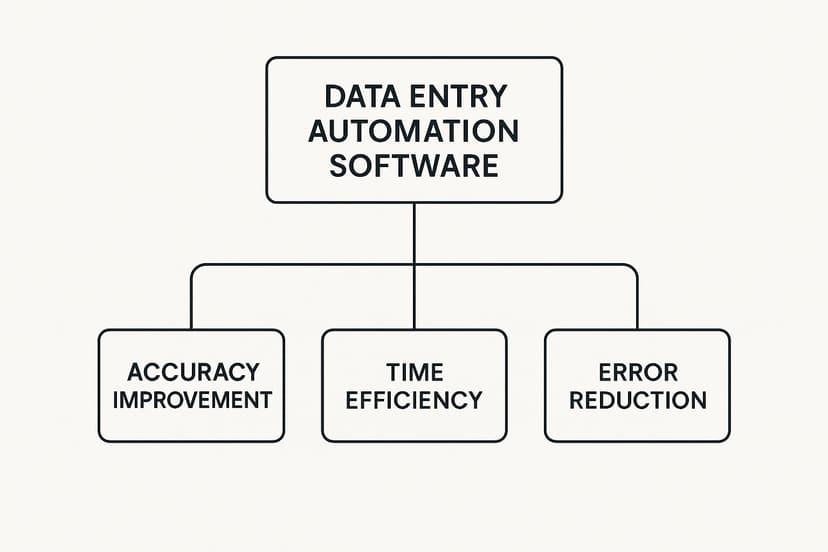
As you can see, any automation tool worth its salt aims to improve accuracy, give you back your time, and drastically reduce errors. Each of the essential features we're about to cover plays a direct role in achieving these goals, forming the backbone of a truly effective system.
Optical Character Recognition (OCR)
First on the list is Optical Character Recognition, or OCR. Let's say you have a folder full of scanned invoices saved as PDF files. OCR technology is like having a digital assistant that can read the text and numbers on those documents, converting them into live, usable data you can drop straight into an Excel sheet.
This is a complete game-changer for anyone who regularly works with paper documents or image files. Instead of painstakingly retyping everything, the software does the tedious work for you, turning static pictures into structured information ready for analysis in your workbook.
Intelligent Data Extraction
Just reading the text on a document is one thing, but understanding what it means is another. That's where intelligent data extraction steps in. Fueled by AI, this feature doesn't just see words—it recognizes specific pieces of information for what they are.
For example, it can pinpoint an invoice number, find a customer’s name, or pull the total amount from a receipt and then place each piece of data into the correct column in your spreadsheet. It’s the difference between having someone dump a pile of words on your desk and having an assistant who neatly organizes everything for you.
This kind of smart processing is a huge part of what the industry calls Digital Process Automation (DPA). The market for DPA tools is exploding and is expected to reach USD 31.6 billion by 2032, all because businesses are realizing the massive value of AI-powered automation. You can learn more about the growth of digital process automation on consegicbusinessintelligence.com.
Automated Data Validation
So, what happens if the software pulls the wrong information? This is why automated data validation is so critical. This feature is your built-in quality control, automatically flagging any data that doesn't follow the rules you've set.
For instance, you could create a rule that requires all invoice dates to be in "MM/DD/YYYY" format, or that a purchase order number must have exactly eight digits. If the software extracts an entry that doesn't match, it gets flagged for a human to review. This simple step prevents bad data from ever messing up your spreadsheets. To dive deeper into this, check out our guide on effective data validation techniques.
Seamless Integrations
Finally, the best software doesn't work in isolation. Seamless integrations are essential to make sure your automation tool can talk to the other systems you use every day—especially Microsoft Excel.
A top-notch tool should be able to:
- Export directly to .xlsx files: This allows you to transfer clean, organized data into a new or existing workbook with a single click.
- Sync with cloud storage: It should automatically pull documents from services like OneDrive or Google Drive, right where your spreadsheets live.
- Connect to other business apps: Linking to your CRM or ERP systems helps create a fully connected data pipeline from start to finish.
This connectivity is what makes the whole process feel effortless, ensuring data flows smoothly from its source right into your spreadsheets without you having to lift a finger.
Essential Features of Data Entry Automation Software
To bring it all together, here’s a quick-glance table that breaks down these essential features and shows how they directly solve common problems, especially for those of us who live and breathe Excel.
| Feature | Primary Function | Example Use Case with Excel |
|---|---|---|
| Optical Character Recognition (OCR) | Converts text from images (PDFs, scans) into machine-readable, editable data. | Automatically transcribes numbers from scanned receipts directly into an expense tracking spreadsheet, eliminating manual typing. |
| Intelligent Data Extraction | Uses AI to identify and pull specific data points (e.g., names, dates, amounts). | Finds the "Total Amount" on 100 different invoice layouts and places each value into the "Amount Due" column in your Excel ledger. |
| Automated Data Validation | Checks extracted data against predefined rules to ensure accuracy and consistency. | Flags any entry in the "Date" column of your Excel sheet that isn't in the correct MM/DD/YYYY format, preventing errors. |
| Seamless Integrations | Connects the software to other applications like Excel, cloud storage, and ERPs. | Sets up a workflow where new invoices saved in a OneDrive folder are automatically processed and their data is added to a master Excel file. |
Ultimately, choosing software with this core set of features ensures you're not just buying a tool, but investing in a smarter, faster, and more reliable way to manage your data.
How Businesses Use Data Entry Automation
It's one thing to talk about the benefits of data entry automation software in theory, but seeing it in action is where the value really clicks. The real magic happens when you see how it can completely overhaul a team's daily grind, turning tedious, error-prone tasks into smooth, automated workflows centered around Excel.
Let's look at a few real-world examples.

As you read these, think about the "before" and "after." Before automation, you have slow, manual work that’s full of potential mistakes. Afterwards, you get speed, precision, and efficiency. It’s a powerful shift that can make you rethink your own processes.
An Accounting Team Eliminates Invoice Errors
Picture an accounting team buried under hundreds of vendor invoices every month. In the past, someone spent nearly 20 hours a week just typing data from PDF invoices into an Excel expense tracker. It was mind-numbing work and, worse, a breeding ground for typos that led to payment mix-ups and headaches with vendors.
Then they brought in automation software. Suddenly, their entire process flipped. The software now pulls key details—invoice numbers, due dates, totals—and plugs them directly into their Excel sheet in seconds. The team got those 20 hours back to focus on actual financial analysis, and payment errors vanished.
This is a perfect example of how automation isn't just about saving time. It's about boosting financial accuracy and protecting the integrity of your operations.
An HR Department Streamlines Onboarding
An HR department was hitting a similar wall with new hire paperwork. Every time someone new joined, an HR coordinator had to manually copy their information from multiple forms into the main employee database and a bunch of different Excel files. This repetitive task was a major source of errors and often slowed down the whole onboarding process.
By setting up an automated workflow, data from a new hire's digital forms now flows instantly and correctly into all the right systems. This one change slashed the administrative time for each new employee by over 75%. Now, the HR team can spend their time making new hires feel welcome instead of getting bogged down in paperwork.
If you're curious about the nuts and bolts, we've got a whole guide on how to automate data entry in Excel.
A Marketing Team Masters Customer Feedback
Finally, let’s look at a marketing team trying to get a handle on customer feedback. They were collecting responses from several online survey tools, and a marketing assistant was spending days painstakingly copying and pasting everything into a giant Excel dashboard. The data was often a mess, which made it nearly impossible to spot any real trends.
With data entry automation, they built a system that pulls in survey responses from all their tools in real-time. The software cleans and standardizes the data as it arrives, feeding it straight into their dashboard. This gives the team an accurate, up-to-the-minute look at customer sentiment, allowing them to make smart decisions much faster.
How to Choose the Right Automation Software
Picking the right data entry automation software can feel overwhelming, but the secret is to start with your problem, not with a flashy features list. Before you even look at a single tool, take a step back and map out your current workflow.
Where are things getting stuck? Is it the sheer volume of invoices piling up? The endless hours spent fixing typos from scanned receipts? Identifying these specific bottlenecks gives you a clear target. Think of this initial assessment as your compass—it points you toward a solution built to solve your exact issue.
Define Your Core Requirements
Once you’ve nailed down the problem, you can start defining what a successful solution looks like. This isn’t about bells and whistles; it’s about the absolute must-haves. Create a simple checklist that puts your needs first. For a lot of businesses, for example, seamless integration with Microsoft Excel is a deal-breaker.
Your list might look something like this:
- Direct Excel Integration: The software absolutely has to export clean data into an
.xlsxfile or, even better, sync directly with the spreadsheets you already use. - Scalability: Can the tool keep up as your business grows? A solution that’s great for 100 documents a month needs to handle 1,000 without the price tag exploding.
- Budget Alignment: Set a realistic budget. Don't forget to factor in the money you'll save on manual labor and error correction to see the real return on investment.
As you explore, it's smart to look at broader data management solutions. Many of the best data management software tools come with powerful automation features baked right in. These can offer a more complete approach to managing your information. Our guide on business process automation tools also provides more context on how these systems can fit into your bigger picture.
Now, let's break down the main types of tools you'll encounter.
Comparing Automation Software Options
The market offers a range of solutions, from simple scripts to comprehensive platforms. Understanding the trade-offs is key to making the right choice for your team's size, budget, and technical comfort level. This table gives a quick overview to help you compare.
| Solution Type | Best For | Excel Integration Level | Typical Cost |
|---|---|---|---|
| No-Code AI Platforms | Teams needing fast, powerful automation without any developers. | Excellent (Native) | $$ – $$$ (Monthly) |
| Robotic Process Automation (RPA) | Large enterprises automating complex, multi-step workflows. | Good to Excellent | $$$$ (High) |
| Excel Macros/VBA Scripts | Individuals or small teams automating simple, repetitive tasks. | Native (Built-in) | $ (Time investment) |
| OCR-Specific Tools | Businesses focused purely on digitizing paper documents. | Varies (Often CSV export) | $ – $$ (Per page/mo.) |
As you can see, there's no single "best" option—only the one that's best for you. A no-code tool might be perfect for a finance department, while an enterprise might need a full-blown RPA system.
Run a Pilot Project Before Committing
Brochures and demos look great, but nothing beats a real-world test drive. Once you’ve narrowed it down to a top contender, run a small, controlled pilot project. This is your chance to see the software in action, using your actual documents and workflows.
A pilot project de-risks your investment. It moves you from "what the software could do" to "what the software actually does for your team."
For instance, grab a batch of 20 real invoices and push them through the system. Did it pull the data accurately? How easily did it connect with your Excel templates? Was the interface intuitive enough for your team to pick up quickly? This hands-on trial gives you the hard evidence you need to choose with confidence and ensure a smooth rollout for everyone.
Common Questions About Data Automation
Diving into data entry automation software naturally brings up a few questions. It’s smart to wonder how this kind of technology will actually impact your day-to-day work, the security of your company's information, and whether it plays nice with the tools you already use—especially Excel. Let's tackle some of the most common concerns head-on.
Will This Software Replace My Job?
This is probably the number one question on everyone's mind. The short answer? No. The real goal of automation is to elevate your role, not get rid of it.
Think of the software as a tireless assistant that handles the most repetitive, brain-draining tasks—like copying numbers from a stack of PDFs into a spreadsheet. By handing that off, you get to focus on the work that actually requires human intelligence.
Instead of spending hours on manual entry, you can now spend that time analyzing the data. You can spot trends in your Excel reports, offer insights that help steer business decisions, and solve complex problems that software simply can't handle. Essentially, automation shifts your job from data entry to data analysis, making your work far more strategic and, frankly, more interesting.
How Secure Is My Data with These Tools?
It’s completely understandable to be cautious about letting a new system handle your sensitive information. The good news is that reputable software companies treat security as their highest priority. Most modern platforms rely on robust encryption to protect your data both while it's being processed and while it's being stored.
When you're evaluating a tool, here are a couple of key security features to look for:
- Role-Based Access Controls: This is a fancy way of saying you can control who sees what. It ensures that only authorized people can view or manage sensitive information.
- Compliance Certifications: Keep an eye out for certifications like SOC 2 or GDPR. These aren't just acronyms; they're proof that the provider adheres to strict, internationally recognized security standards.
Here's something to consider: automation can actually make your data more secure. By reducing the number of people manually handling documents like invoices or financial records, you automatically lower the risk of human error and accidental exposure.
Can I Use This with My Existing Excel Spreadsheets?
Yes, absolutely. Since Microsoft Excel is the lifeblood of so many business processes, most automation tools are built from the ground up to integrate smoothly with it. The depth of that integration might vary between tools, but it’s a fundamental feature of any worthwhile solution.
A classic example is setting up a workflow where the software watches a specific folder. The moment a new PDF invoice arrives in that folder, the tool instantly reads it, pulls out the key details, and plugs that information directly into the right cells in your master Excel sheet. Your records stay perfectly up-to-date without you ever having to touch a thing. This direct link is what makes the technology so practical for real-world use.
Ready to stop the tedious manual work and let AI handle your Excel tasks? Elyx.AI is an AI-powered add-in that brings automation directly into your spreadsheets. Generate formulas, clean data, and get instant insights with simple prompts. Discover a smarter way to work by visiting https://getelyxai.com.
Reading Excel tutorials to save time?
What if an AI did the work for you?
Describe what you need, Elyx executes it in Excel.
Sign up