AI Business Process Optimization in Excel: A Practical Guide

Ever feel like your team is running in place? You're busy, but the important work just isn't moving forward. This often means your internal processes, especially those built in Excel, are working against you. This is where business process optimization comes in.
Think of it like tuning up an engine. Before, it might have been clunky, inefficient, and burning too much fuel. After a good tune-up, everything runs smoothly, powerfully, and gets you where you need to go faster. The same principle applies to your daily work, whether you're processing invoices in a spreadsheet or managing inventory lists. The goal is to make every Excel-based workflow smarter, faster, and less costly, and AI is the key to doing it.
Understanding Business Process Optimization

Spending too much time on Excel?
Elyx AI generates your formulas and automates your tasks in seconds.
Sign up →At its core, business process optimization (BPO) is a structured method for analyzing how work gets done and finding ways to do it better. It's about stepping back from the "this is how we've always done it" mindset and asking a simple, powerful question: "Is there a smarter way to do this in Excel?"
This doesn't mean you have to scrap your existing spreadsheets. More often than not, real improvement comes from making small, strategic tweaks that have a big ripple effect. By mapping out a workflow from start to finish, you can spot hidden bottlenecks, eliminate steps that add no value, and use AI to automate the tedious tasks that drain your team's time and energy.
The Tangible Goals of BPO
When done right, process optimization delivers measurable results. It’s a key strategy for boosting efficiency and cutting unnecessary costs. In fact, research shows that 21% of companies save at least 10% on costs by refining their processes. These savings come from smarter workflows, less rework, and fewer errors—especially in data-heavy environments like Excel. You can dig deeper into the financial benefits of BPO by reviewing industry research on process management statistics.
Ultimately, BPO is about achieving specific, concrete business goals. The table below breaks down the main objectives companies target when optimizing their workflows.
Core Objectives of Business Process Optimization
| Objective | Description | Example Outcome in Excel |
|---|---|---|
| Cost Reduction | Eliminating wasteful steps and automating manual tasks to cut operational expenses. | Using an AI tool in Excel to automate invoice data entry, cutting manual processing time by 75%. |
| Increased Efficiency | Accelerating the time it takes to complete a process from start to finish. | A redesigned sales reporting workflow in Excel reduces the time to generate weekly reports from 4 hours to 15 minutes. |
| Improved Quality | Minimizing errors and inconsistencies to deliver more reliable outputs. | Implementing an AI-driven data validation checklist in Excel leads to a 30% reduction in data entry errors. |
| Enhanced Agility | Building flexible processes that can easily adapt to market shifts or new business goals. | A dynamic project management dashboard in Excel allows teams to reallocate resources based on real-time data. |
These objectives translate into a stronger, more competitive business that can respond quickly to challenges and opportunities.
The Hidden Costs of Inefficient Workflows

Before you can fix a broken process, you have to understand the real damage it’s causing. The most dangerous costs are the ones you don't see—the ones that quietly drain resources and morale long before they show up on a balance sheet. Think of these inefficiencies like tiny leaks in a boat; they seem manageable at first, but given enough time, they can sink the whole ship.
Let's imagine a growing e-commerce business still running on clunky, manual Excel workflows. Every week, the sales team burns hours just copying and pasting order details from one sheet to another. It's not just tedious; it's a perfect recipe for data entry errors, which leads directly to shipping the wrong products to very unhappy customers.
This single snag creates a domino effect. The finance team wastes even more time reconciling mismatched invoices, which delays payments. Project managers are stuck waiting for accurate sales data to decide what to restock. Before you know it, your best-selling products are out of stock. One bad process can send ripples through the entire organization.
The True Price of Inefficiency
Wasted time is the most obvious cost, but the real pain is much deeper. When your sharpest people are bogged down with mind-numbing administrative work in Excel, they have no bandwidth left for the strategic thinking that actually grows the business. This is where the hidden costs really start to sting.
An inefficient process does more than waste time and money. It slowly erodes team morale, stifles creativity, and creates a culture where "good enough" becomes the standard.
These bottlenecks eventually hit your customers, too. Delayed projects and fulfillment mistakes tarnish your reputation. Recognizing these symptoms is the first step toward meaningful business process optimization.
Optimizing your workflows isn't about saving a few hours here and there. It's about unleashing your team's potential, delighting your clients, and building a more resilient company. In the end, the cost of doing nothing is far greater than the effort it takes to change.
Choosing the Right Framework for Optimization
https://www.youtube.com/embed/0fONene3OIA
Starting a business process optimization project doesn't mean you have to invent a new method. Thankfully, there are proven frameworks that provide a structured path forward, acting like a blueprint for improvement. Think of them as different toolkits, each designed for a specific kind of job.
Choosing the right one comes down to what you're trying to fix. You wouldn't use a sledgehammer to repair a watch, and you wouldn't apply a complex statistical model to a simple workflow hiccup in your spreadsheet.
Let's break down three of the most effective frameworks.
Lean: The Art of Cutting Waste
The entire idea behind Lean is simple: do more with less. Picture a professional chef in a busy kitchen. Every single movement is precise, every ingredient has a purpose, and absolutely nothing is wasted. Lean applies this same sharp focus to business processes.
It’s all about relentlessly hunting down and eliminating "waste." In an Excel context, waste can be anything from redundant data entry, overly complex formulas that slow down a sheet, or valuable employee time spent on manual report generation. This framework is perfect for getting workflows humming where speed and efficiency are everything.
Six Sigma: The Science of Reducing Errors
If Lean is about speed and getting rid of waste, Six Sigma is all about precision and getting rid of defects. Think of the mindset a pharmaceutical company uses to ensure every pill has the exact dosage. It's a deeply data-driven approach that aims for near-perfect quality.
Six Sigma uses hard numbers and statistical analysis to find and fix the root causes of errors in a process. In Excel, this could mean analyzing a dataset to find the source of recurring calculation errors or inconsistencies in financial reports. It’s the ideal choice for high-stakes workflows where accuracy is non-negotiable.
A good framework can make all the difference, and for a deeper dive, our guide on decision-making frameworks offers additional valuable perspectives.
Kaizen: The Practice of Continuous Improvement
Kaizen is less of a one-time project and more of a daily mindset. The word itself means "change for the better," and it’s built on the belief that small, ongoing improvements add up to more than occasional, massive overhauls. It’s like tending a garden—you care for it daily, pulling a few weeds here and watering there.
This philosophy encourages everyone in the company to constantly look for small ways to make their work better. For Excel users, this could mean a team member creating a small macro to automate a weekly task or finding a better way to organize a shared workbook. Kaizen is fantastic for building a culture of improvement.
The most powerful business process optimization frameworks are not about radical, disruptive change. They are about creating a system where small, intelligent adjustments become a natural part of the daily routine.
To help you decide which approach is the best fit for your team, have a look at the table below.
Comparing Business Process Optimization Frameworks
| Framework | Primary Goal | Best For | Core Principle |
|---|---|---|---|
| Lean | Eliminate waste and maximize value. | Improving speed and efficiency in processes like data entry or report generation in Excel. | Do more with less by removing any step that doesn't add value. |
| Six Sigma | Reduce defects and process variation to near perfection. | Complex, data-heavy Excel processes where quality is critical, like financial modeling. | Use statistical analysis to identify and remove the root causes of errors. |
| Kaizen | Foster a culture of continuous, incremental improvement. | Empowering teams to make small, ongoing changes to their daily Excel workflows. | Everyone, everywhere, is responsible for making small improvements every day. |
Once you’ve got a framework in mind, the next step is putting it into action. For those ready to dive in, this practical guide on how to automate business processes effectively outlines the essential steps to get started.
How AI Is Changing The Game In Process Optimization
For years, we've relied on traditional frameworks to improve business processes. They've served us well, but now, Artificial Intelligence is adding a completely new layer to the mix—especially inside the tool you use every day: Excel. Think of AI as an intelligent assistant embedded in your spreadsheet, ready to handle tedious work and spot insights you'd never find on your own.
This isn't just about doing things faster; it's about fundamentally changing how we approach improvement. Instead of waiting for a problem to appear, AI lets you get ahead of the curve. It can analyze massive datasets in your spreadsheets to find hidden bottlenecks, flag risks before they become disasters, and even predict future trends. Suddenly, making smart, data-backed decisions is for everyone on the team, not just data scientists.
The AI Advantage in Workflow Analysis
The real magic of AI in business process optimization is its ability to see patterns the human eye can't. It can scan thousands of rows in a heartbeat and tell you exactly where a process is getting bogged down or where mistakes keep happening.
This move toward intelligent automation is quickly becoming the norm. A McKinsey poll showed that 66% of executives were already trying out automation. On top of that, 54% of firms use AI to boost process effectiveness, which tells you where the industry is heading.
At the heart of this shift are advanced Machine Learning solutions that make intelligent automation and predictive analysis a reality for businesses directly within their existing tools.
Key Ways AI Enhances Optimization in Excel
AI brings a few game-changing capabilities that elevate process improvement beyond simple macros. We're moving past basic automation and into creating genuinely smart, adaptive workflows in Excel.
- Predictive Analytics: AI can look at your historical data in Excel and make surprisingly accurate predictions. For instance, an AI tool could analyze past sales data to forecast inventory needs, helping you avoid both stockouts and costly overstock.
- Intelligent Automation: This is a huge leap from standard macros. AI can manage complex, multi-step tasks that require judgment, like sorting customer feedback into categories or automatically flagging unusual financial transactions for human review.
- Root Cause Analysis: When something goes wrong in your data, AI can be your detective. It digs through related data in your spreadsheet to pinpoint the most likely root cause, saving you hours of manual digging so you can fix the real problem, not just the symptoms.
When you bring AI into your Excel processes, you're not just making them faster—you're making them smarter. The system learns as it goes, creating a cycle of continuous improvement driven by real data.
This technology makes sophisticated analysis more accessible than ever. If you live in spreadsheets, it's worth checking out our guide on the practical uses of AI in Excel to see how you can put these ideas to work right away. AI is the logical next step for business process optimization, making it more powerful and intuitive than ever before.
Optimize Your Excel Workflows with AI: A Practical Example
Theory is great, but business process optimization truly comes to life when you use it to solve a real-world problem. Let's walk through how an AI tool like Elyx.AI can transform a messy, manual Excel workflow into a streamlined, automated system.
We'll use a classic example that causes headaches in nearly every business: a disorganized sales reporting process in Excel.
You know the one. It's a spreadsheet cluttered with inconsistent data pulled from different sources. Cleaning, consolidating, and analyzing it takes hours and is a minefield for human error. By integrating an AI tool directly into Excel, you can solve these issues in minutes, turning tedious work into an automated task.
This infographic breaks down the core stages of what AI-powered optimization looks like, from handling repetitive tasks to analyzing data and even making predictions.
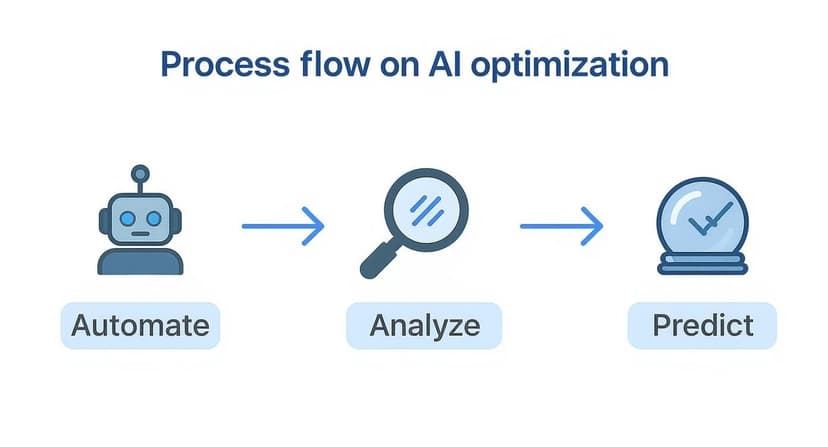
As you can see, AI isn't just about speed. It’s about building a smarter workflow that delivers deeper insights from your data.
Step 1: Pinpointing Inefficiencies in Your Spreadsheet
First, you have to diagnose the problem. Before fixing a broken process, you need to know where it's falling apart. In our sales report spreadsheet, the usual suspects are:
- Inconsistent Formatting: Dates appearing as "01-Jan-2024" in one column and "January 1, 2024" in another.
- Duplicate Entries: The same sale accidentally recorded multiple times, skewing your totals.
- Missing Information: Empty cells in critical columns like "Region" or "Product Category" that make analysis impossible.
- Manual Calculations: Team members wasting time manually adding up totals for different products or regions.
Spotting these issues is half the battle. Each one is a friction point that drains time and ruins data credibility—and each is a perfect opportunity for AI to step in.
Step 2: Using AI to Analyze and Clean Your Data
Once you’ve identified the problems, you can use an AI tool like Elyx.AI to solve them in seconds. Forget writing complex formulas or manually correcting cells. Now, you can use simple, plain-English prompts. This makes data cleaning accessible to everyone, not just the office Excel guru.
Let’s say you need to fix those jumbled date formats. Just highlight the column and tell Elyx.AI: "Standardize all dates in this column to MM/DD/YYYY format." The AI reformats the entire column instantly.
What about duplicates? A simple command like "Identify and remove all duplicate rows based on the 'Order ID' column" cleans up your dataset in a single click. For a deeper dive, take a look at our guide on essential business process automation tools.
Step 3: Automating Calculations and Visualizations
With your data squeaky clean, the next step is analysis. This is where AI becomes a game-changer. Instead of wrestling with PivotTables or trying to remember VLOOKUP syntax, you can just ask your AI assistant to do the work.
With AI-powered tools, the focus shifts from how to do something in Excel to what you want to accomplish. You state the goal, and the AI handles the execution.
You can give commands like:
- "Calculate the total sales for each product category and show the results in a new table." The AI generates a perfect summary table without you building a PivotTable.
- "Create a bar chart showing the top 5 sales regions by revenue." A professional chart appears, ready for your report.
- "What is the average sale value for Q4?" You get an instant answer, no formulas required.
This practical approach to business process optimization gives you a skill you can start using today. By bringing AI into Excel, you can turn a time-consuming reporting task into a fast, accurate, and automated workflow, freeing up your team to focus on what the data actually means.
What's Next for Process Automation?
Looking ahead, business process optimization isn't just a nice-to-have anymore; it's essential for any business that wants to stay competitive. We're seeing a major shift from simply reacting to problems to proactively predicting and preventing them, largely thanks to the power of AI integrated into everyday tools like Excel.
This isn't just a trend; the numbers back it up. The global market for process automation was valued at $13 billion in 2024. By 2029, it's expected to rocket to nearly $23.9 billion. That kind of growth tells you one thing: building skills in automation is a very smart career move. If you're curious, you can dig deeper into the business process automation statistics and see just how fast things are moving.
It's All About Continuous Improvement
Ultimately, the future of optimization is less about a single project and more about a cultural shift in how a company operates. You have to move away from the idea that you can "fix" a process once and be done with it.
Business process optimization is not a destination; it's an ongoing journey. The goal is to build an agile organization where small, intelligent improvements are a natural part of the daily routine.
This dedication to constant tweaking is what separates great companies from good ones. It’s what allows a business to pivot quickly, adapt to new market demands, and achieve sustainable growth. When you weave optimization into the fabric of your company, you’re not just improving workflows—you’re building a resilient organization ready for whatever the future holds.
Frequently Asked Questions
Even with the best tools, taking the first step toward business process optimization can feel overwhelming. Let's tackle some common questions to help you move forward with confidence.
How Can I Start With Process Optimization On a Small Budget?
Don't try to boil the ocean. A tight budget forces you to focus on what matters most.
Pick one process that’s a known pain point—something that constantly causes delays or frustration. Maybe it's the weekly sales report that takes hours to compile in Excel, or the clunky way you track inventory in a massive spreadsheet.
You don't need fancy new software right away. Start with what you've got: Excel. Map out the current steps, pinpoint the most obvious bottleneck, and aim for one small improvement. For example, use an AI tool to automate data cleaning in one report. Getting that first quick win proves the value of the effort and builds momentum for bigger changes, all without a hefty price tag.
How Do I Measure the Success of My BPO Efforts?
If you can't measure it, you can't improve it. Success in optimization needs to be backed by real numbers, not just a gut feeling that things are "better."
Before you change anything, establish a baseline. How is the process performing right now? Track a few key metrics within your Excel workflow:
- Time Saved: How many hours are you getting back each week on a specific task?
- Cost Reduction: Are you spending less on labor or resources to get the same result?
- Error Reduction: How many data entry or calculation mistakes are happening now compared to before?
When you can show a clear "before and after" picture with these metrics, the value of your work becomes undeniable.
How Do I Get My Team On Board With a New Process?
The biggest hurdle is often cultural, not technical. People naturally stick to what they know, even if it's inefficient. The key to overcoming this resistance is communication. Be upfront about why a change is needed and, most importantly, how it will make your team's work less frustrating. Get them involved in identifying problems in your spreadsheets and brainstorming solutions. When people have a stake in the new process, they’re far more likely to get on board.
Ready to turn those tedious Excel tasks into a well-oiled machine? Elyx.AI plugs right into your spreadsheets, letting you clean up data, find insights, and automate reports with simple, clear commands. Start optimizing your processes today with Elyx.AI.
Reading Excel tutorials to save time?
What if an AI did the work for you?
Describe what you need, Elyx executes it in Excel.
Sign up