Top Accounts Payable Best practices to Streamline Payments in Excel

Accounts Payable is the financial engine of any business, yet it's often bogged down by manual data entry, human error, and inefficient workflows, especially in Excel-heavy environments. The good news? It doesn't have to be. By adopting modern accounts payable best practices, you can transform this critical function from a cost center into a strategic asset that actively contributes to your bottom line, all within the familiar interface of your spreadsheets.
This guide moves beyond generic advice, offering seven actionable, tech-forward strategies designed for finance professionals who work extensively with spreadsheets. We'll explore how to implement robust internal controls like the three-way match, leverage automation for invoice processing, and optimize payment schedules to capture valuable discounts. You will learn how to make your processes more secure and efficient using the tools you already have.
More importantly, we'll demonstrate how you can use powerful AI tools, such as Elyx.AI, directly within Excel to not only enhance accuracy but also unlock significant cost savings and operational efficiency. Get ready to leave outdated processes behind and build an AP system that is precise, streamlined, and ready for the future.
Spending too much time on Excel?
Elyx AI generates your formulas and automates your tasks in seconds.
Sign up →1. Three-Way Match Process Implementation in Excel
The three-way match is a fundamental accounts payable best practice that serves as a powerful internal control. It’s a systematic verification process that confirms the accuracy of an invoice before payment is issued. This method involves matching three key documents: the purchase order (PO), the goods receipt note (GRN) or delivery confirmation, and the vendor invoice. By cross-referencing these documents in Excel, you ensure you only pay for what you ordered, what you actually received, and what you were correctly billed for.
This process is a critical safeguard against overpayments, duplicate invoices, and potential fraud. It confirms that the quantity, price, and terms on the invoice align perfectly with the PO and the GRN, providing a clear and auditable trail for every transaction. Without it, a company is vulnerable to paying for incorrect shipments or fraudulent invoices.
How to Implement a Three-Way Match Using Excel and AI
While traditionally managed in ERPs, a robust three-way match can be implemented and managed within Excel, especially when enhanced with AI.
- Data Consolidation: Create a master Excel workbook with separate sheets for POs, GRNs, and incoming invoices. Use Power Query to import and consolidate data from different sources.
- Matching Logic: Use Excel functions like
VLOOKUPorINDEX/MATCHto cross-reference the invoice number, PO number, and GRN number across the sheets. For example, your invoice sheet can have a formula like=IF(VLOOKUP(A2, PO_Sheet!A:C, 3, FALSE)=C2, "Price Match", "Price Mismatch")to check prices. - AI-Powered Verification: For complex matching, an AI tool like Elyx.AI can automate this. You can simply ask: "Compare the 'Invoices' sheet with the 'POs' and 'GRNs' sheets. Flag any invoices where the quantity or total amount doesn't match the PO and GRN." The AI will instantly highlight discrepancies without complex formulas.
For example, a small manufacturing company can use this Excel-based system to achieve a high automated matching rate. Similarly, giants like General Electric have leveraged automated three-way matching to reduce payment errors by a staggering 95%.
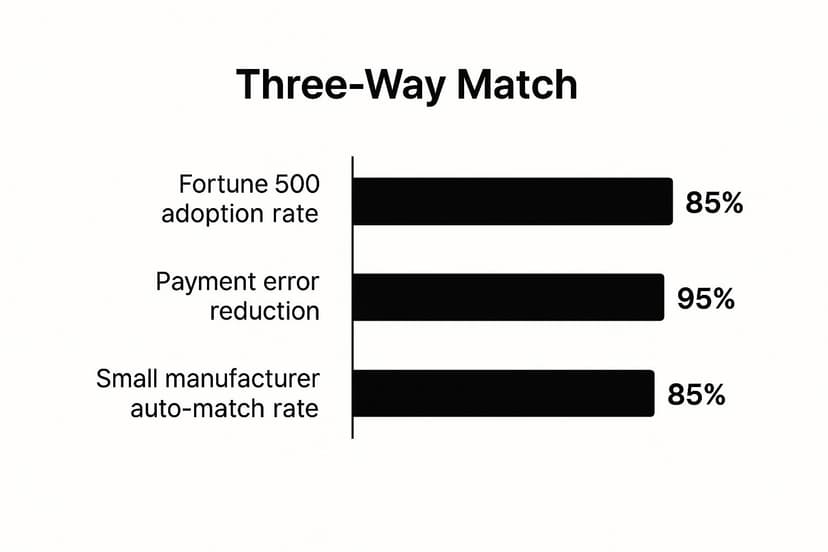
As the chart illustrates, the benefits are substantial, with a high adoption rate among top-performing companies and a dramatic reduction in payment errors. To learn more about how technology can streamline this, explore our guide to automated invoice processing.
Actionable Tips for Success
- Set Tolerance Levels in Excel: Use
IFstatements to build in tolerance levels for minor discrepancies (e.g.,IF(ABS(InvoiceAmt - PO_Amt) <= (PO_Amt * 0.02), "OK", "Review")). This reduces manual review flags. - Use Conditional Formatting: Automatically highlight rows with mismatches in red to make exceptions visually pop out for your AP team.
- Digitize Receiving: Encourage your warehouse to log GRNs in a shared spreadsheet (like Google Sheets or Excel on SharePoint) to ensure real-time data for matching.
- Automate with AI: Use an AI assistant in Excel to handle the matching logic, which is faster and less error-prone than maintaining complex nested formulas.
2. Accounts Payable Automation and Digitization in Excel
Accounts payable automation involves transforming manual, paper-based AP processes into efficient, digital workflows. This is one of the most impactful accounts payable best practices a modern finance department can adopt. It leverages technologies like Optical Character Recognition (OCR) to extract data from PDF invoices and AI-powered tools within Excel to process it, eliminating manual data entry, accelerating cycle times, and significantly boosting accuracy.
Instead of teams drowning in paperwork and manual data entry into spreadsheets, automation allows systems to capture invoice data, validate it, and prepare it for review with minimal human touch. This shift not only reduces the risk of human error but also frees up your skilled AP professionals to focus on strategic activities like vendor analysis and cash flow forecasting directly within Excel.
How to Implement AP Automation in Excel
Integrating automation into your Excel-based workflow can be done incrementally without abandoning your existing system.
- Centralize Invoice Intake: Set up a dedicated email address where vendors send all invoices. Use tools like Power Automate to automatically save attachments to a specific folder.
- Automated Data Extraction (OCR): Use an OCR tool (many are available as standalone apps or integrated platforms) to scan PDF invoices and export the data (Invoice #, Date, Amount, etc.) into a CSV file.
- Import and Process in Excel: Use Power Query in Excel to automatically import and clean the data from the CSV file each day.
- AI-Powered Analysis: Once the data is in Excel, use an AI tool like Elyx.AI to streamline the next steps. For example, you can command: "Check for duplicate invoices in column C. Highlight any duplicates in yellow." or "Categorize expenses in column F based on vendor names in column B."
Many leading companies have seen remarkable results from automation. Siemens cut its invoice processing time from 30 days down to just 3, while Heineken achieved an impressive 85% straight-through processing rate.
As the data shows, automation drives substantial improvements in efficiency and cost reduction. To better understand the specific advantages, explore our deep dive into the benefits of accounts payable automation.
Actionable Tips for Success
- Start with a Pilot: Begin by automating the process for a small group of high-volume vendors to prove the concept and demonstrate ROI within your Excel workflow.
- Clean Your Vendor Data: Before automating, ensure your vendor master list in Excel is accurate and free of duplicates. Clean data is crucial for high matching rates.
- Use Data Validation: Set up Data Validation rules in Excel for manually entered data to prevent errors like incorrect date formats or text in numerical fields.
- Establish Exception Protocols: Create a separate "Exceptions" tab in your workbook. Use conditional formatting or AI prompts to automatically move invoices that fail validation to this sheet for manual review.
3. Early Payment Discounts and Dynamic Discounting Programs
Capitalizing on early payment discounts is one of the most effective accounts payable best practices for transforming your AP department from a cost center into a profit generator. This strategy involves paying vendor invoices before their due date in exchange for a discount, typically offered under terms like "2/10 net 30", meaning a 2% discount if paid in 10 days, with the full amount due in 30 days.
This practice directly reduces procurement costs and optimizes cash flow. An advanced version is dynamic discounting, where the discount rate changes based on how early the payment is made. This provides flexibility for both you and your suppliers, allowing them to accelerate cash flow while you capture savings.
How to Implement Discounting Programs in Excel
Managing and prioritizing these opportunities is a perfect task for Excel, especially with AI enhancements.
- Track Discount Terms: Add columns to your AP aging report in Excel for "Discount Percentage," "Discount Window (Days)," and "Discount Deadline Date."
- Calculate Potential Savings: Create a formula to calculate the dollar value of the discount for each invoice (e.g.,
=IF(TODAY() <= DiscountDeadline, InvoiceAmount * DiscountPercentage, 0)). - Prioritize with AI: It can be hard to decide which discounts to take. Use an AI tool like Elyx.AI with a simple prompt: "Based on my AP aging sheet, create a new table showing all invoices with available early payment discounts. Rank them by the highest annualized rate of return." This instantly gives you an action plan.
For instance, consumer goods giant Procter & Gamble saves over $50 million annually by systematically capturing early payment discounts. On a smaller scale, businesses using accounting software and spreadsheets have reported average annual savings of $15,000 by leveraging these programs.
Actionable Tips for Success
- Calculate Annualized Return in Excel: Add a column with the formula
= (Discount % / (1 - Discount %)) * (365 / (Full Due Date - Discount Days)). This shows the powerful annualized ROI (a 2/10 net 30 term is a 36.7% annual return) and helps you prioritize. - Use Conditional Formatting: Set up a rule to highlight invoices in green when they are within 3 days of the discount deadline, ensuring they get immediate attention.
- Create a "Discount Dashboard": Use a PivotTable and chart to create a simple dashboard in Excel that visualizes total potential savings, upcoming deadlines, and captured discounts for the month.
- Negotiate Better Terms: During contract renewals, proactively ask vendors for early payment discount terms. Track these terms in your centralized vendor master sheet in Excel.
4. Vendor Master Data Management and Centralization
Effective vendor master data management is an accounts payable best practice that creates a single source of truth for all supplier information. For businesses running on Excel, this means maintaining a clean, centralized vendor master file. This standardized approach to collecting, storing, and maintaining vendor data—including names, tax IDs, banking details, and contact information—prevents duplicate records, ensures data accuracy, and streamlines the entire procure-to-pay cycle.
This practice is a critical defense against payment fraud and operational inefficiencies. A well-maintained vendor master sheet in Excel ensures that payments are sent to the correct entities and duplicate payments are avoided. Without it, companies risk making costly errors and straining vendor relationships.
How to Implement Vendor Master Data Management in Excel
A robust vendor master file can be managed effectively in Excel with disciplined processes and a touch of automation.
- Create a Master Template: Design a standardized Excel sheet for all vendor information. Use features like locked cells for headers and data validation dropdowns (e.g., for country codes, payment terms) to ensure consistency.
- Standardize Onboarding: Create a standardized workflow for onboarding new vendors. This could be a simple form that, once approved, is used to populate the master Excel file.
- Cleanse Data with AI: An initial data cleanse is crucial. Instead of manually searching for duplicates, use an AI tool like Elyx.AI. A simple prompt like "Analyze the vendor list in this sheet. Identify and highlight any potential duplicate vendors based on similar names, addresses, or tax IDs" can save hours of work.
For example, Johnson & Johnson reduced vendor data errors by 90% after centralizing its master data management. Similarly, Ford Motor Company identified over 40,000 duplicate vendor records, saving $2.3 million annually.
Actionable Tips for Success
- Use Data Validation Rules: In your master Excel sheet, apply data validation to critical columns. For example, set the Tax ID column to accept only numbers of a specific length to prevent typos.
- Implement a Duplicate Check Formula: Before adding a new vendor, use a simple
COUNTIFformula (e.g.,=COUNTIF(VendorNames_Column, NewVendorName)) to check if the name already exists. If the result is greater than 0, it requires further investigation. - Establish Clear Ownership: Assign a specific team member responsibility for maintaining the integrity of the master Excel file. Use SharePoint or Google Sheets to control access and track changes.
- Conduct Regular Audits: Schedule quarterly reviews of your vendor data. Use Excel’s filtering tools to easily identify inactive suppliers (e.g., no payments in the last 12 months) for archival.
5. Segregation of Duties and Internal Controls
Segregation of Duties (SoD) is a cornerstone of accounts payable best practices, designed to minimize the risk of errors and fraud. It’s an internal control concept that involves separating critical AP functions among different individuals. By dividing responsibilities, no single person has control over an entire transaction from start to finish, which creates a system of checks and balances.
This practice is essential for preventing unauthorized payments and asset misappropriation. It ensures that functions like invoice processing, payment approval, and bank reconciliation are handled by separate team members. Without SoD, a company is highly vulnerable to internal fraud, as one individual could create a fictitious vendor, approve a fake invoice, and issue a payment. The Enron scandal famously highlighted the catastrophic consequences of weak internal controls, leading to strengthened SoD requirements.
How to Implement Segregation of Duties
Implementing SoD involves carefully designing workflows and assigning specific roles within the AP process.
- Identify Key Functions: Map out the critical steps in your procure-to-pay cycle: vendor setup, invoice processing, payment approval, and payment execution.
- Assign Separate Roles: Allocate these functions to different individuals. For example, the person who enters invoices into the main AP spreadsheet should not be the one who approves the payment run file.
- Establish Clear Authority: Define and document approval hierarchies. For instance, a manager can approve invoices up to $5,000, while a director must approve anything higher. This can be managed with a separate "Approvals" tab in your workbook.
For example, many banks require dual authorization for any wire transfer exceeding $10,000. In smaller businesses where staff is limited, a common control is to have an external accountant review and approve the final payment batch file exported from Excel before it's uploaded to the bank.
Actionable Tips for Success
- Establish Clear Thresholds: Create a simple table in an Excel worksheet outlining approval limits for different roles (e.g., AP Specialist < $1,000, Manager < $10,000). This serves as a clear reference.
- Use Protected Sheets/Ranges in Excel: Leverage Excel's "Protect Sheet" functionality. Allow the AP clerk to enter data but lock the "Approved By" and "Payment Date" columns, which can only be edited by a manager with the password.
- Document All Authorities: Maintain a clear, accessible "Controls" tab in your main AP workbook that outlines all approval hierarchies and spending limits for auditors and team reference.
- Implement Backup Approvers: Designate secondary approvers for each level to prevent bottlenecks. The approval matrix in your Excel file should include columns for both primary and backup approvers.
- Provide Fraud Awareness Training: Regularly train AP staff on common fraud schemes (e.g., fake invoice emails) and how to spot them within your Excel-based workflow.
6. Electronic Payments and Payment Method Optimization
Transitioning from traditional paper checks to electronic payment methods is a transformative accounts payable best practice. This strategic shift involves embracing methods like ACH transfers, wire transfers, and virtual credit cards. By analyzing payment data in Excel, you can implement the most cost-effective and secure payment method for each transaction, reducing manual effort and processing costs.
This optimization is crucial for modernizing your AP department. It not only accelerates the payment cycle but also cuts down on expenses related to check printing and postage. Furthermore, electronic payments provide a much clearer audit trail, minimizing the risk of fraud.
How to Implement Payment Method Optimization using Excel
Excel is the perfect tool to analyze and manage this transition.
- Analyze Payment Data: Export your payment history into Excel. Create a PivotTable to summarize payment volumes, frequencies, and amounts by vendor.
- Segment Vendors: Add a "Preferred Payment Method" column to your vendor master sheet. Based on your analysis, segment vendors. For example, tag high-volume, recurring vendors as "ACH Candidates."
- Track Onboarding Progress: Create a simple checklist in your vendor master file to track the status of onboarding each vendor to electronic payments (e.g., "Invited," "Forms Sent," "Active ACH").
Many organizations have seen massive returns. Apple processes over 95% of supplier payments electronically, reportedly saving $12 million annually. Even small businesses benefit, saving an average of $7 per transaction compared to paper checks.
Actionable Tips for Success
- Create a Cost-Benefit Analysis in Excel: Build a simple model to compare the cost of a paper check (supplies, postage, labor) vs. an ACH transaction fee. This will help you build a business case for the transition.
- Use AI for Vendor Segmentation: For large vendor lists, use an AI tool like Elyx.AI with the prompt: "Segment the vendors in this list into three groups based on payment frequency and average invoice amount: High, Medium, Low." This helps prioritize your outreach efforts.
- Use ACH for Recurring Payments: Implement ACH (Automated Clearing House) payments for regular expenses like rent and utilities. This is often the cheapest electronic method.
- Secure One-Time Payments: Use virtual credit cards for one-time vendors. This method enhances security by creating a unique card number for each transaction, protecting your primary bank account details.
7. Regular Reconciliation and Month-End Close Optimization
Regular reconciliation is a non-negotiable accounts payable best practice that ensures the integrity of your financial records. For Excel users, this is the systematic process of matching your internal AP ledger against vendor statements and bank records to identify and resolve discrepancies. A cornerstone of an efficient month-end close is robust payment reconciliation, which prevents errors from compounding.
This disciplined approach is crucial for maintaining an accurate AP aging report and preventing duplicate payments. By optimizing your reconciliation and month-end close processes in Excel, you accelerate your financial reporting timeline. Neglecting this practice leads to inaccurate financial statements and a painful, prolonged month-end scramble.
How to Implement and Optimize Reconciliation in Excel
A modern approach shifts from a monthly crunch to a continuous activity, using Excel's powerful features.
- Use Power Query for Data Import: Instead of manually copy-pasting, use Power Query to automatically import bank statements and vendor statements into your Excel workbook. This creates a refreshable, direct link to your data.
- Standardize Procedures: Create a month-end close checklist as a tab in your main AP workbook. List all reconciliation tasks, assign owners, and add a status column.
- Automate Matching with AI: The most time-consuming part of reconciliation is matching transactions. An AI tool like Elyx.AI can automate this. Simply ask: "Compare the 'Bank Statement' sheet with the 'AP Ledger' sheet. Highlight all matching transactions in green and list any unmatched items from either sheet." This reduces hours of manual ticking and tying to seconds.
Netflix famously reduced its month-end close from 10 days to just 3 by implementing automated reconciliation. General Motors uses daily reconciliation to resolve 99% of discrepancies within 24 hours.
For more insights on how to ensure your datasets are perfectly aligned, explore our guide on what data reconciliation is and why it matters.
Actionable Tips for Success
- Reconcile Daily in Small Batches: Reconcile yesterday's payment run against the bank statement each morning. This 15-minute daily task is far more manageable than a multi-day month-end effort.
- Use Excel's Reconciliation Templates: Excel has built-in templates for account reconciliation. Use them as a starting point to structure your process.
- Use
SUMIFfor High-Level Checks: Before diving into line-by-line reconciliation, use aSUMIFfunction to quickly check if the total payments to a specific vendor in your ledger match the total debits on their statement. - Resolve Discrepancies Immediately: Create an "Open Items" log in a separate Excel tab. Document every discrepancy, assign an owner, and track it until resolved. Don't let items carry over to the next month.
Accounts Payable Best Practices Comparison
| Item | Implementation Complexity 🔄 | Resource Requirements ⚡ | Expected Outcomes 📊 | Ideal Use Cases 💡 | Key Advantages ⭐ |
|---|---|---|---|---|---|
| Three-Way Match Process Implementation | Medium to High – requires system integration | Moderate to High – IT and training needed | Strong internal controls; reduces payment errors | Companies with volume invoice processing needing controls | Fraud prevention; accurate payments; audit readiness |
| Accounts Payable Automation & Digitization | High – involves new tech adoption and change mgmt | High – software, training, ongoing maintenance | Significant time savings; error reduction; real-time visibility | Organizations seeking end-to-end AP process digitization | Reduced processing time; remote access; compliance |
| Early Payment Discounts & Dynamic Discounting | Medium – needs cash flow analysis & discount system | Moderate – treasury resources and analytics | Cost savings on procurement; improved vendor relations | Firms with available cash preferring cost optimization | Procurement cost reduction; better vendor leverage |
| Vendor Master Data Management & Centralization | Medium to High – data cleaning and governance setup | Moderate – dedicated data teams and audits | Improved data accuracy; compliance; reduced duplicate payments | Organizations with many vendors and payment errors | Eliminates duplicates; compliance; better spend analytics |
| Segregation of Duties & Internal Controls | Medium – policy and system controls implementation | Moderate – multiple staff and audit functions | Fraud reduction; compliance; process transparency | All organizations with risk of fraud or regulatory need | Fraud prevention; accountability; regulatory compliance |
| Electronic Payments & Payment Method Optimization | Medium – vendor onboarding and bank integration | Moderate – systems setup and vendor training | Cost reduction on payments; faster processing; security improvements | Organizations shifting from manual check payments | Cost savings; payment speed; fraud risk reduction |
| Regular Reconciliation & Month-End Close Optimization | Medium – process standardization and automation | Moderate – skilled staff and automation tools | Faster close; accurate financial reporting; error detection | Companies seeking improved financial close efficiency | Accuracy; reduced close time; early error detection |
Activating Your Modern AP Strategy
Transforming your accounts payable department from a cost center into a strategic business asset doesn't happen overnight. It's an incremental process built on a foundation of smart, consistent execution. Throughout this guide, we've explored a collection of the most impactful accounts payable best practices available today, moving far beyond basic data entry to embrace efficiency, accuracy, and strategic financial management. From the foundational rigor of a three-way matching process to the tactical advantage of capturing early payment discounts, each practice serves as a crucial building block in constructing a world-class AP function.
The journey begins with a clear-eyed assessment of your current state. Where are the bottlenecks? Where does manual intervention lead to the most frequent errors? Pinpointing these high-impact areas allows you to prioritize your efforts effectively. Centralizing your vendor master file, for example, can immediately reduce the risk of duplicate payments and fraud, while implementing stronger internal controls through the segregation of duties protects your company's assets. Each step builds on the last, creating a powerful ripple effect that enhances financial visibility and operational control across the board.
Your Actionable Next Steps
Making these changes tangible requires a focused approach. Don't try to overhaul everything at once. Instead, choose one or two practices to implement in the next quarter.
- For immediate impact: Start with optimizing your month-end close and performing regular reconciliations. This improves accuracy and gives you a clearer financial picture to guide other decisions.
- For long-term efficiency: Begin the process of digitizing invoices and automating workflows. Even small steps, like establishing a central email for invoice submissions, can eliminate significant manual effort. As you look to activate your modern AP strategy, understanding the broader landscape of modernization for SMBs can provide valuable insights into technology adoption and process improvement.
The ultimate goal is to free your finance team from the repetitive, low-value tasks that consume their time. By embracing these accounts payable best practices, you empower them to focus on strategic analysis, vendor relationship management, and cash flow optimization. This shift not only improves departmental morale but also directly contributes to your organization's bottom line. The future of AP is intelligent, automated, and proactive, and the tools to build that future are more accessible than ever. The key is to start today.
Ready to implement these best practices without leaving your favorite spreadsheet tool? Elyx.AI integrates directly into Microsoft Excel, allowing you to automate data cleaning, identify duplicate invoices, and generate insightful AP reports using simple, natural language commands. Transform your AP processes and unlock powerful financial insights by trying Elyx.AI today.
Reading Excel tutorials to save time?
What if an AI did the work for you?
Describe what you need, Elyx executes it in Excel.
Sign up