8 Accounts Payable Best Practices for Excel & AI in 2025

Accounts Payable is often seen as a routine, back-office function—a necessary cost center focused solely on paying bills. But what if you could transform it into a strategic hub for cost savings, all within the tool you use every day: Microsoft Excel? The key lies in implementing robust accounts payable best practices powered by the smart use of spreadsheets and artificial intelligence.
This guide provides a practical roadmap with eight essential practices to help you standardize workflows, eliminate costly errors, and turn your AP processes into a well-oiled machine. We will explore how to implement everything from three-way matching to invoice processing automation, providing actionable tips and real-world examples you can apply directly in Excel. To truly transform AP into a strategic asset, departments can leverage AI for financial analysis to gain deeper insights from their payables data.
By the end of this article, you'll have a clear framework to not only prevent payment discrepancies but also to actively improve your company's cash flow. You will learn how to leverage powerful AI tools, such as Elyx.AI directly within Excel, to streamline complex tasks and unlock new levels of financial control.
Spending too much time on Excel?
Elyx AI generates your formulas and automates your tasks in seconds.
Sign up →1. Three-Way Matching in Excel
One of the most effective accounts payable best practices for preventing fraud and payment errors is implementing a rigorous three-way matching process. This foundational control ensures you only pay for what was ordered, received, and correctly billed. It involves a systematic comparison of three critical documents:
- Purchase Order (PO): The official document confirming what your company ordered.
- Receiving Report: The internal document verifying what was actually delivered.
- Vendor Invoice: The bill from the supplier requesting payment.
When the details on all three documents align, the invoice is approved for payment. Discrepancies put the payment on hold until resolved, drastically reducing the risk of overpayments, duplicate payments, and unauthorized purchases.
How to Perform Three-Way Matching in Excel
This infographic illustrates the linear workflow of the three-way matching process, which can be replicated in a spreadsheet.
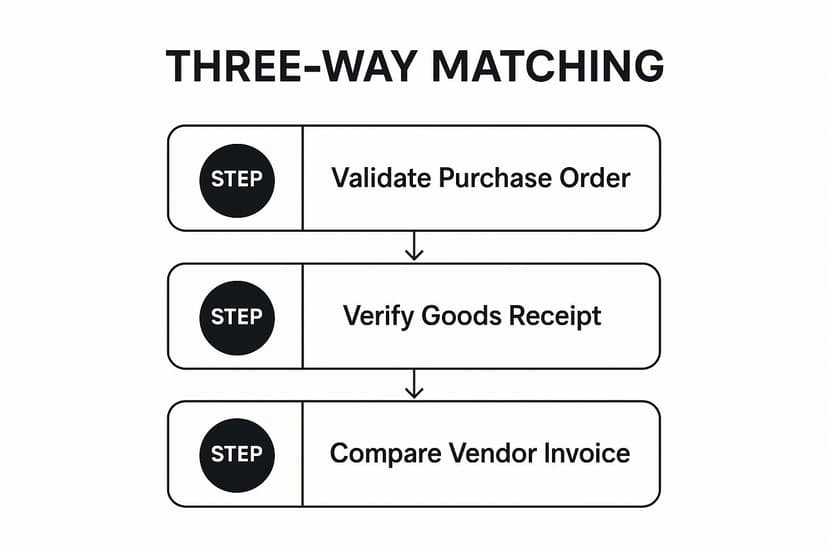
Imagine a spreadsheet where each row is an invoice. Columns would hold data for the PO number, receiving report number, and invoice details. Using formulas like VLOOKUP or XLOOKUP, you can automatically pull data from separate tabs (one for POs, one for receiving reports) and compare quantities and prices. A final column with an IF statement can flag any mismatches (=IF(AND(Price_PO=Price_Invoice, Qty_Report=Qty_Invoice), "Match", "Mismatch")).
Actionable Tips for Implementation:
Start by creating a standardized Excel template for three-way matching. Set tolerance levels for minor variances using formulas; for example, an IF statement could automatically approve a 1-2% price difference. For high-volume tasks, leverage AI tools within Excel to extract data from PDF invoices and populate your matching template, flagging only the exceptions for manual review. This allows your AP team to focus on resolving complex issues rather than tedious data entry.
2. Vendor Master Data Management in Excel
Another foundational accounts payable best practice is establishing a robust system for vendor master data management. This involves creating a centralized, accurate, and up-to-date repository of all vendor information, ideally managed within a controlled Excel workbook or database. A clean master file is the single source of truth for your payables process.
This centralized approach standardizes key vendor data points:
- Contact and Address Details: Official business names, physical addresses, etc.
- Banking and Payment Information: Verified bank account numbers and payment terms.
- Tax Information: W-9 forms, tax identification numbers (TINs), etc.
- Contractual Terms: Agreed-upon pricing and discount terms.
A well-managed vendor master file, maintained in a locked-down Excel sheet with change-tracking enabled, mitigates risks like duplicate payments and fraud by ensuring every payment is sent to the right, verified vendor.
Why Vendor Master Data is Crucial
Strong vendor master data management acts as a gatekeeper for the procure-to-pay cycle. Global companies like Procter & Gamble rely on sophisticated systems to manage suppliers, but mid-size companies can achieve similar control using a well-structured Excel database. It provides a reliable foundation for other key processes, such as three-way matching and payment automation.
Actionable Tips for Implementation:
To build a strong vendor data management process in Excel, use features like Data Validation to create dropdown lists for standardized entries and restrict data formats. Protect the master sheet with a password and use the "Track Changes" feature to log all modifications. Use COUNTIF formulas or Conditional Formatting to automatically highlight potential duplicate vendor entries before they cause problems. For an AI-powered approach, tools like Elyx.AI can help you cleanse and validate vendor data by cross-referencing information and flagging inconsistencies automatically.
3. Early Payment Discount Optimization with AI
A strategic approach to managing vendor payments, early payment discount optimization is one of the most impactful accounts payable best practices. This method involves systematically identifying and capturing discounts offered by suppliers for paying invoices early, and Excel is the perfect tool for the analysis.
This process requires balancing cash conservation with high-return opportunities. By analyzing terms like "2/10, net 30" (a 2% discount if paid in 10 days), your AP team can make data-driven decisions. In Excel, you can easily calculate the effective annualized rate of return for such a discount: it's over 36%—a highly attractive, risk-free return.
How Early Payment Discount Optimization Works
The AP team must quickly process and approve invoices to pay within the discount window. In Excel, you can create a dashboard that lists all open invoices, their due dates, and discount deadlines. Use formulas to calculate the potential savings and the annualized return for each discount. An AI tool integrated with Excel could automatically scan incoming invoices, extract the payment terms, and populate this dashboard, prioritizing invoices with the most valuable discounts.
Many large companies have mastered this practice. Apple uses a sophisticated supplier financing program, while Walmart leverages its scale to offer an early payment program to thousands of suppliers. These examples show how a systematic approach is a powerful financial lever.
Actionable Tips for Implementation:
Start by building an Early Payment Discount Calculator in Excel. Create columns for invoice amount, discount terms (e.g., 2%), discount period (10 days), and full term (30 days). Use formulas to calculate the annualized return. Next, use AI tools to automatically flag invoices with favorable terms and route them for priority approval. Use Excel’s charting features to create a report tracking both captured and missed discounts, helping you identify process bottlenecks and continuously improve your strategy.
4. Invoice Processing Automation with Excel and AI
One of the most transformative accounts payable best practices is embracing invoice processing automation. This involves using technology to digitize, process, and route invoices with minimal manual work. By integrating tools like optical character recognition (OCR) and AI into your Excel-based workflows, you can eliminate tedious data entry and accelerate the entire invoice-to-payment lifecycle.
This modern approach frees your team to focus on strategic activities. For instance, Siemens processes over 1.6 million invoices annually with 90% automation. Smaller businesses can achieve similar benefits by connecting AI tools like Elyx.AI to their Excel workbooks.
How Invoice Processing Automation Works
The process begins when an invoice is received. An AI-powered system uses OCR to scan and extract key data like the vendor name, invoice number, and amount, and then populates a structured Excel table. This data is then validated against existing records (like your vendor master file) using VLOOKUP or XLOOKUP. The system can then use predefined rules to route the invoice for approval. Once approved, it is scheduled for payment, and all actions are logged for a transparent audit trail. For a deeper dive, you can learn more about automated invoice processing on getelyxai.com.
Actionable Tips for Implementation:
Begin with a pilot program targeting high-volume, standardized invoices. Use an AI tool to extract data from PDF invoices directly into a central Excel log. From there, use Power Automate (part of the Microsoft 365 suite) to create simple workflows that email managers for approval based on the invoice data in your spreadsheet. Document procedures for handling exceptions—invoices the AI flags for discrepancies—to ensure a smooth process.
5. Segregation of Duties
A fundamental internal control, segregation of duties is one of the most critical accounts payable best practices for mitigating internal fraud. This principle involves dividing key AP tasks among different individuals so no single person controls an entire transaction from start to finish. It creates a system of checks and balances that inherently safeguards company assets.

This practice is built on a simple premise: it is much harder for fraud to occur when multiple people must collude to make it happen. By separating responsibilities, you build a protective barrier against unauthorized transactions.
Key Roles to Separate
To effectively implement segregation of duties, the following functions should be handled by different employees:
- Vendor Master File Management: The person who adds or modifies vendor data should not process invoices or authorize payments.
- Invoice Processing: The employee responsible for entering invoices should be separate from the one who approves them.
- Payment Authorization: The individual who approves payments should not be the one who executes them.
- Bank Reconciliation: The team member who reconciles bank statements should have no role in day-to-day AP processing.
Actionable Tips for Implementation:
Start by documenting all roles and responsibilities within your AP workflow in an Excel spreadsheet to create a clear approval matrix. This defines who can approve what and at what value. For smaller organizations, implement compensating controls, such as requiring a detailed review of all transactions by a senior manager. In a shared workbook environment like Excel on SharePoint, you can use permissions to restrict editing access to certain tabs (like the vendor master file) to specific users, creating a digital barrier that supports your segregation policies. This is a key component of effective accounts payable automation.
6. Payment Term Optimization in Excel
A strategic approach to managing supplier payment terms is a powerful accounts payable best practice for improving cash flow. Payment term optimization involves systematically negotiating and aligning supplier payment cycles with your company's own cash conversion cycle, and you can manage this entire process within Excel.
This practice requires a delicate balance between extending payment periods and maintaining strong supplier relationships. The goal is to hold onto your cash longer, reduce financing costs, and fund business growth with operational cash.
How Payment Term Optimization Works
This process begins with analyzing current terms in an Excel sheet. List all vendors, their annual spend, and current payment terms (e.g., Net 30, Net 60). Benchmark these against industry standards. For example, large retailers often negotiate terms of 90 days or more. You can then use this data to identify key vendors for renegotiation. The key is to create a win-win scenario where the supplier agrees to new terms in exchange for benefits like higher order volumes.
Actionable Tips for Implementation:
Start by segmenting your suppliers in an Excel spreadsheet. Use PivotTables to categorize them by spend volume and strategic importance. Focus your initial negotiation efforts on high-spend vendors where a change in terms will have the most impact. Continuously monitor your Days Payable Outstanding (DPO)—a simple calculation in Excel—as a key performance indicator. Create a chart to visualize your DPO trend over time. For critical suppliers who cannot extend terms, consider modeling supply chain financing options in your spreadsheet as an alternative.
7. Regular Reconciliation and Reporting in Excel
Maintaining financial integrity hinges on consistent verification. One of the most critical accounts payable best practices is establishing a routine for reconciliation and reporting using Excel. This involves regularly comparing your AP ledger with vendor statements and general ledger accounts to ensure every transaction is accurate.
This disciplined approach serves as a crucial health check, helping you catch issues before they escalate. It addresses several key areas:
- Vendor Statement Reconciliation: Using functions like
VLOOKUPor AI tools to compare your internal records against vendor statements to identify discrepancies. - General Ledger (GL) Reconciliation: Ensuring the AP sub-ledger balance in your spreadsheet matches the GL control account.
- Performance Reporting: Creating Excel dashboards with PivotTables and charts to track metrics like Days Payable Outstanding (DPO) and invoice processing times.
The Reconciliation and Reporting Cycle
This best practice operates as a continuous cycle. It begins with data gathering, followed by a systematic comparison in Excel to identify variances. Any discrepancies trigger an investigation. The cycle concludes with comprehensive reporting from your Excel dashboard, which informs strategic decisions. This structured workflow transforms AP from a purely transactional function into a strategic financial control center.
Actionable Tips for Implementation:
Establish firm monthly deadlines for reconciliations. Create a standardized Excel reconciliation template to ensure consistency. Use AI tools to automatically extract data from vendor statements and populate your template, then use Conditional Formatting to highlight any mismatches. You can learn more about setting up these comparisons by understanding the fundamentals of data reconciliation. Finally, create a dynamic Excel dashboard that provides stakeholders with the specific metrics they need to monitor performance.
8. Comprehensive Approval Workflows
Establishing comprehensive approval workflows is a critical accounts payable best practice for maintaining financial control. This structured system ensures invoices are reviewed and signed off by the appropriate personnel before payment. It moves beyond a single-level approval to a multi-tiered process based on factors like invoice amount and department.
This approach creates a clear chain of custody and accountability. Key components include:
- Approval Thresholds: Different dollar amounts require different levels of authorization.
- Delegation of Authority: A formal matrix outlines who is authorized to approve what.
- Escalation Procedures: The system defines what happens if an approver is unavailable.
By formalizing the approval process, you create a powerful internal control that mitigates the risk of fraudulent payments and budget overruns.
How Comprehensive Approval Workflows Function
An effective approval workflow acts as a series of gates. For example, a marketing invoice might first go to the campaign manager for initial verification, then to the marketing director for budget approval. Technology companies often use automated tools to route invoices based on preset rules. For smaller teams, this can be managed with a combination of email and a shared Excel log that tracks the approval status of each invoice.
Actionable Tips for Implementation:
Start by mapping your approval process and defining thresholds in an Excel-based approval matrix. This document becomes your single source of truth for who can approve what. You can use tools like Microsoft Power Automate to trigger approval emails based on data entered into an Excel file stored on SharePoint or OneDrive. This way, managers can review and approve invoices on the go, preventing delays and creating a digital audit trail.
Accounts Payable Best Practices Comparison
| Item | Implementation Complexity 🔄 | Resource Requirements ⚡ | Expected Outcomes 📊 | Ideal Use Cases 💡 | Key Advantages ⭐ |
|---|---|---|---|---|---|
| Three-Way Matching | Medium – requires system setup and staff training | Moderate – needs integration and document handling | High – prevents fraud, errors, and ensures payment accuracy | Suitable for organizations needing strict payment verification | Strong fraud prevention and audit compliance |
| Vendor Master Data Management | High – significant initial cleanup and ongoing maintenance | High – requires data governance and cross-department coordination | High – improves payment accuracy and vendor management | Best for companies managing large supplier bases | Centralized, accurate vendor data reduces duplicates |
| Early Payment Discount Optimization | Medium – needs analysis and cash flow integration | Moderate – requires monitoring and payment prioritization | High – cost savings, improved cash flow, and vendor relations | Ideal for firms with available cash flow and discount opportunities | Significant cost savings and better working capital use |
| Invoice Processing Automation | High – complex technology implementation and change management | High – involves AI, OCR, and ERP integration | Very High – drastically reduced processing time and errors | Best for high-volume invoice processing environments | Speedy processing with error reduction and cost savings |
| Segregation of Duties | Medium – involves role definitions and system controls | Moderate to High – needs multiple staff and training | High – reduces fraud risk and improves compliance | Essential for companies needing strong internal controls | Effective fraud prevention and error reduction |
| Payment Term Optimization | Medium – requires negotiation and performance monitoring | Moderate – ongoing supplier management effort | Moderate to High – improved cash flow and financial flexibility | Useful for firms optimizing working capital and supplier relations | Enhanced liquidity and cash conversion cycle |
| Regular Reconciliation and Reporting | Medium – systematic process requiring skilled staff | Moderate – needs reconciliation tools and data sources | High – detects errors early and supports accurate financials | Best for organizations focused on financial integrity | Early error detection and improved reporting accuracy |
| Comprehensive Approval Workflows | Medium – involves multiple approval levels and system integration | Moderate – requires maintenance of approval processes | High – ensures authorization, budget compliance, accountability | Ideal for organizations requiring tight controls over spend | Clear audit trails and risk reduction |
Bringing It All Together: Your Action Plan for AP Excellence
Transitioning from theory to practice is where the real value of mastering accounts payable best practices is unlocked. We've explored a comprehensive roadmap, from the foundational security of three-way matching to the strategic gains of early payment discounts. Each practice represents a powerful lever you can pull to transform your AP function using the tools you already have.
The key is to avoid feeling overwhelmed. You don't need to revolutionize your department overnight. Start by assessing your current processes and identifying the most significant pain points. Is your team drowning in manual data entry? Then invoice processing automation should be your top priority. Are you constantly battling duplicate payments? Focus on strengthening your vendor data management.
Your Immediate Next Steps
To make this actionable, here’s a simple plan to get started:
- Prioritize Your Focus: Select just one or two practices from this list that will deliver the most immediate impact in Excel.
- Leverage Your Existing Tools: Before investing in new systems, explore the full potential of what you already have. Modern Excel, enhanced with AI capabilities, is a powerful platform for implementing many of these strategies. You can build reconciliation templates, analyze vendor payment terms, and create insightful reports.
- Document and Standardize: Create a standard operating procedure in a shared document for the process you choose to improve. Clarity is crucial for consistency.
- Measure and Refine: Establish clear metrics in an Excel dashboard to track your progress. Whether it’s “invoice processing time” or “discounts captured,” data will prove the value of your efforts.
Implementing these accounts payable best practices is a strategic initiative and a core component of broader business process improvement methods. By transforming your AP department from a reactive cost center into a proactive, data-driven function powered by Excel and AI, you strengthen vendor relationships, improve cash flow, and provide the business with more reliable financial intelligence.
Ready to supercharge your accounts payable processes directly within Excel? Discover how Elyx.AI can automate data extraction, streamline reconciliations, and generate insightful reports with simple, natural language commands. Stop spending hours on manual tasks and start leveraging AI to implement these best practices today by visiting Elyx.AI.
Reading Excel tutorials to save time?
What if an AI did the work for you?
Describe what you need, Elyx executes it in Excel.
Sign up